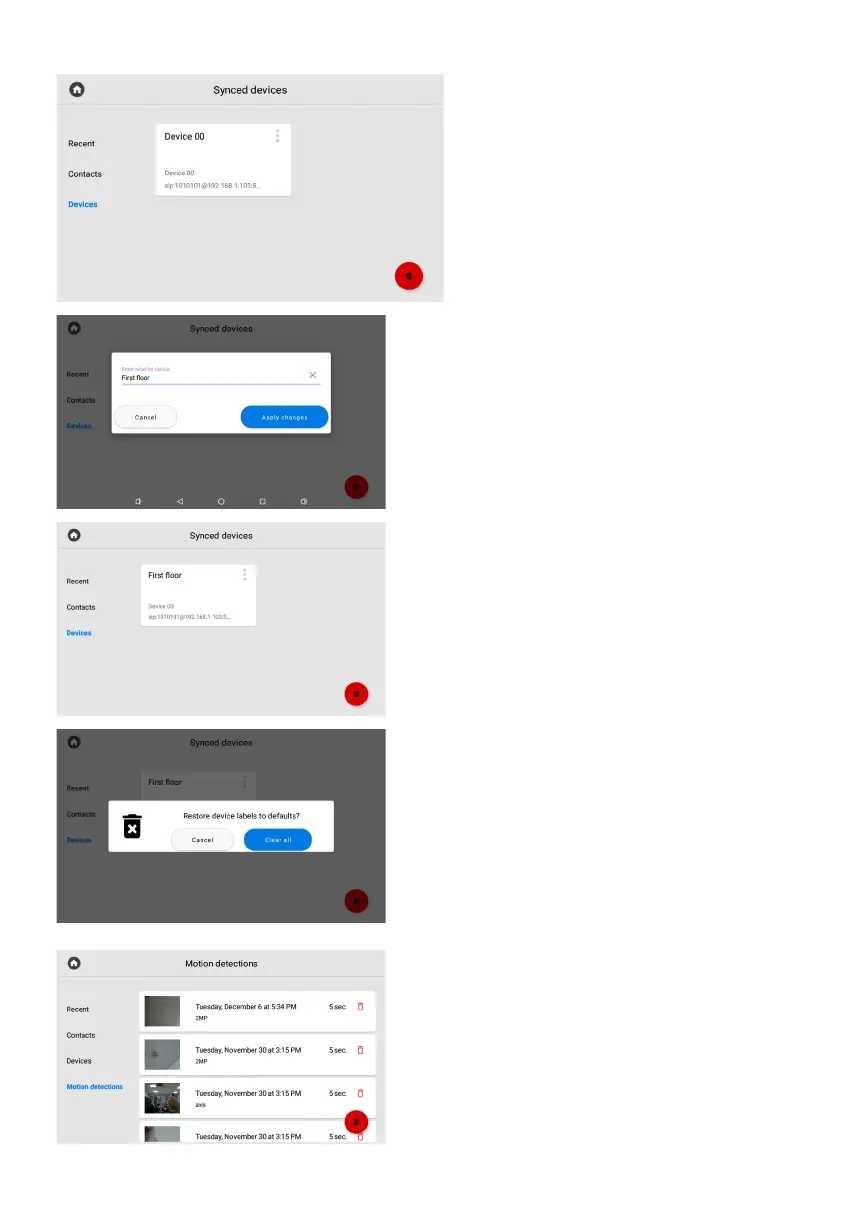
This menu displays additional monitors
that have the same logical address,
but different device numbers.
Devices
This tab will appear in the menu if you have
enabled and configured the feature of recording
video when a motion sensor is triggered. Here you
can view the recorded videos. The tab contains
information about the date, time, duration of the
recording and the name of the camera from which
the video was recorded.
If necessary, you can delete a video by pressing
the corresponding button on its card or delete all
videos using the button in the lower right corner.
Motion detections
If you press the button in the upper left corner
near the device, the menu for editing the name
will be displayed. In the new window, you can
enter the name of the additional monitor you
want to display.
After pressing the Apply changes button,
the updated device name will be displayed.
You can also refresh the page by dragging
the page down.
By pressing the Delete button (in the lower right
corner), you can restore the default device names.



 To Next Page