EasyManua.ls Logo

Baumer NE134 - Connecting

Baumer NE134
Print Icon
To Next Page IconTo Next Page
To Previous Page IconTo Previous Page
Loading...
NE134
www.baumer.com
27
3 Connecting
This chapter will explain how the contacts are assigned and give you
some examples of connection.
Under chapters 3.1 to 3.6, you will find actual tips and technical data
for the various connections.
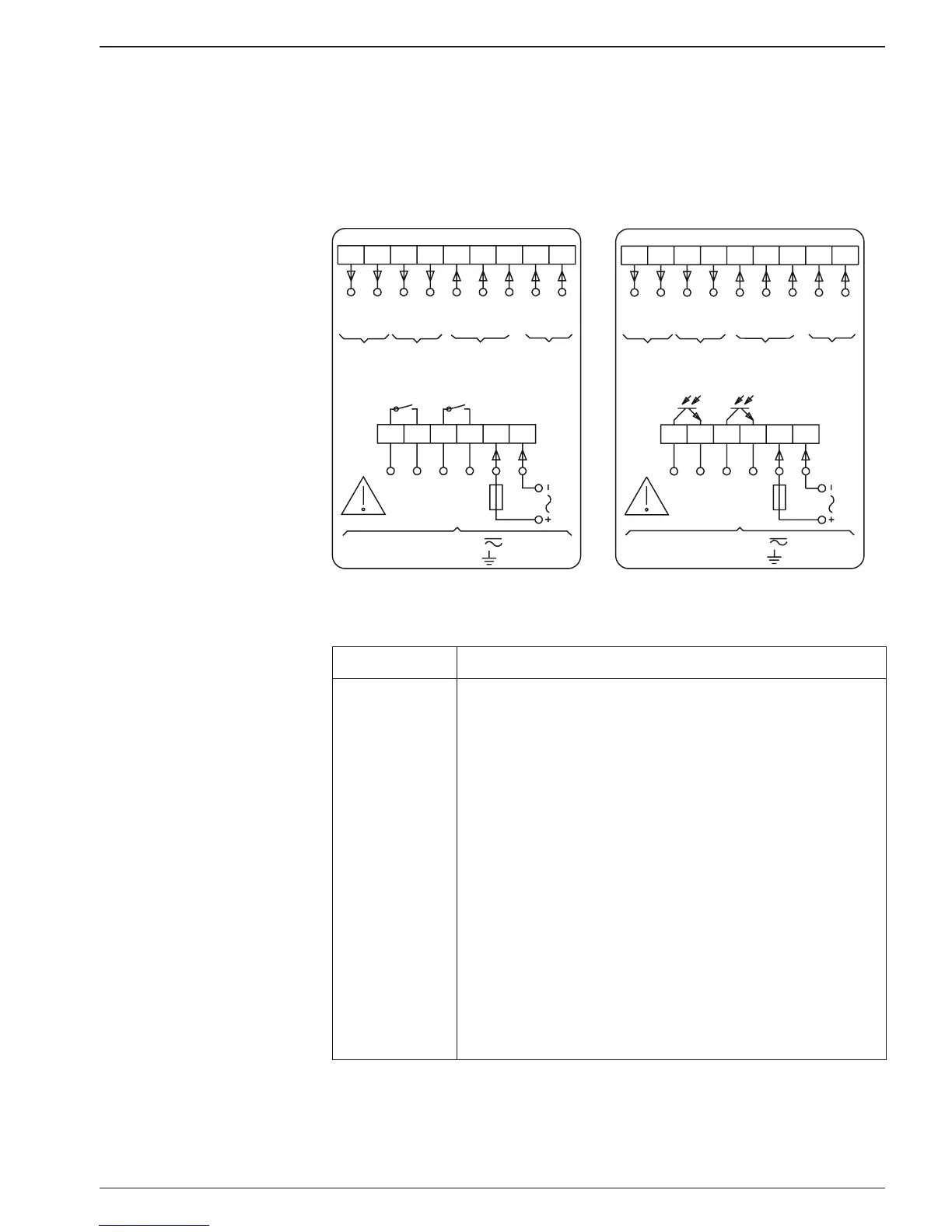
Assignment Relay outputs Electronic outputs
5HOD\RXWSXWV (OHFWURQLFRXWSXWV
9ROWDJHVXSSO\
75
      
3 3

75
±
75
%
$
56 6HQVRU
VXSSO\
&RQWURO
LQSXW
6LJQDO
LQSXW
WHUPLQDOWHUPLQDO
PD[9
WHUPLQDO
9ROWDJHVXSSO\
75
      
3 3

75
±
75
%
$
56 6HQVRU
VXSSO\
&RQWURO
LQSXW
6LJQDO
LQSXW
WHUPLQDOWHUPLQDO
PD[9
WHUPLQDO
2XWSXWV 2XWSXWV
Connecting assignment
Relay outputs and Electronic outputs
Terminal Function
1
2
3
4
5
6
7
8
9
10
11
12
13
14
15
Voltage Supply (-)
Voltage Supply (+)
Relay output / Output P1
Relay output / Output P2
Signal input track A
Signal input track B
Control input 1 (Main counter Reset)
Control input 2 (Main counter Stop)
Control input 3 (Totalizer Reset)
Sensor supply (+)
Sensor supply (–)
Option RS485 (T,R-)
Option RS485 (T,R+)

Related product manuals