EasyManua.ls Logo

Baxi POWER HT+ Series - Description of the Power Supply Terminal Block

Baxi POWER HT+ Series
136 pages
Print Icon
To Next Page IconTo Next Page
To Previous Page IconTo Previous Page
Loading...
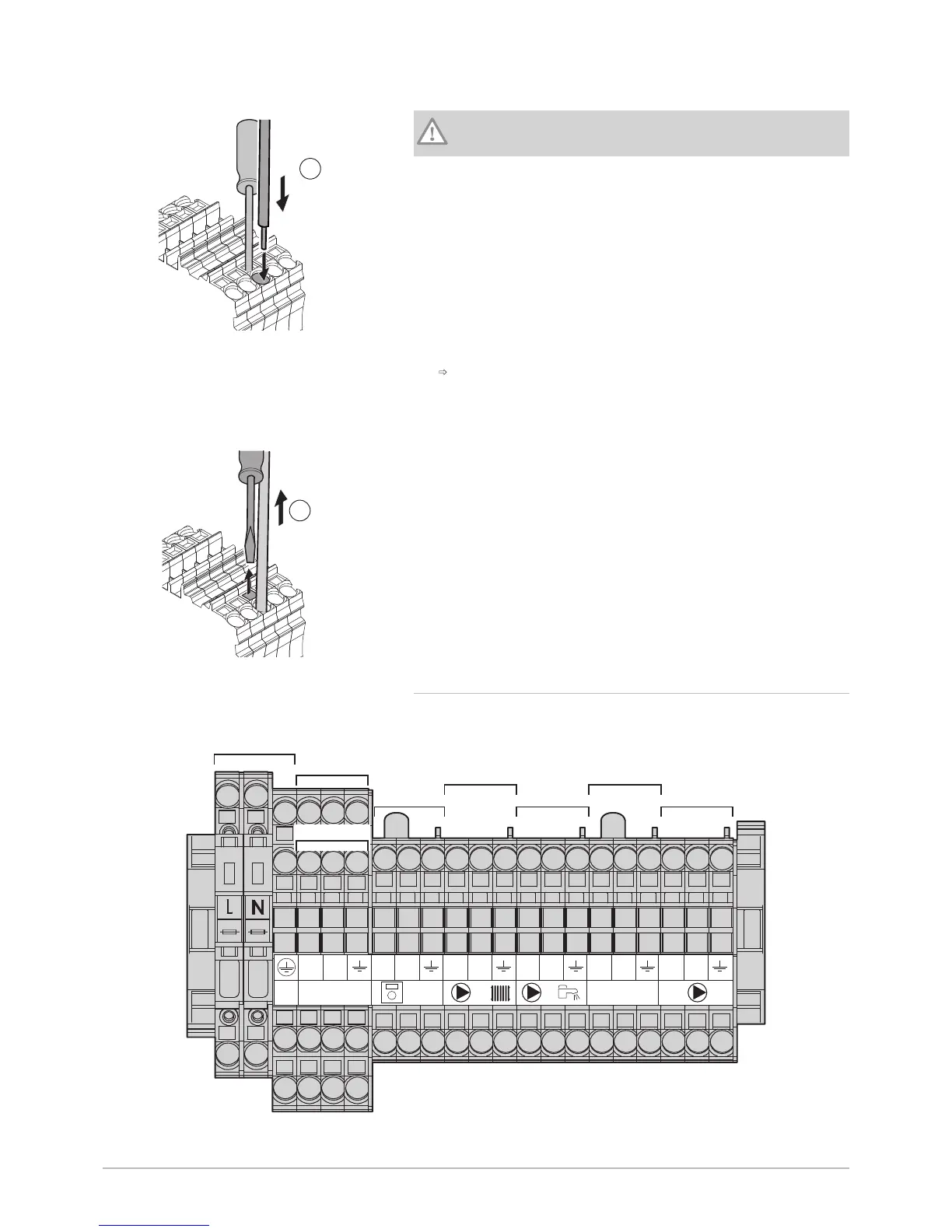
2. Insert the stripped part of the wire into the corresponding connector.
Caution
The length to be stripped must be between 10 and 12 mm.
3. Release the pressure on the spring.
The wire is attached.
4. Check that the wire is attached by pulling it gently upwards. If it comes
out of the housing, repeat step 3.
7.6.4 Description of the power supply terminal block
Fig.83

MW-1000015-06
1
2
3
4
Aux 1-2 230 V
TA TS
L N T1 T2 L LN N S1 S2 L N
2
4 6 8
5 7
1
3
1 Power supply 230 V 50 Hz 2 Power supply auxiliary circuit 1
Fig.81
MW-3000038-05
2
Fig.82
MW-3000039-04
3
7 Installation
7702630 - v02 - 11082018 POWER HT + 61

Table of Contents

Other manuals for Baxi POWER HT+ Series

Related product manuals