No sound in power amplifier
board when playing disc
Check whether flat cable holder is joint
welding or inserted to proper position
No sound output for all
channels
Whether +28V
power supply on
XP503 is normal
Refer to troubleshooting
process of +28V power
supply
Whether HDET
signal on pin 24 of
XS207 is high level
(when no microphone
is inserted)
1. Check whether HDET signal
on pin 24 of XS207 has joint
welding.
2. Check whether HDET signal
on pin 7 of XS201 has joint
welding.
3. Check whether headphone
holder has problem to cause
HDET to produce low level
(high level when in normal
condition)
Check whether
mute control signal MUTE
on pin 14 of XS207
is high level
1. Check whether it is mute
status.
2. Whether capacitor on
MUTE circuit of mute
control signal has electric
leakage.
3. Others
1. Check whether
crystal oscillator Y3
is 12.2MHz.
2. Check whether
crystal oscillator Y1
is 13.5MHz.
Check the clock circuit of
Y1, Y3.
1. Check whether the capacitor
on N12 (TAS5508) reset signal
RST line has electric leakage
or short circuit.
2. Change MT1389
Check whether
RST reset signal of pin 1
of Xs207 is high
level (3.3V)
No sound for a certain channel
(take centre sound for instance)
Play 5.1CH disc
Check whether
SDATA2 signal on pin 4
of XS201 has digital
waveform
Change MT1389
Change N3
Check whether
pin 11 of N3 has
digital waveform
Change
Check whether
pin 50, 51 of N12 (TAS5508)
has digital waveform
Check whether
R98 is normal
Change N12 (TAS5508)
Check whether
R202, R203 are
normal
Change
Change N14 (TAS5112)
Y
N
N
Y
Y
Y
Y
N
Y
Y
N
N
N
N
Y
Y
Y
Use oscillograph
to check whether 3DATAD
signal on pin 21 of Xs207
has digital waveform
(when playing
disc)
Change MT1389
N
Check whether
pin 40~43 of N12 (TAS5508)
has digital waveform
Y
Reset N12
(TAS5508) forcibly and
check whether
it is normal
Change 5508
N
N
N
Check power supply circuit
If repeat power on/off is
normal, this player is normal.
If there is no sound when
power on again, you need to
change MT1389.
Y
OK
Y
Change N13 N14
(7AS5112) and check whether
they are normal
N
N
N
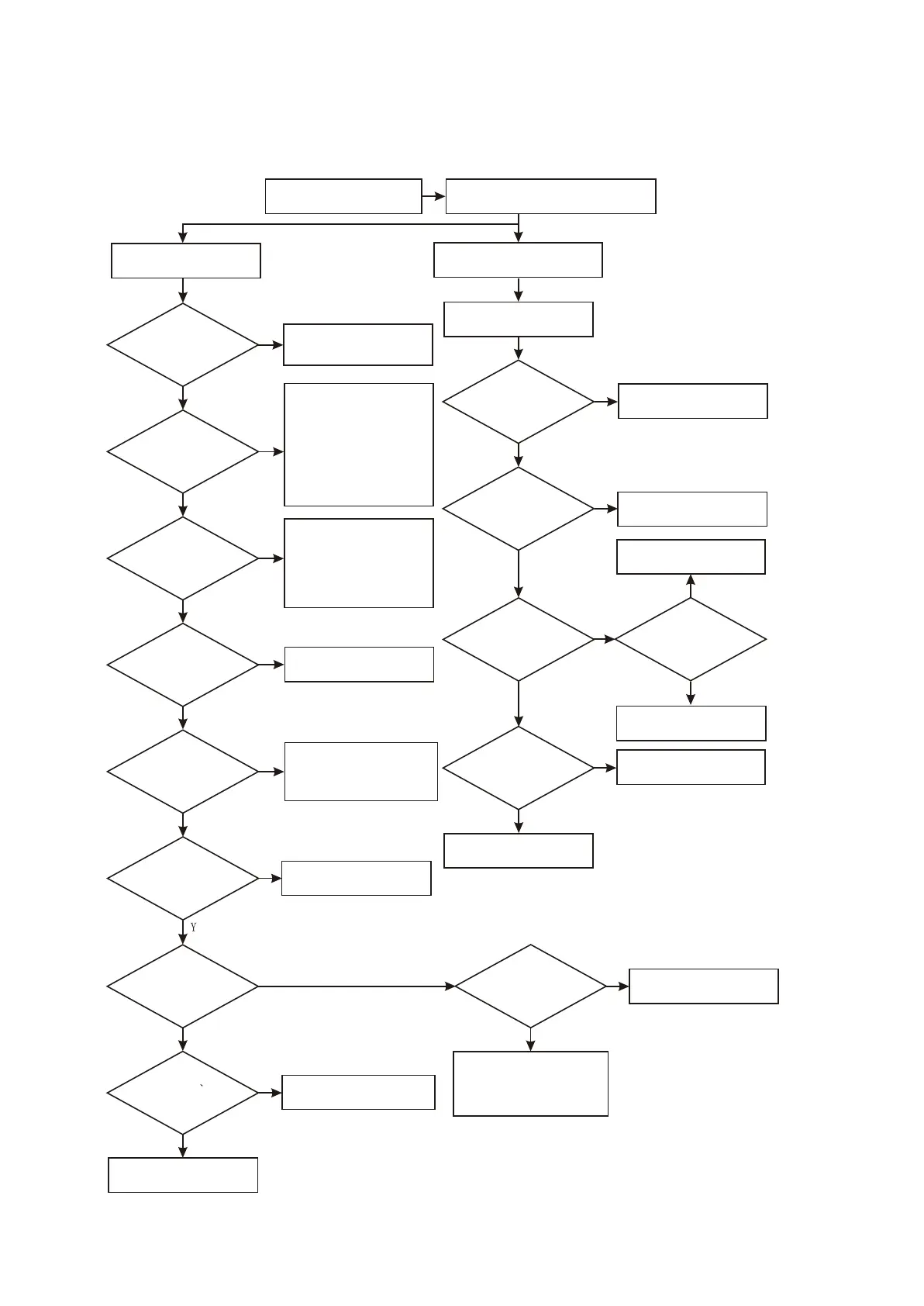
7. Troubleshooting process for no sound of power amplifier board when playing is shown as the
following figure : 3.3.2.7
Figure Troubleshooting process for no sound of power amplifier board when playing
3.3.2.7
- 44 -



 To Next Page