Home
Switch
2b
Page 6 of 16 75.5753.15 LZR-MICROSCAN T 20180720
INSTALLATION (cont.)
On / Off / Hold Open Switch
Determine mounting location,
apply mounting template, drill
holes.
Route On / Off / Hold Open switch
harness and plug into hub port
labeled On / Off / Hold Open.
If using an existing On / Off / Hold Open switch, plug
On / Off / Hold Open Switch Jumper into hub port
labeled On / Off / Hold Open and wire-nut red and
black wires together, or if desired, splice existing
switch into jumper.
FUNCTION JUMPER WIRES
on red jumped to black
hold open black jumped to white
off none
IMPORTANT:
• All activation devices must be wired directly to hub.
• Logic modules must be activated by hub via Door Control Harness activation wires.
Peripherals
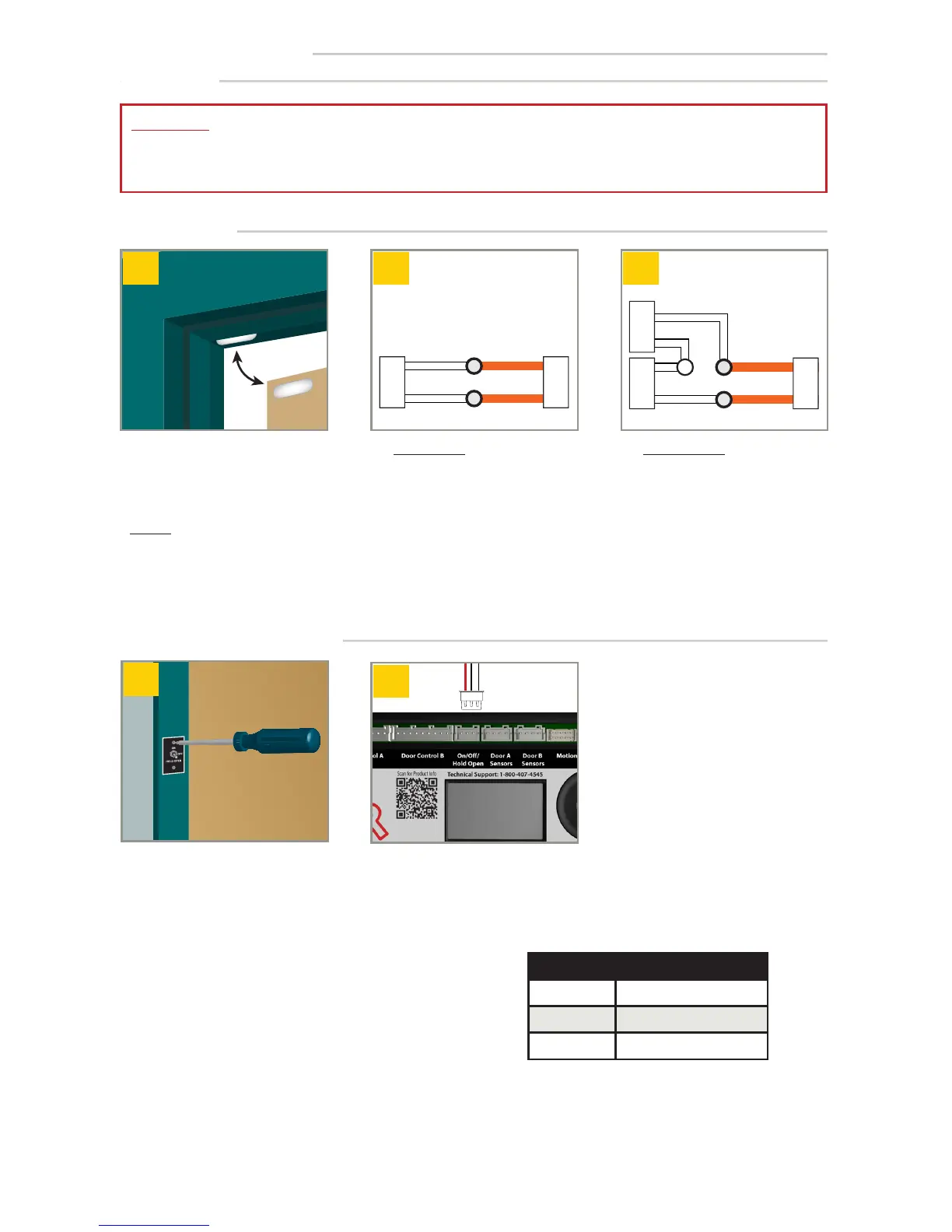
Install Home Switch at desired
location.
For single doors, wire-nut white
Home Switch wires to orange
wires of System Harness plugged
into hub.
Home Switch
1
For pairs of doors, wire-nut white
Home Switch wires in series to
orange wires of System Harness
plugged into hub.
2
NOTES:
1. Any dry-contact Home Switch or auxiliary switch may be used and must be closed when door is closed.
2. For simultaneous pairs or dual-egress doors, two (2) Home Switches must be wired in series with orange wires of System
Harness plugged into hub.


 To Next Page