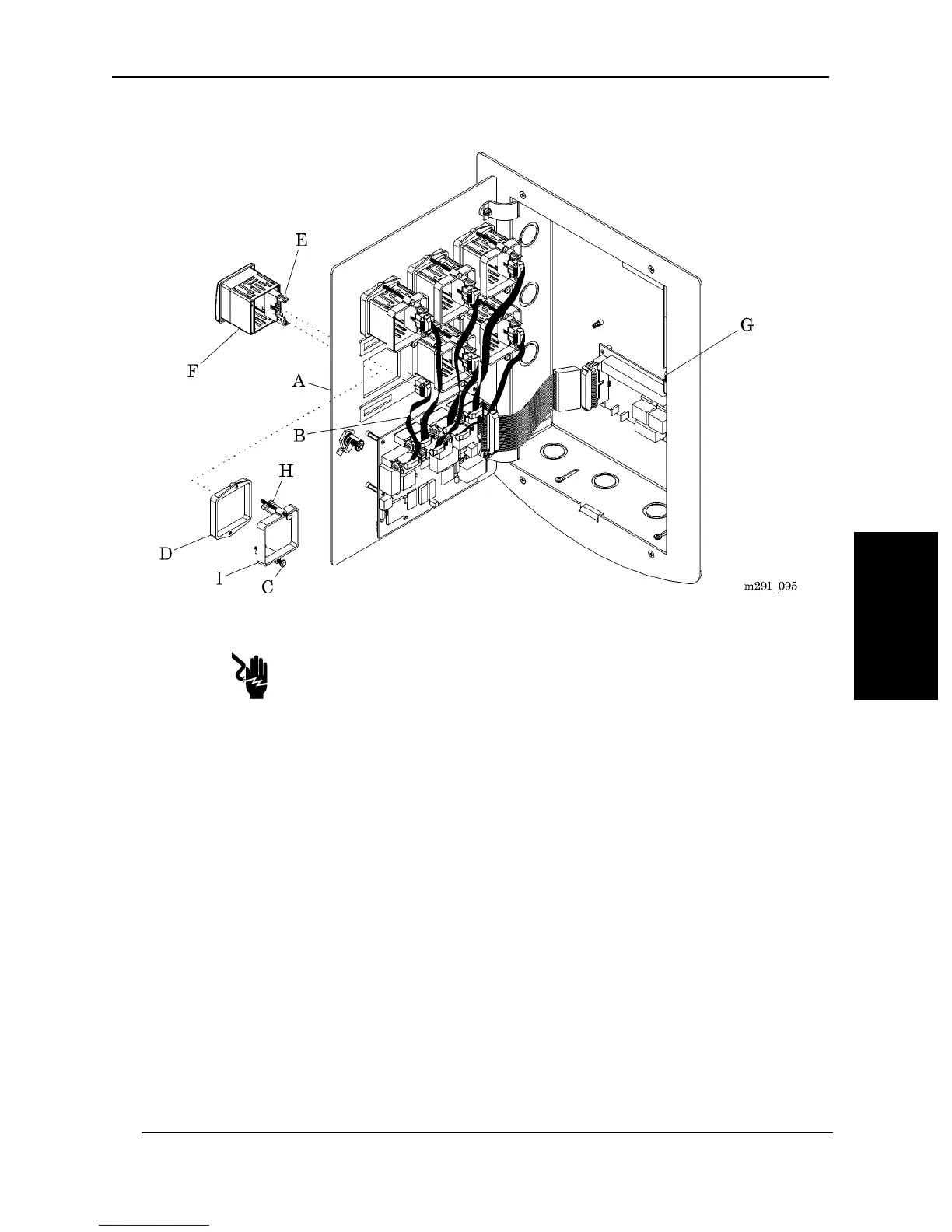
Figure 4-10. Area Alarm Module
Shock Hazard:
Turn off the power supply in the alarm, and leave it off during the installa-
tion or replacement of any component or sub-assembly. Failure to do so
could result in personal injury or equipment damage.
3. Turn the power switch (G) to the OFF position.
4. Push open the ears (E) of the connectors that hold the ribbon cable (B).
5. Remove the ribbon cable (B) from the Area Alarm Module (F).
6. Using a phillips head screwdriver, remove the two screws (C) from the retain-
er ring assembly (D and I).
7. Press the retaining clips (H), and pull the retainer ring (I) off of the Area
Alarm Module (F).
8. Remove the Area Alarm Module (F) and the retainer ring assembly
(D and I).
MedPlus TotalAlert® Alarm Network Operation and Maintenance Manual (205728) Page 4-27
Area Alarm Module
Chapter 4: Removal, Replacement, and Adjustment Procedures
4


 To Next Page