Page 4-32 MedPlus TotalAlert® Alarm Network Operation and Maintenance Manual (205728)
Local Alarm Front Panel
Chapter 4: Removal, Replacement, and Adjustment Procedures
4.11 Local Alarm Front Panel
Tools required: Phillips head screwdriver
Removal
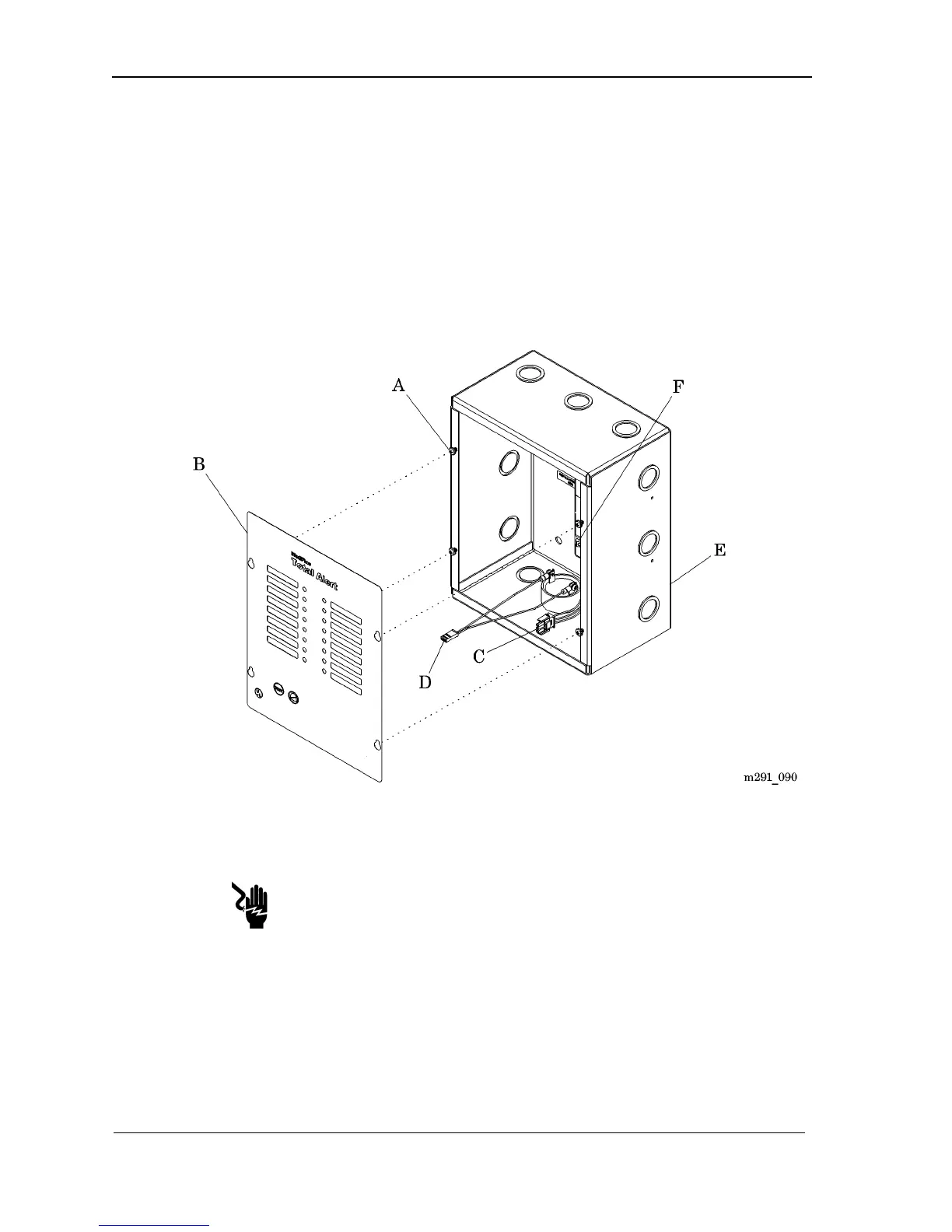
1. Using a phillips head screwdriver, loosen the four screws (A) enough to
allow the front panel (B) to slide off (see figure 4-12 on page 4–32).
Figure 4-12. Local Alarm Front Panel
2. Slide the front panel (B) up and off of the back box (E).
Shock Hazard:
Turn off the power supply in the alarm, and leave it off during the installa-
tion or replacement of any component or sub-assembly. Failure to do so
could result in personal injury or equipment damage.
3. Turn the power switch (F) to the OFF position.
4. Unplug the buzzer wiring (D).
5. Unplug the power supply wiring (C).


 To Next Page