Page 1-74 MedPlus TotalAlert® Alarm Network Operation and Maintenance Manual (205728)
Configuring and Browsing the Master Alarm Using the Web Pages
Chapter 1: Introduction
Log in to the Master Alarm
Before you can configure the Master Alarm, you need a user name and password.
Each Master Alarm ships with the user name as “new,” and the password as
“new.”
1. To configure the Master Alarm, click on the Login
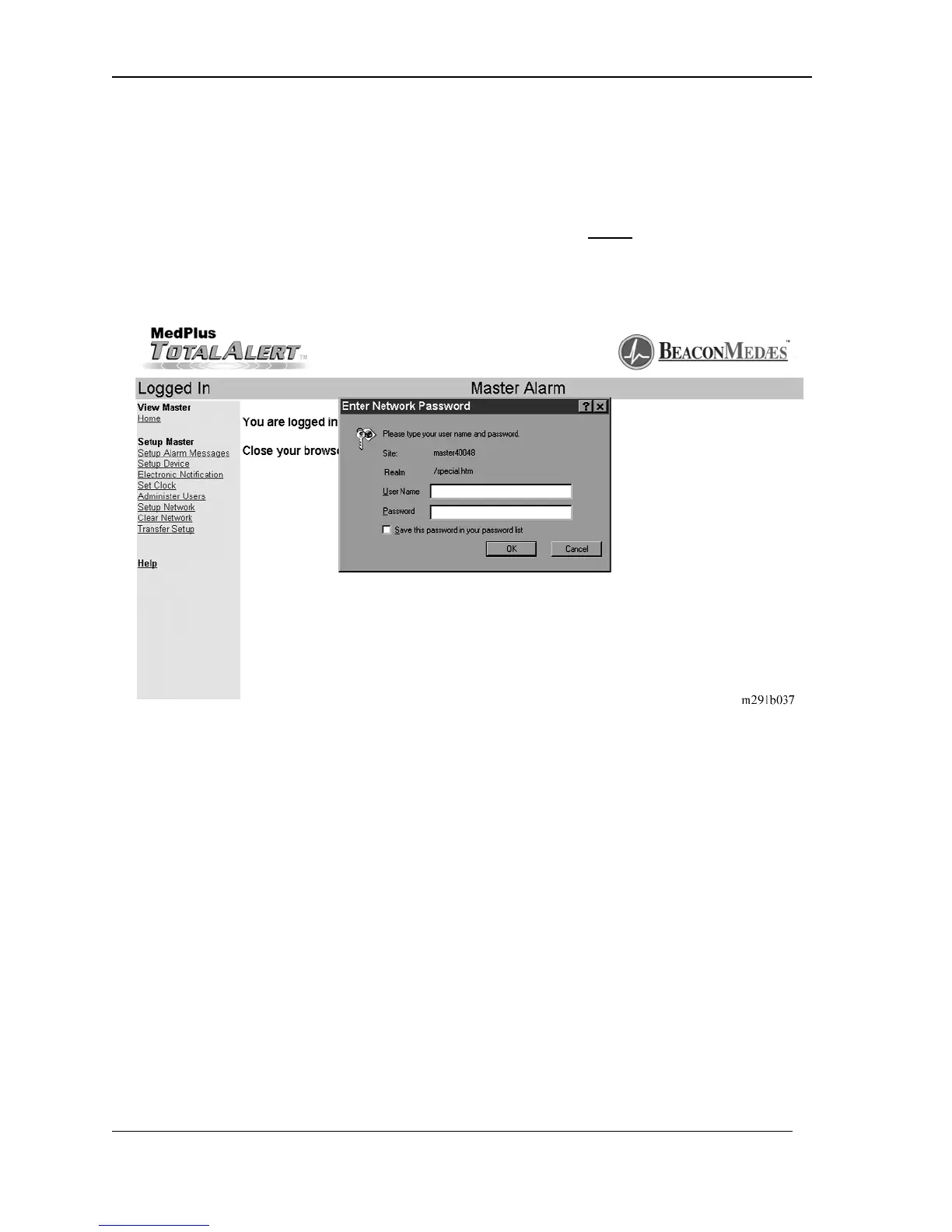
link. The Enter Network
Password window displays (see figure 1-24 on page 1–74).
Figure 1-24. Enter Network Password
NOTE:
Logging in applies only to the computer on which the login occurs. If more than
one PC is being used to enter the Master Alarm Web pages, each one must be
logged in individually. The computer stays logged in until the user closes the
browser.
2. Click in the User Name window.
3. Type new in that window.
4. Click in the Password window.
5. Type new in that window.


 To Next Page