Page 1-86 MedPlus TotalAlert® Alarm Network Operation and Maintenance Manual (205728)
Configuring and Browsing the Master Alarm Using the Web Pages
Chapter 1: Introduction
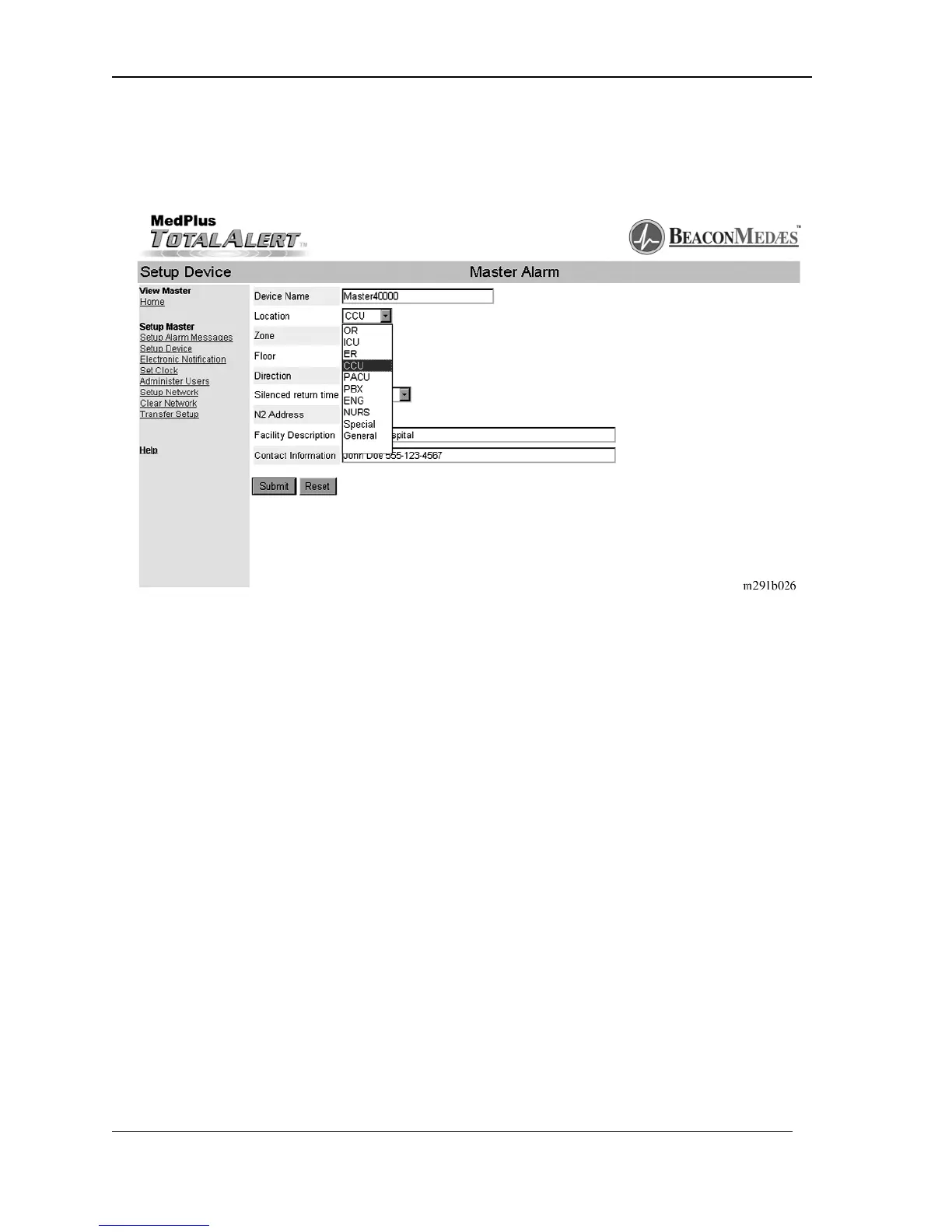
4. Click on the Location pull down menu arrow. The available location options
display on the screen (see figure 1-36 on page 1–86).
Figure 1-36. Setup Device—Location
The options are as follows:
a. PBX—Public broadcast system room
b. OR—Operating room
c. ER—Emergency room
d. CCR—Critical care unit
e. PACU—Post anesthesia care unit
f. ENG—Engineering room
g. Nurse Station—Nurses’ station
h. Special—Special care unit
i. General—General medical unit
5. Click on the location of this Master Alarm.
6. Click in the Zone window.
7. Type in the zone number of this Master Alarm.
NOTE:
Zones 1 through 9999 are available.


 To Next Page