OperationOperation
iso165C_D00154_03_M_XXEN/01.2019
16
Command descriptions can be found in Chapter 7.2 on page 17.
6.3.1 Example
The example shown below is a request to unlock the device.
*DLC = Data Length Code is always 0x5. Only IMD_Info has a DLC of 0x6.
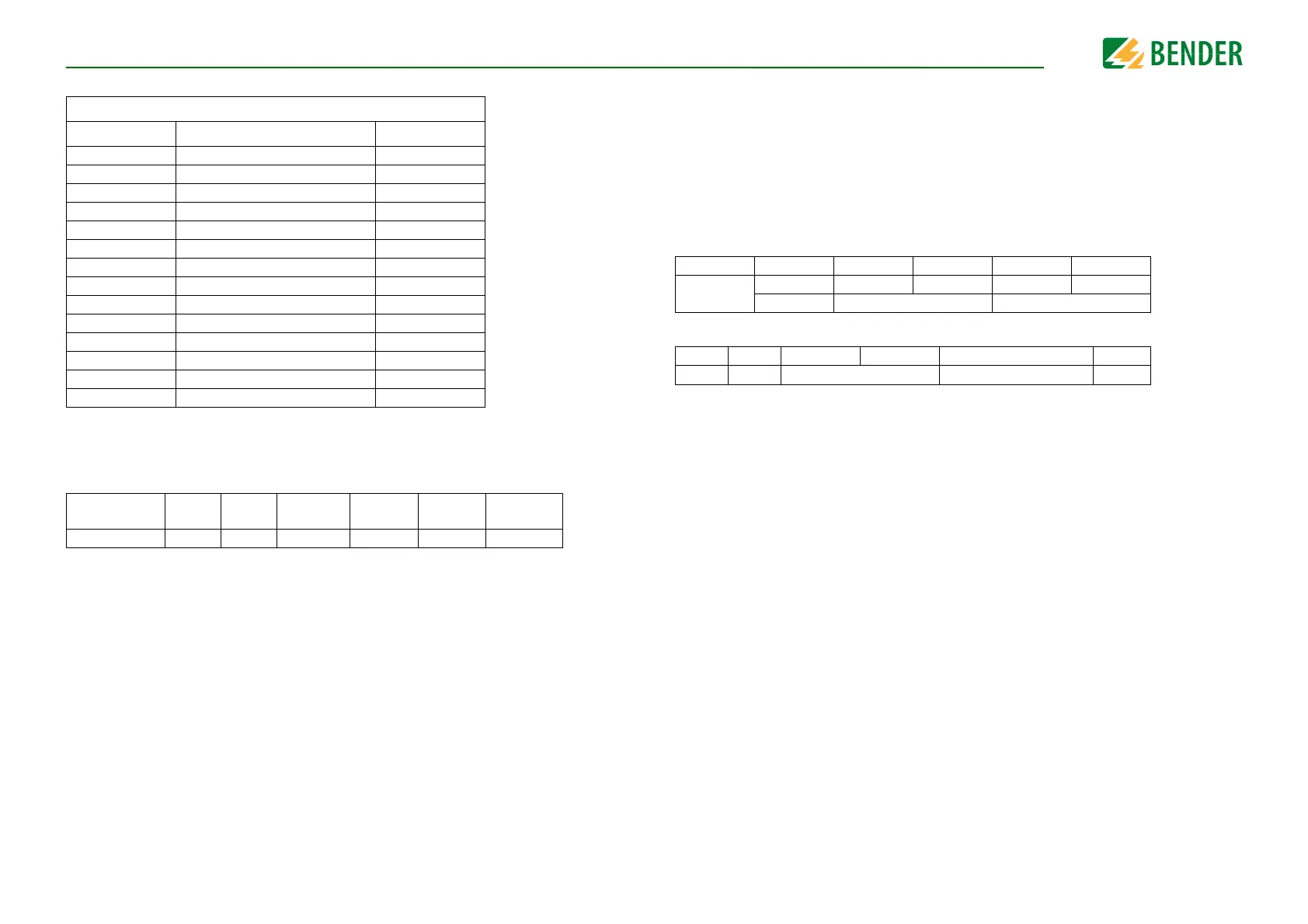
GET commands
CMD DBC command description Locked
0x0 S_VIFC_DUMMY
0x37 S_IMC_GET_STATUS
0x35 S_IMC_GET_R_ISO
0x32 S_IMC_GET_R_ISO_ERR_THR
0x39 S_IMC_GET_R_ISO_WRN_THR
0x3C S_IMC_GET_MEAN_FACTOR
0x36 S_IMC_GET_HV_1
0x3A S_IMC_GET_HV_2
0x33 S_IMC_GET_VERSION
0xDC S_VIFC_GET_STATUS
0xDD S_VIFC_GET_HV_RELAIS
0xDE S_VIFC_GET_VERSION
0x5A S_IMC_GET_TEST_CNT
0x3D S_IMC_GET_MANUFACTURER
CAN-ID
(Request)
DLC* CMD Data1 Data2 Data3 Data4
0x22 0x5 0xCA 0x00 0x00 0x00 0x00
6.4 IMD_Response
IMD_Response is generated exclusively as an answer to the IMD_Request command. The
system guarantees that every request is answered with a response if the IMD_Request is
accepted by the queue implementation. The response can have one of two frame for-
mats: a valid response is returned in the event the request can be successfully answered.
Otherwise an error response is returned, the format of which contains an error code that
specifies the reason.
Valid response format:
Error response format:
Byte01234
CMD Data1 Data2 Data3 Data4
DataWord1 DataWord2
Byte 0 1 2 3 4
0xFF
D_IMD_ERROR_CODE D_IMD_FAILED_CMD
0x00






 To Next Page