HD-973P Series Multi-Level Parking Lift 67 P/N 5900076 — Rev. B3 — January 2024
Tire Stops
Each Platform has two Tire Stops that go at the Front of the Lift. They prevent the Tires of your Vehicle
from going too forward.
To install the Tire Stops:
Locate the two Tire Stops, Pins, and Rotor Clips needed.
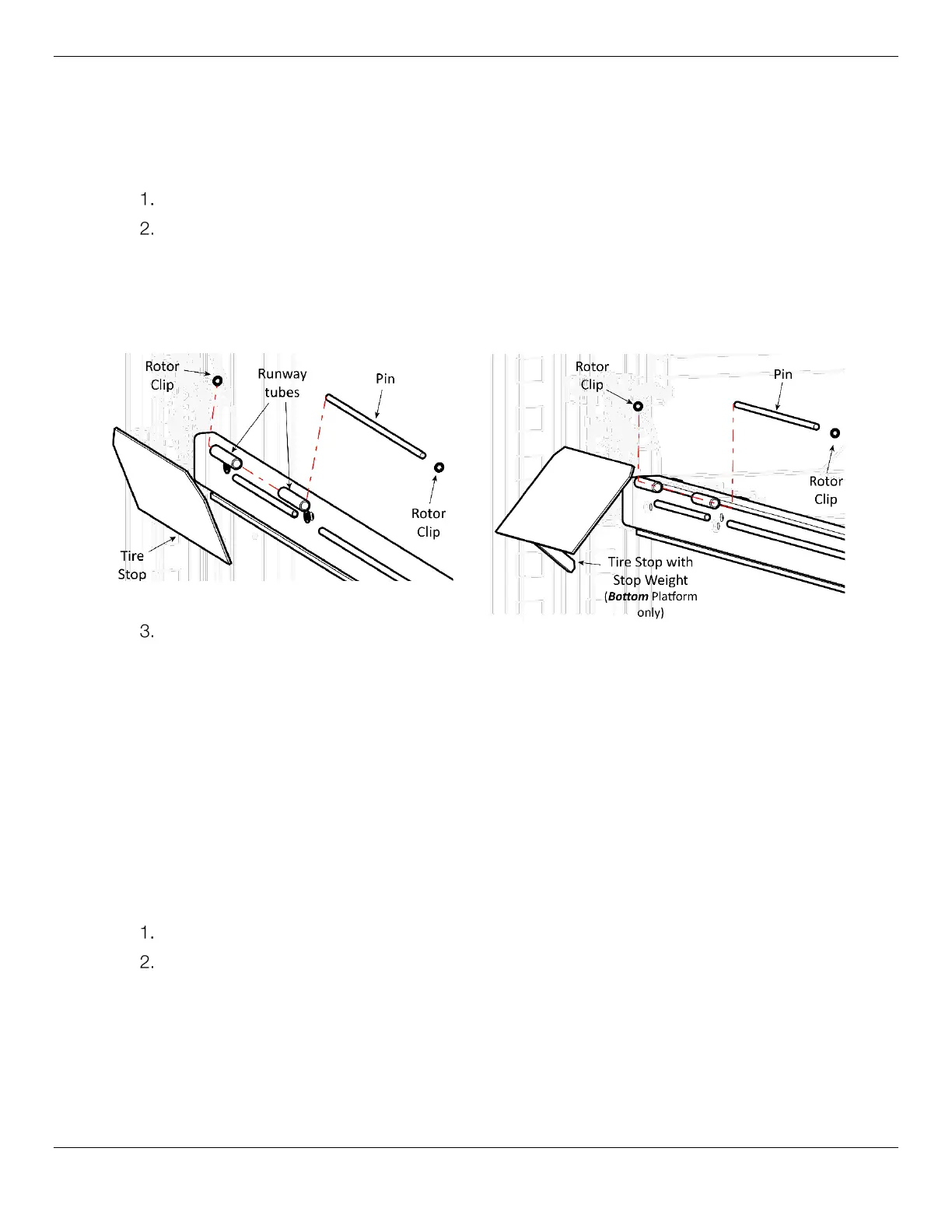
Put a Tire Stop in position in between the Runway tubes, then put the Pin through the Tire Stop
and Runway tubes, and secure the Tire Stop in place with a Rotor Clip on each end of the Pin.
The following graphics show how to install the Tire Stops for both Platforms.
Side view. Some components not shown.
Repeat Steps 1 and 2 for the remaining three Tire Stops.
⚠ WARNING Always chock the Vehicle’s Rear Tires when you position it in place on the
Runways.
Drive-up Ramps
Each Platform has two Drive-up Ramps that go at the Rear of the Runways, allowing for easy drive-up
onto the Platforms.
The longer Drive-up Ramps go with the Upper Platform, and the shorter Drive-up Ramps go with the
Lower Platform.
Note: The Ramps are heavy and awkward, so you may want to consider having two
people install them; one to hold the Ramp, the other to put the components into place.
To install the Drive-up Ramps:
Find the required components for the Upper Platform: two Ramps, two Pins, and four Rotor Clips.
Put a Drive-up Ramp in position in between the Runway tubes, then put the Pin through Drive-up
Ramp and Runway tubes and secure the Drive-up Ramp in place with a Rotor Clip on each end of
the Pin; repeat for the other Drive-up Ramp.


 To Next Page