11
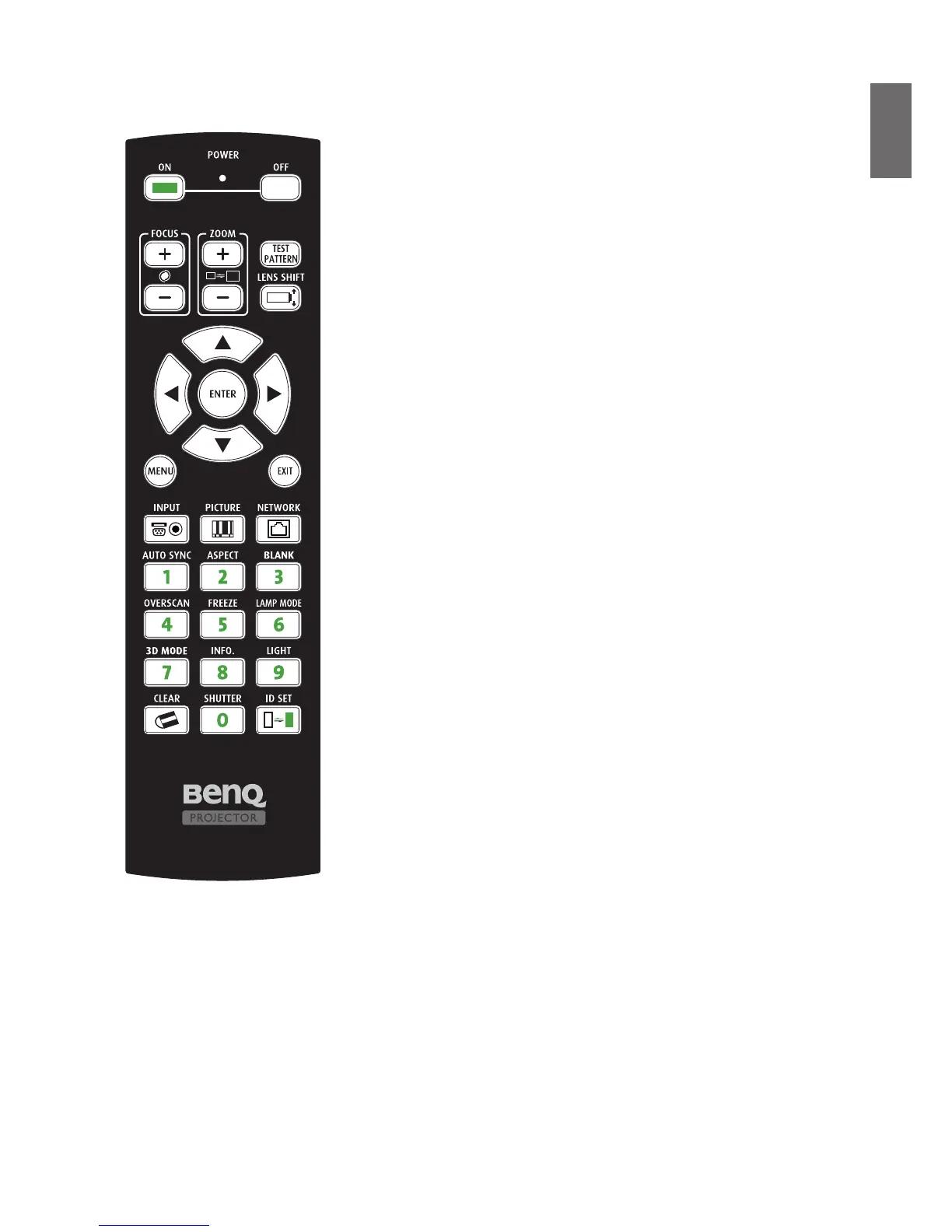
Remote control and functions
• ON
Press to power projector.
• OFF
Press to power off projector.
• FOCUS +/-
Press to adjust focus of projection image.
• ZOOM +/-
Press to zoom in and out on projection image.
• TEST PATTERN
Press to display test image. Press continuously to scroll through available
ones. Press MENU key to exit to projection image.
• LENS SHIFT
Press to move lens move up, down, left and right.
• ENTER
Press to select or accept settings.
• MENU
Press to hide or display OSD menu.
• EXIT
Press to go back to last menu or exit OSD menu.
• INPUT
Press to select input source.
• PICTURE
Press to display Picture menu.
• NETWORK
Press to display Network menu.
• AUTO SYNC
Press to execute auto signal sync.
• ASPECT
Press continuously to scroll through individual aspect ratio.
• Blank
Press to pause projection.
• OVERSCAN
Press to select overscan mode.
• FREEZE
Press to toggle switch between freeze and unfreeze.
• LAMP MODE
Press to display OSD menu to select desired lamp mode.
• 3D MODE
Press to display 3D setup menu.
• INFO.
Press to display SERVICE menu.
• LIGHT
Press to open backlight of remote controller.
• CLEAR: Not available with this model.
• SHUTTER
Press to open/close shutter.
• ID SET: Not available with this model.



 To Next Page