22
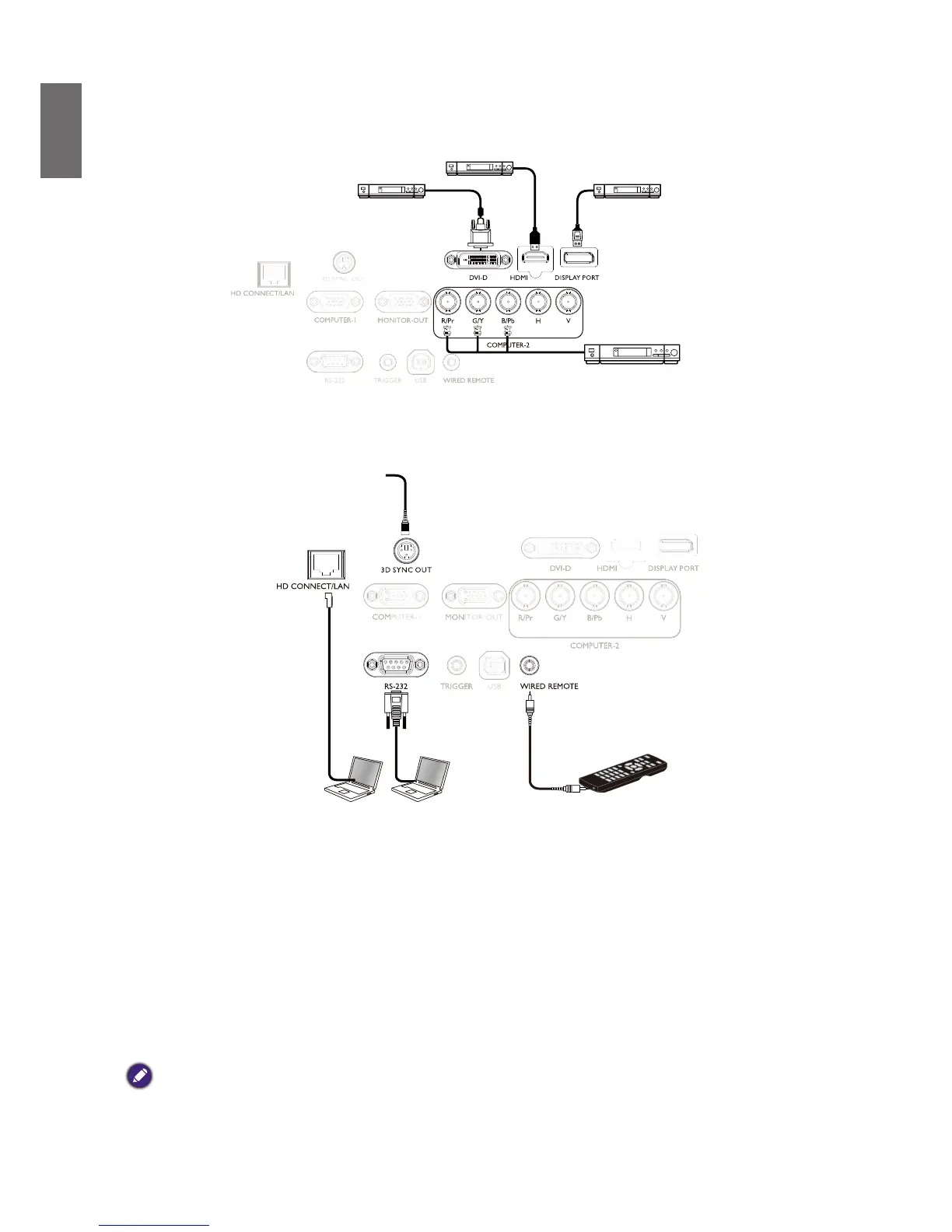
Connect to video equipment
You may connect any video equipment to your projector’s input port with a DVI-D, HDMI,
DisplayPort or YPBPR cable.
Connect to control port
Your projector features the following control ports:
3D sync signal
transmitter (IR)
• HD CONNECT/LAN
Your projector supports network control with shared LAN (network control) and HD Connect.
• RS-232 (RS-232c control)
Your projector supports RS-232c serial control,You may connect the projector to a PC with
standard 9-pin serial cable (straight through wire) for remote control.
• Wired controller
If the remote controller’s IR signal fails to reach your projector because the two are too far
apart or blocked by any obstacle, you may connect the WIRE input port of your projector to an
IR remote controller or an (optional) IR repeater to expand its working area.
• 3D Sync Out
3D IR sync signal transmitter
Caution:
• The projector enters wired control mode automatically and cannot be controlled by a remote controller’s IR signal
once the terminal of a remote controller is inserted in the projector’s wire port. To control your projector with
the IR signal of a remote controller again, remove the wire control terminal from the projector.
• Make sure the port is valid before inserting a wired remote controller. The remote controller may be damaged if a
port is invalid, e.g. a wired remote controller is connected to trigger output.



 To Next Page