53
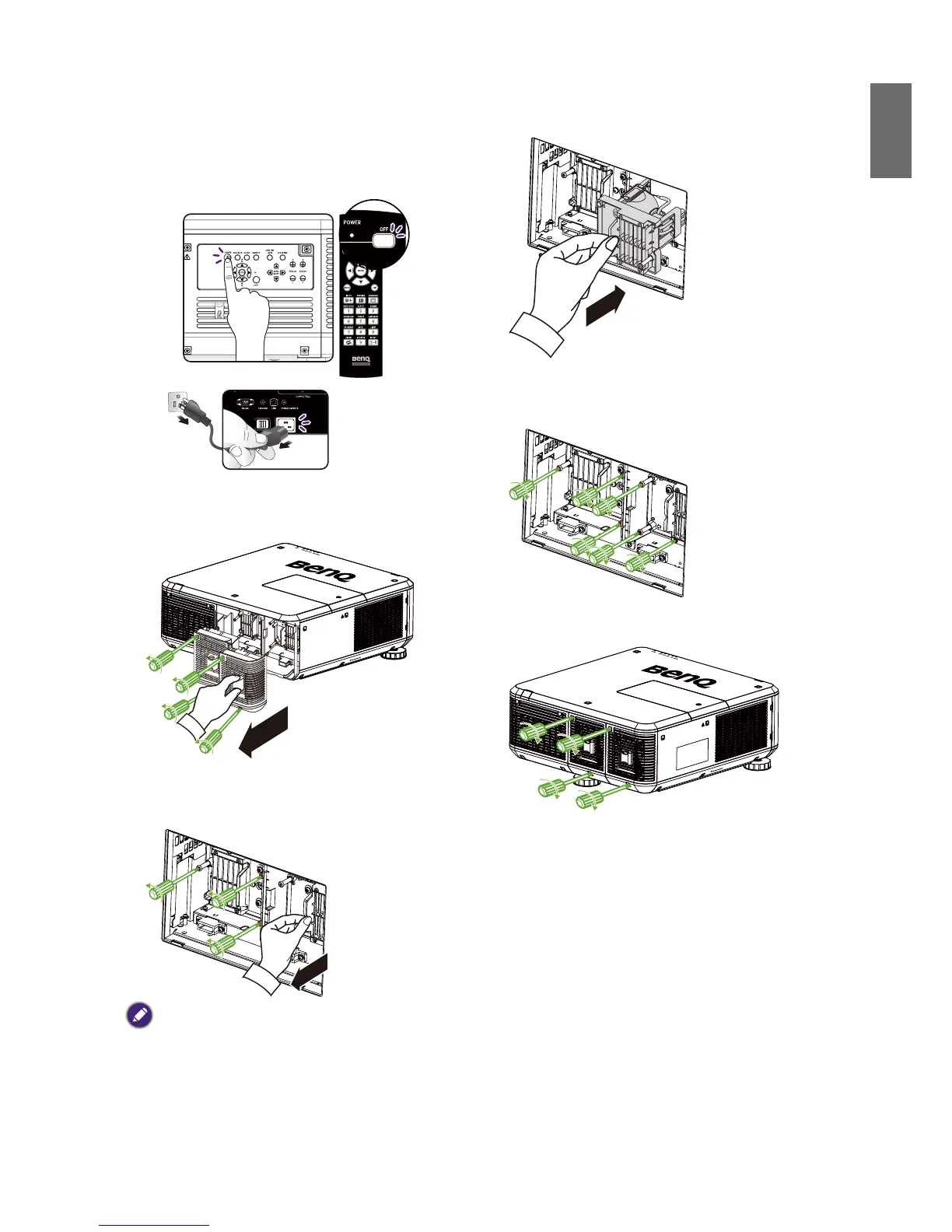
1. Power off and unplug the projector
power cord. Remove the lamp module to
be replaced after it cools down and the
temperature of its lamps and peripheral
components falls.
2. Loosen the screws holding the lamp cap with
a screwdriver before removing it.
3. Loosen the screws holding the lamp with a
screwdriver before removing it.
4. Insert a new lamp according to orientation
of the old one.
5. Cover the lamp cap by tightening the lamp
screws with a screwdriver.
6. Cover the lamp cap and tighten
• Pulling it too quickly may cause the lamp to break and scatter broken glass in the projector. To reduce the risk of
injuriestongersanddamagetointernalcomponents,usecautionwhenremovinglampglassthathasshattered.
• Do not place the lamp in locations where water might splash on it, children can reach it, near or above heat
sources,ornearammablematerials.
• Do not insert your hand into the projector when the lamp is removed. If you touch the optical components inside,
it could cause blurred images.
• Please be careful to not over-tighten the screws. Loose screws may cause a bad connection, which could result in
malfunction.



 To Next Page