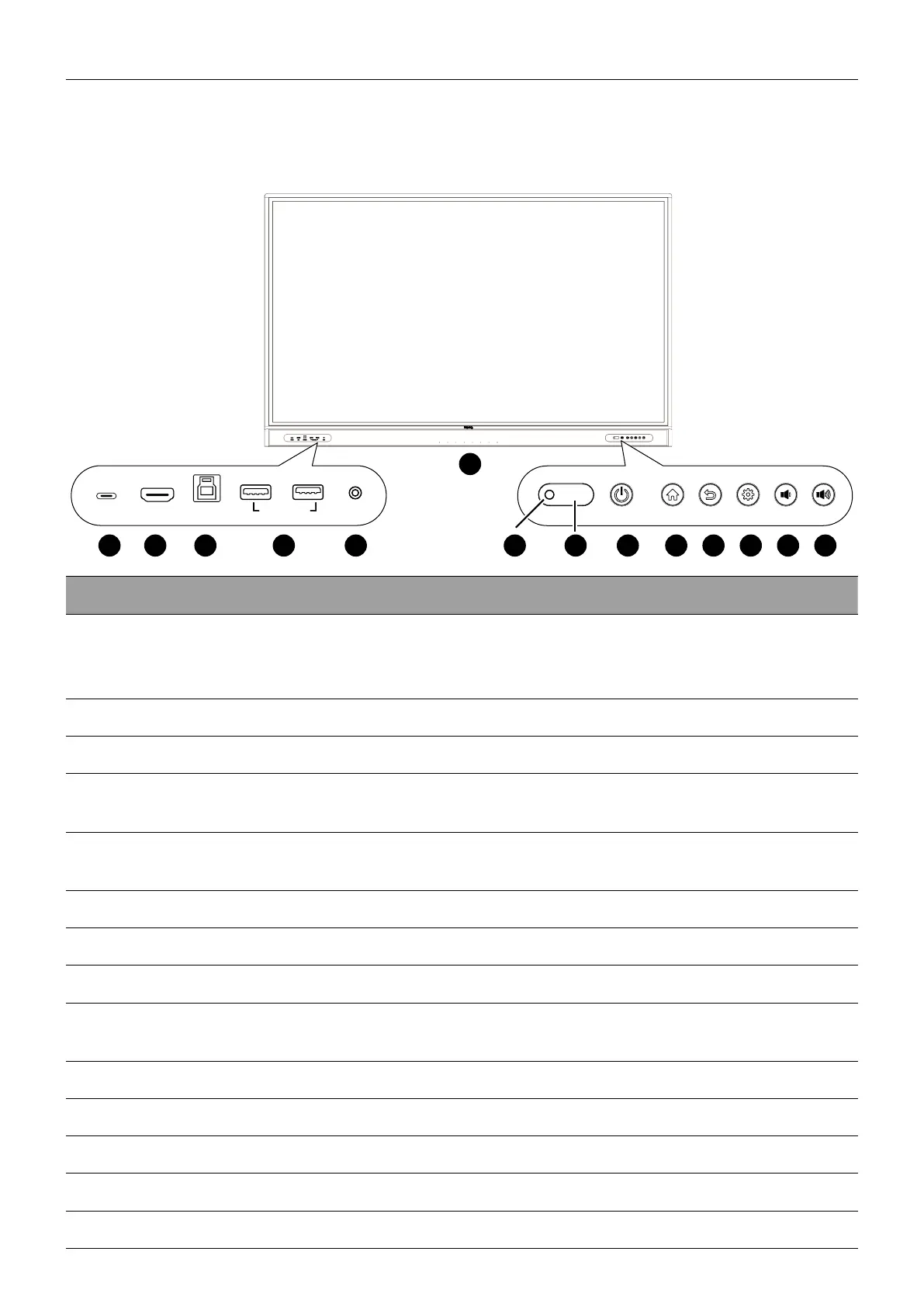
Parts of the display and their functions
9
Parts of the display and their functions
Front panel
TYPE-C
TOUCH-USB
MIC-IN
PUBLIC-USB3.0
HDMI
6
No. Name Description
1
TYPE-C
Connects to USB-C devices for charging and data
transfer. Allows the transmission of video, audio, and
touch function.
2
HDMI Connects to a source device using a HDMI cable.
3
TOUCH-USB Supports touch signal input from an external computer.
4
USB 3.0
Connects to USB devices such as keyboards, mouse, and
USB ash drives.
5
MIC-IN
Receives sound from a source device (e.g., microphone)
via an audio cable.
6
Array microphones Receives and transmits sound from near the display.
7
Ambient light sensor Detects the ambient light around the display.
8
IR signal receiver Receives infrared signals from remote control.
9
Power
Tap to enter energy saving mode. Press and hold for 4
seconds or more to power off.
10
Home Press to return to the main screen.
11
Return Press to return to the previous menu.
12
Menu Press to enter the function menu.
13
Volume down Press to decrease the volume.
14
Volume up Press to increase the volume.



 To Next Page