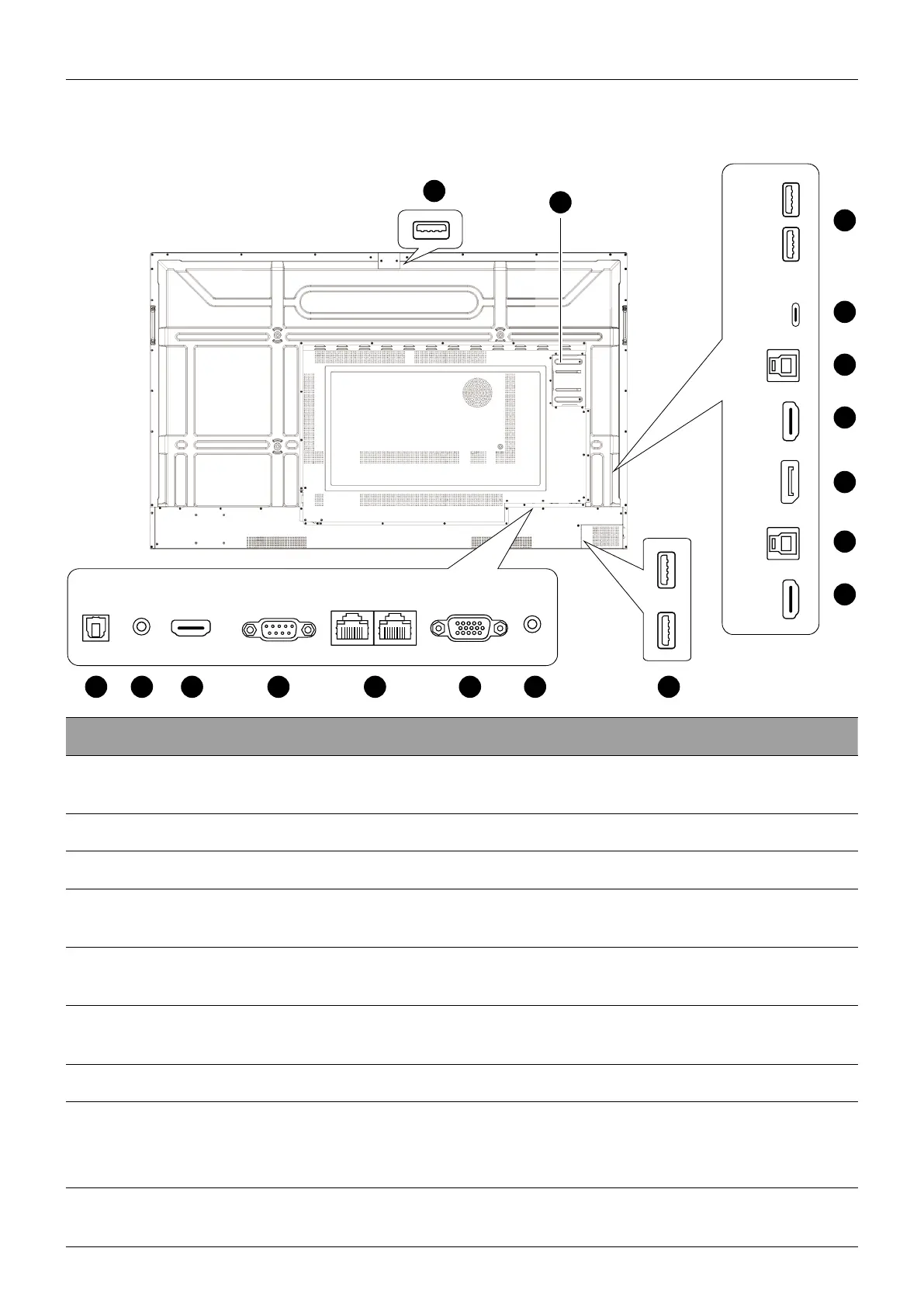
Parts of the display and their functions
10
Input/output terminals
See Connections on 16 for connection details.
TYPE-CTOUCH-USBHDMI1DP USB2.0USB2.0TOUCH-USBHDMI2
HDMI-OUTAUDIO-OUT
SPDIF AUDIO-IN
VGARS232 LAN LAN
9
10
11
12
13
11
12
15
No. Name Description
1
SPDIF
Connects the SPDIF cable from external audio devices
to the display for audio out.
2
AUDIO-OUT Connects to external speakers or earphones.
3
HDMI-OUT Connects to display devices with an HDMI input.
4
RS232
Serial interface, used for mutual transfer of data
between devices.
5
LAN
Supports LAN in and out, 10/100/1000 Mbps for
Android system and OPS.
6
VGA
Receives input from an external device (such as a
computer).
7
AUDIO-IN Receives audio input from an external device.
8
USB 3.0
Unscrew the USB cover to access the USB slot for the
wireless USB adapter and the remote control USB
receiver.
9
USB 2.0
Connects to USB devices such as keyboards, mice, and
USB ash drives.



 To Next Page