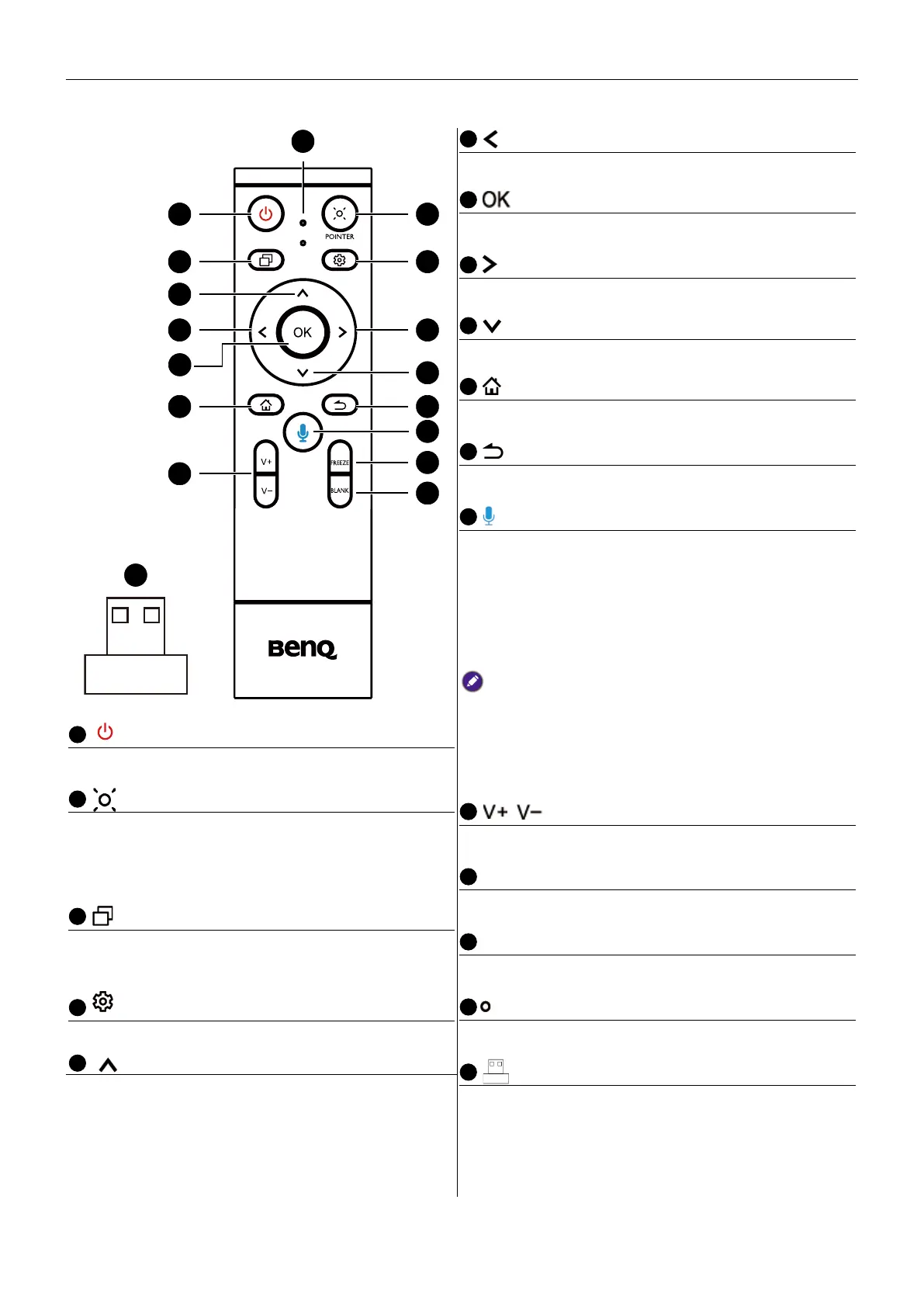
Parts of the display and their functions
12
Remote control
1 2
3
6
10
4
14
15
8
11
5
12
17
16
7
6
Direction key. Press for left selection.
7
Press to proceed
8
Direction key. Press for right selection.
Direction key. Press for downward selection.
Android system main screen button.
Return key
Voice command key. Press to activate Saf
(BenQ Voice Assistant), hold the button for
two seconds, then say the supported
command. Release the button until you nish
the command.
Speak directly to the microphone built into the
top portion of the remote control. Position the
microphone closer to your mouth or speak in a
loud and clear voice.
• Available by 2023 Q1
/
Volume up/down.
FREEZE
Freeze screen
15
BLANK
One key for blank screen.
16
Microphone
17
The USB receiver to pair with the remote
control. See Using the BenQ Interactive Flat
Panel by remote control on 14 for more
information.
1
Turns the display on or off.
Pointer key. Press to activate the spotlight or
pointer function and follow the instructions
on the screen.
3
Press to open Task Switcher to switch
between recent apps and input sources.
Press to open or close the menu.
Direction key. Press for upward selection.



 To Next Page