7
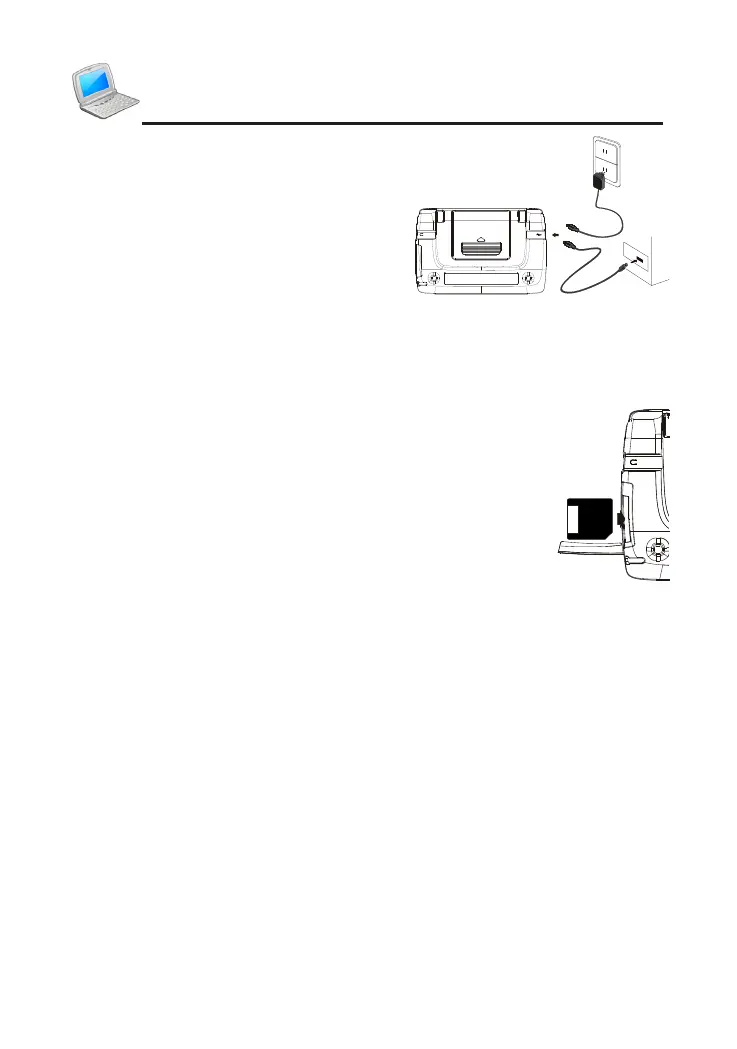
into the electrical outlet. It takes about 4.5 hours to
fully recharge.
N
o
t
e
s
:
①
T
h
e
L
E
D
d
i
s
p
l
a
y
s
d
i
f
f
e
r
e
n
t
c
o
l
o
r
s
i
n
d
i
f
f
e
r
e
n
t
s
i
t
u
a
t
i
o
n
s
:
*
G
r
e
e
n
l
i
g
h
t
-
-
-
>
N
o
b
a
t
t
e
r
y
o
r
b
a
t
t
e
r
y
f
u
l
l
y
r
e
c
h
a
r
g
e
d
.
*
O
r
a
n
g
e
l
i
g
h
t
-
-
-
>
R
e
c
h
a
r
g
i
n
g
.
②
P
l
e
a
s
e
r
e
c
h
a
r
g
e
w
h
e
n
s
c
r
e
e
n
i
c
k
e
r
s
w
i
t
h
a
"
b
i
"
s
o
u
n
d
,
w
h
i
c
h
i
n
d
i
c
a
t
e
s
t
h
a
t
t
h
e
s
u
p
p
l
y
v
o
l
t
a
g
e
i
s
t
o
o
l
o
w
.
4. SD/SDHC/MMC Card
You can extend the available memory with a
SD/SDHC/MMC card.
card into the card jack until you hear a sound.
the card until you hear a sound. Release the card then.
N
o
t
e
:
M
a
k
e
s
u
r
e
t
h
e
p
o
w
e
r
i
s
o
f
f
b
e
f
o
r
e
i
n
s
e
r
t
i
n
g
a
n
d
r
e
m
o
v
i
n
g
c
a
r
d
,
o
r
t
h
e
d
a
t
a
i
n
t
h
e
d
e
v
i
c
e
o
r
t
h
e
c
a
r
d
w
i
l
l
b
e
l
o
s
t
.
5. USB Disk
Through USB cable, you can move, duplicate or delete data and add
①
Connect the device and PC with USB cable.
②
Please safely remove the USB cable from PC before unlink, then quit
"SYS--PC Link" in the device.
N
o
t
e
s
:
D
u
r
i
n
g
o
p
e
r
a
t
i
o
n
:
①
P
l
e
a
s
e
d
o
n
o
t
r
e
m
o
v
e
t
h
e
l
i
n
k
c
a
b
l
e
,
o
t
h
e
r
w
i
s
e
t
h
e
d
a
t
a
w
i
l
l
b
e
l
o
s
t
o
r
t
h
e
d
e
v
i
c
e
w
i
l
l
b
e
a
b
n
o
r
m
a
l
.
②
P
l
e
a
s
e
d
o
n
'
t
i
n
s
e
r
t
/
r
e
m
o
v
e
c
a
r
d
.
6. Initialization or RESET
you should set your device according to the following steps:
Introduction of the Device



 To Next Page