54
2.2 Video Converter
Video Converter is an easy film converting tool. It can convert the
common media(.mpg, .mpeg, .mov, .mp4, .vob, .asf, .flv, .3gp, .dat, .rm,
.rmvb)into.avilethatcanplayintheelectronicdictionaryandPC.
①
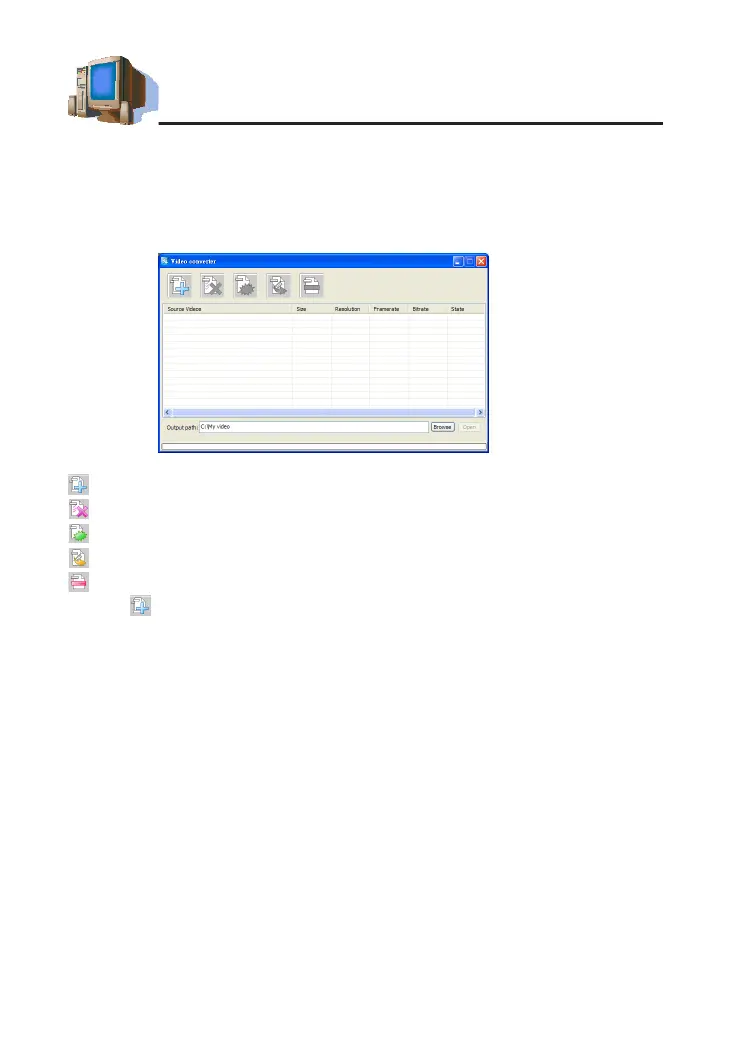
Open Video Converter (as picture 11).
Tool bar:
:Addthemedialeswhichneedtobeconverted.
:Deletetheleswhichyouselected.
:Deletethelesinthelelist.
:Begintoconvertles.
:Stoptoconvertles.
②
Tap toselecttheleswhichneedtobeconverted,thenclick"OK".
③
Tap[Browse]tobrowsethefolderofoutputles,defaultpathofSYSis
C:\MY video.
④
Youcouldsetsizeoftheoutputles,defaultproportion:[4:3].
⑤
Use mouse to adjust the voice volume.
⑥
Tap,begintoconvertto.aviformatle.Afternishconverting,escape
from the display frame, there will be a mention is "Converting Finish".
picture 11
PC Service Home Guide



 To Next Page