17
2.3 Repetition & Read after the Device
On the explanation screen of some dictionaries, provides Repetition and
Read after the Device function for words and sentences. Press [
跟讀/複讀
]
once to practice Chinese/English pronunciations. Press [Shift] once, and
then press [
跟讀/複讀
] , the device will repeat the current Chinese/English
headwords, The times of repetition can be set in "SYS--Sound Setting".
2.4 Visual Speech
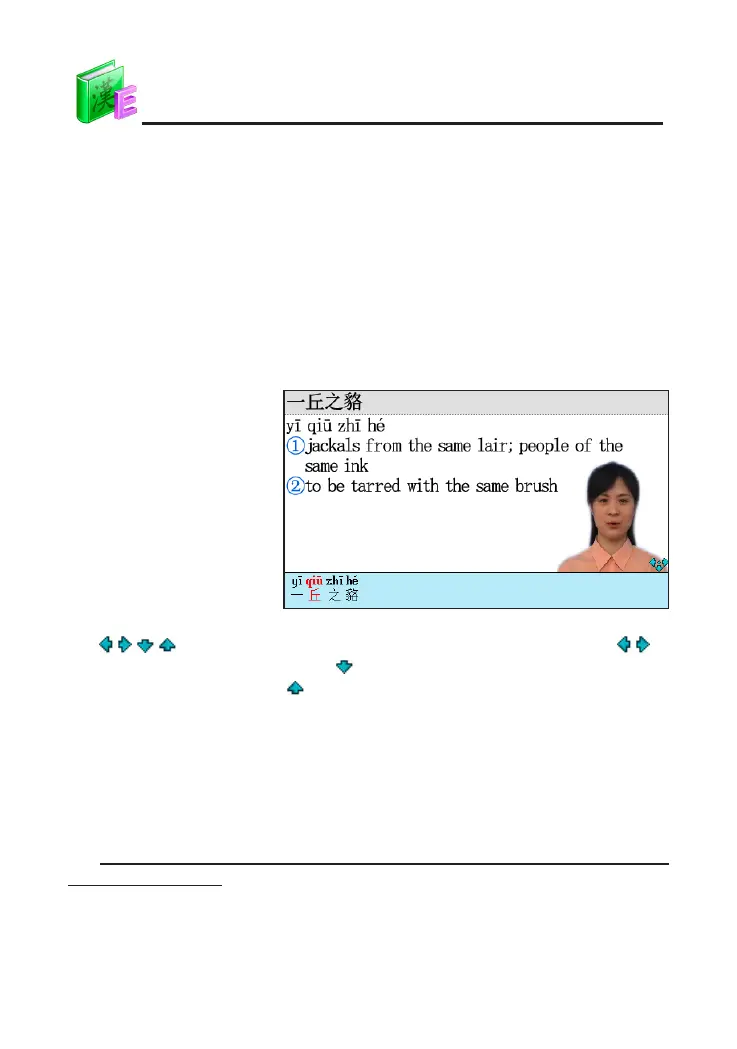
The device can pronounce Chinese words with visual speech, it make
you easy to learn pronunciation of words. Please set the function in the
"SYS--Sound Setting".
"Visual Speech" of
Chinese words
N
o
t
e
:
/
/
/
k
e
y
s
h
o
w
s
t
h
e
m
o
v
i
n
g
s
c
o
p
e
o
f
t
h
e
p
o
r
t
r
a
i
t
o
f
s
c
r
e
e
n
.
T
a
p
/
t
o
m
o
v
e
t
h
e
p
o
s
i
t
i
o
n
o
f
t
h
e
p
o
r
t
r
a
i
t
;
t
a
p
k
e
y
t
o
m
o
v
e
t
h
e
p
o
r
t
r
a
i
t
t
o
t
h
e
d
o
w
n
s
i
d
e
o
f
s
c
r
e
e
n
a
n
d
h
i
d
e
t
h
e
s
c
r
i
p
t
;
t
a
p
k
e
y
t
o
o
p
e
n
t
h
e
s
c
r
i
p
t
.
2.5 Pronunciation Comparison
Device provides pronunciation comparison function for both Chinese
and English words and phrases. The comparison function will compare the
standard pronunciation with the recorded users' pronunciation. It will help users
rectify their pronunciation.
For example, comparison function of “a babe in arms" in Oxford Advanced
Learner's Dictionary,
DICT



 To Next Page