20
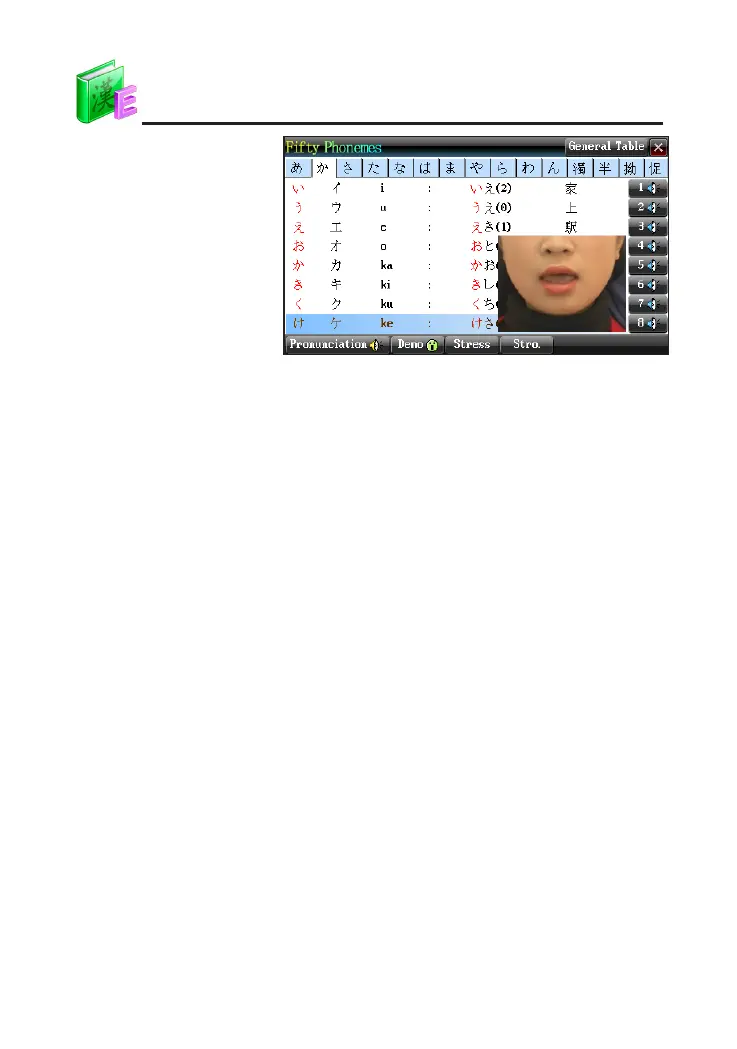
Press corresponding
numeric key to listen to
the pronunciation and
view the demo of
pronunciation
N
o
t
e
s
:
*
T
a
p
[
S
t
r
e
s
s
]
t
o
v
i
e
w
t
h
e
p
r
o
n
u
n
c
i
a
t
i
o
n
r
u
l
e
o
f
s
t
r
e
s
s
e
d
t
u
n
e
a
n
d
p
r
o
v
i
d
e
p
r
o
n
u
n
c
i
a
t
i
o
n
o
f
e
x
a
m
p
l
e
w
o
r
d
s
.
*
T
a
p
[
G
e
n
e
r
a
l
T
a
b
l
e
]
t
o
v
i
e
w
t
h
e
l
i
s
t
o
f
f
t
y
p
h
o
n
e
m
e
s
a
n
d
p
r
o
v
i
d
e
p
r
o
n
u
n
c
i
a
t
i
o
n
o
f
K
a
t
a
k
a
n
a
a
n
d
H
i
r
a
g
a
n
a
.
*
T
a
p
[
S
t
r
o
.
]
t
o
v
i
e
w
t
h
e
J
a
p
a
n
e
s
e
s
t
r
o
k
e
s
.
4. Searching Data
4.1 Smart Input Search
or phrases.
There are 3 methods:
①
②
③
Double tap the word or character to search.
4.2 Wildcard Search
To look up a word that you are not sure of spelling, input all the letters
or characters you know, and then replace the unknown letters or characters
with "?" or "*".
Steps:
①
Input the letters or characters that you are sure of.
②
Input unknown letters or characters with "?" or "*".
③
Press [Enter], the list of words matching with your input will be displayed.
*
Press the Page Up/Down key to look up.
DICT



 To Next Page