45
⑤
Click "Next" to select setup type.
⑥
Select "Typical" and click "Next" to access the screen of "Select
Program Folder". Then click "Next" to continue.
⑦
The Install Shield Wizard begins to install EBook Editor to your computer.
⑧
After installation is completed, click "Yes" or "No" to select whether to
restart your computer now, and then click "Finish" to end.
N
o
t
e
s
:
T
o
u
n
i
n
s
t
a
l
l
P
C
S
e
r
v
i
c
e
H
o
m
e
p
r
o
g
r
a
m
,
p
l
e
a
s
e
a
c
c
e
s
s
"
C
o
n
t
r
o
l
P
a
n
e
l
"
→
"
A
d
d
/
R
e
m
o
v
e
P
r
o
g
r
a
m
s
"
(
A
l
s
o
c
a
n
f
r
o
m
"
P
r
o
g
r
a
m
s
"
→
"
P
C
S
e
r
v
i
c
e
H
o
m
e
"
→
"
U
n
i
n
s
t
a
l
l
P
C
S
e
r
v
i
c
e
H
o
m
e
"
.
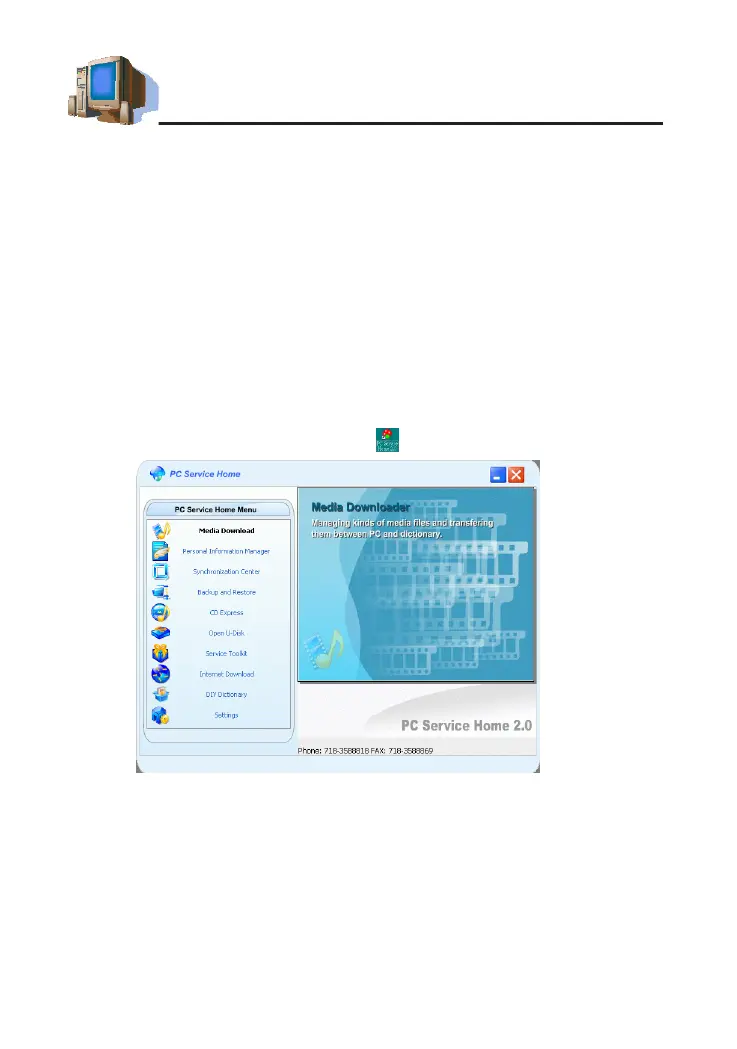
1.3 Opening the Program
Click"Start"menu→"Programs"→"PCServiceHome"→"PCService
Home 2.0" or double click the shortcut in desktop to open (as picture 2).
N
o
t
e
s
:
P
l
e
a
s
e
u
s
e
s
t
a
n
d
a
r
d
f
o
n
t
t
y
p
e
i
n
W
i
n
d
o
w
s
t
o
o
p
t
i
m
i
z
e
P
C
S
e
r
v
i
c
e
H
o
m
e
d
i
s
p
l
a
y
.
1.4 Communication
Data communication is one of the functions in PC Service Home,
including Media Download, Synchronization Center, Backup and Restore,
CD Express and Open U-Disk.
* Media Download: Download applications, eBooks, etc., to the device.
* Synchronization Center: Synchronize data in the device and PC,
PC Service Home Guide
picture 2



 To Next Page