48
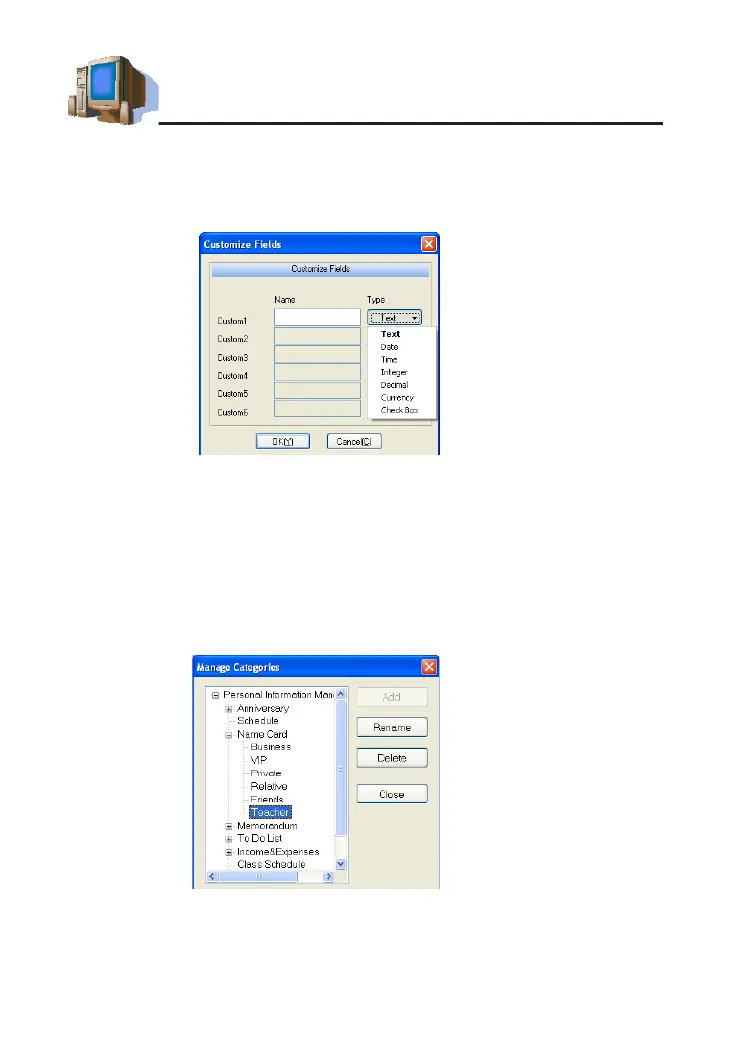
1.5.2 Custom Field
Click "Edit Custom Fields" to add custom fields besides the built-in
elds.Upto6eldtypescanbeselected:text,date,time,integer,decimal,
currency, or check box, shown in picture 4.
1.5.3 Editing a Category
In Name Card and Memorandum, you may add up to 8 categories
(including built-in categories).
Tap "Manage Categories" in "Tasks Pane".
* Select"NameCard"→"Add"→Inputanewcategory"Teacher"(aspicture5);
* Select "Delete" to delete the newly added category (built-in category
cannotbedeleted);
* Select "Rename" to rename the selected category.
N
o
t
e
s
:
①
D
a
t
a
c
a
n
n
o
t
b
e
c
o
p
i
e
d
o
r
p
a
s
t
e
d
i
n
d
i
f
f
e
r
e
n
t
f
u
n
c
t
i
o
n
s
.
②
C
u
s
t
o
m
e
l
d
i
s
u
n
a
v
a
i
l
a
b
l
e
i
n
I
n
c
o
m
e
&
E
x
p
e
n
s
e
o
r
C
l
a
s
s
S
c
h
e
d
u
l
e
.
③
T
h
e
n
a
m
e
o
f
C
u
s
t
o
m
F
i
e
l
d
i
s
u
p
t
o
1
6
w
o
r
d
s
;
t
h
e
n
a
m
e
o
f
E
d
i
t
C
a
t
e
g
o
r
y
i
s
u
p
t
o
2
0
w
o
r
d
s
.
PC Service Home Guide
picture 5
picture 4



 To Next Page