6
2. The Panel
①
The touch panel possesses high penetrability.
②
The product adopts 5.0 inch TFT screen.
3. Power Source
One of the following three power sources can be used.
①
Rechargeable lithium battery: 3.7V/1270mAh
②
Connect with PC via USB cable. (With charging function)
③
A power adaptor with DC output 5V/1A.
* The
②
and
③
power source can be used together with the battery
.
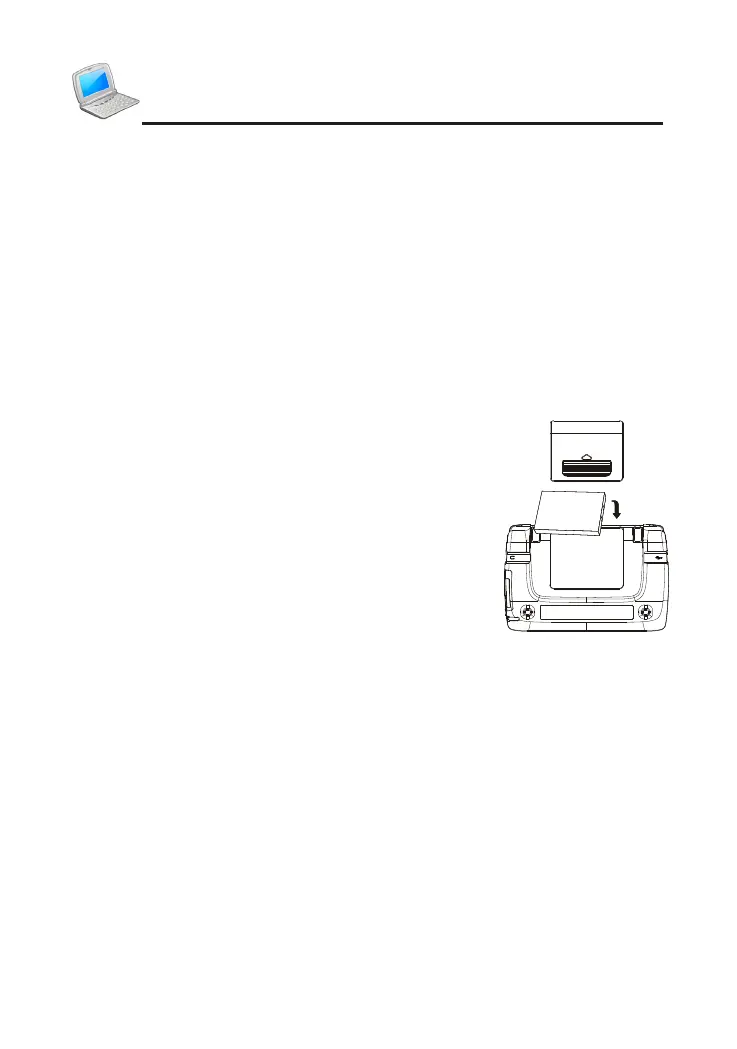
3.1 Replacing Battery
Insert:
①
Remove the battery compartment cover.
②
Insert the battery into the compartments.
③
Close the battery compartment cover securely.
Remove:
①
Press [ON/OFF] to switch off the power.
②
Please remove the battery as instructions above.
N
o
t
e
s
:
①
W
h
e
n
t
h
e
p
o
w
e
r
i
s
i
n
s
u
f
c
i
e
n
t
,
p
l
e
a
s
e
i
n
s
e
r
t
t
h
e
U
S
B
c
a
b
l
e
o
r
p
o
w
e
r
a
d
a
p
t
o
r
t
o
r
e
c
h
a
r
g
e
t
h
e
b
a
t
t
e
r
y
.
②
T
h
e
p
o
w
e
r
i
s
i
n
s
u
f
c
i
e
n
t
w
h
e
n
j
u
s
t
c
h
a
r
g
e
d
,
w
h
i
c
h
m
e
a
n
s
t
h
e
b
a
t
t
e
r
y
i
s
n
o
l
o
n
g
e
r
u
s
a
b
l
e
.
P
l
e
a
s
e
g
e
t
a
n
e
w
o
n
e
.
③
P
e
r
s
o
n
a
l
d
a
t
a
w
i
l
l
b
e
r
e
t
a
i
n
e
d
e
v
e
n
i
f
t
h
e
d
e
v
i
c
e
i
s
o
u
t
o
f
p
o
w
e
r
.
P
l
e
a
s
e
t
u
r
n
t
h
e
d
e
v
i
c
e
o
f
f
r
s
t
,
a
n
d
t
h
e
n
t
a
k
e
o
u
t
t
h
e
b
a
t
t
e
r
y
3
s
e
c
o
n
d
s
l
a
t
e
r
.
O
t
h
e
r
w
i
s
e
,
d
a
t
a
m
a
y
b
e
d
i
s
p
l
a
y
e
d
i
n
c
o
r
r
e
c
t
l
y
.
3.2 Recharging Battery
can recharge the battery through PC or special adaptor that comes with the
device.
①
Through PC: connect the device and PC with USB cable. It takes about
5.5 hours to fully recharge.
②
Through adaptor: connect the device and power supply with the
adaptor. One end is inserted into the USB jack, the other is inserted
Introduction of the Device



 To Next Page