8
* Select [N] to access the main menu.
* Select [Y], system will check the data of memory to return to the default
values. Then enter the Date/Time Setting screen.
device. Then enter the Date/Time Setting screen.
N
o
t
e
:
I
f
『
清
除
用
戶
資
料
』
i
s
s
e
l
e
c
t
e
d
,
a
l
l
t
h
e
d
a
t
a
t
h
a
t
y
o
u
s
a
v
e
d
i
n
t
h
e
d
e
v
i
c
e
w
i
l
l
g
e
t
l
o
s
t
,
i
n
c
l
u
d
i
n
g
P
I
M
d
a
t
a
a
n
d
d
o
w
n
l
o
a
d
e
d
d
a
t
a
.
P
l
e
a
s
e
u
s
e
i
t
w
i
t
h
e
x
t
r
e
m
e
c
a
u
t
i
o
n
.
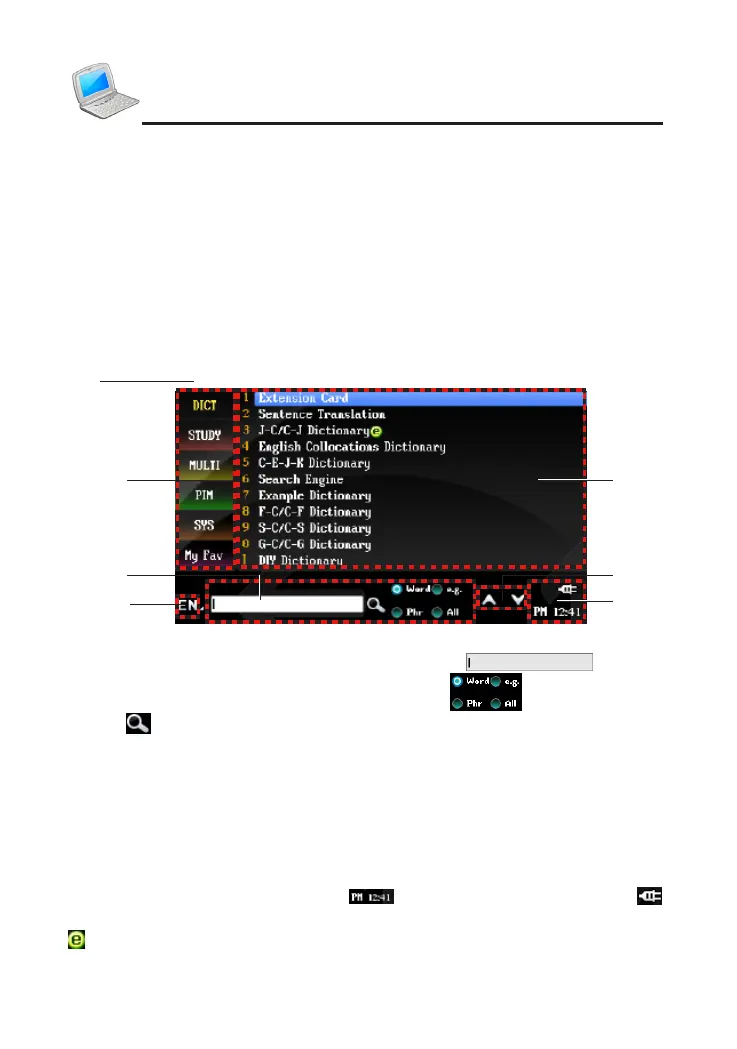
7. Introduction of the Functions
Main Menu:
A--Switch the input method.
B--Input your desired words directly in the area of .
Tap to select the search scope in the area of .
Tap
to search.
C--Five main function categories and My Favorite:
Five main function categories--tap each function and press direction keys
or page up/down key to check all the items of the function.
My Favorite--tap it to open the list of My Favorite.
D--Function select area: display all functions of each category. Tap to run the
function.
E--Tap to page up/down.
F--District of Time and Battery
:
tap to access the World Time, tap
to look up the power status.
: indicating data can be downloaded.
Introduction of the Device
A
B
C
F
D
E



 To Next Page