5
1.2 Touch Panel
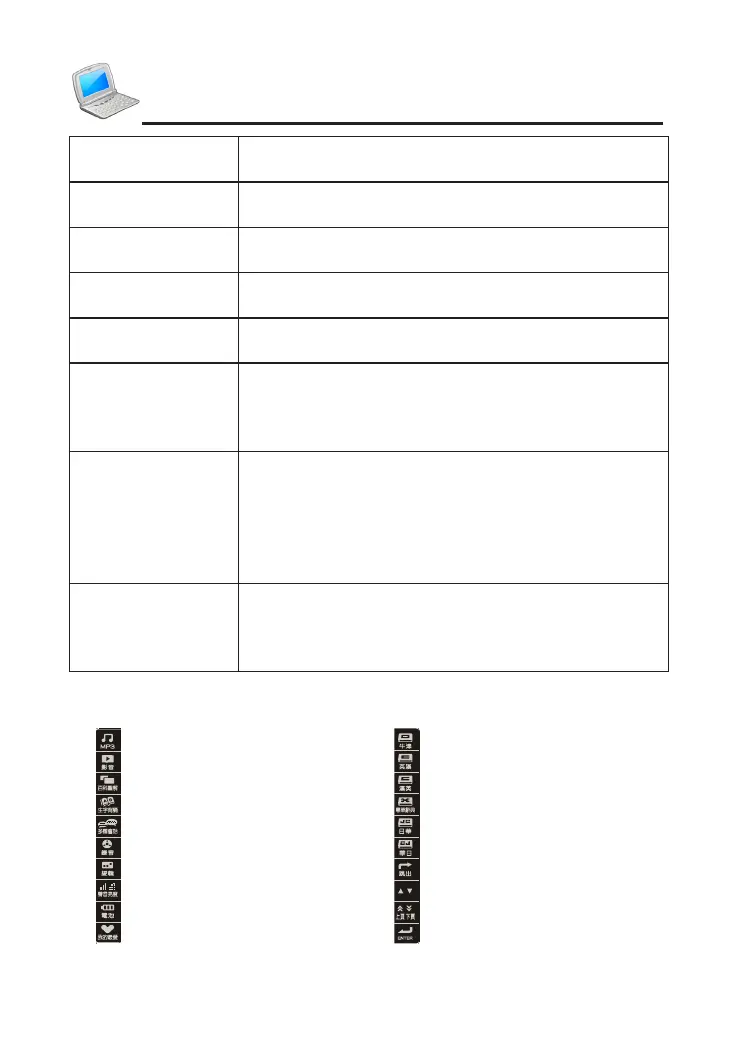
: MP3 : Oxford Advanced Dictionary
: Video : English-Chinese Dictionary
: Illustrated Dictionary : Chinese-English Dictionary
: New Words Study : Terminological Dictionaries
: Multi-language Dialogue : J-C Dictionary
: Digital Recorder : C-J Dictionary
: Open the editing screen : Same as [Esc]
: Set Sound and Brightness : Same as the Up/Down key
: Check battery power : Same as the Page Up/Down
: Open My Favorite screen : Same as [Enter]
『Menu』
* Back to main menu
* Switch different languages of main menu with [Shift]
『跟讀/複讀』
* Read after the device
* Repetition with [Shift]
『中文/粵語』
* Pronounce mandarin
* Pronounce Cantonese with [Shift]
『英文/日文』
* Pronounce English
* Pronounce Japanese with [Shift]
『Esc』
* Exit from the current function or return to the
previous screen
『Space/輸入法』
* Input a space
* Open input methods menu with [Shift]
▲▼
◀▶
* Up direction key, move the cursor up or scroll a line up
* Down direction key, move the cursor down or scroll
a line down
* Left direction key, move the cursor left or page left
* Right direction key, move the cursor right or page
right; mark words on explanation screen
》《
* Page up
* View the previous data
* Page down
* View the next data
Introduction of the Device



 To Next Page