7 Introduction
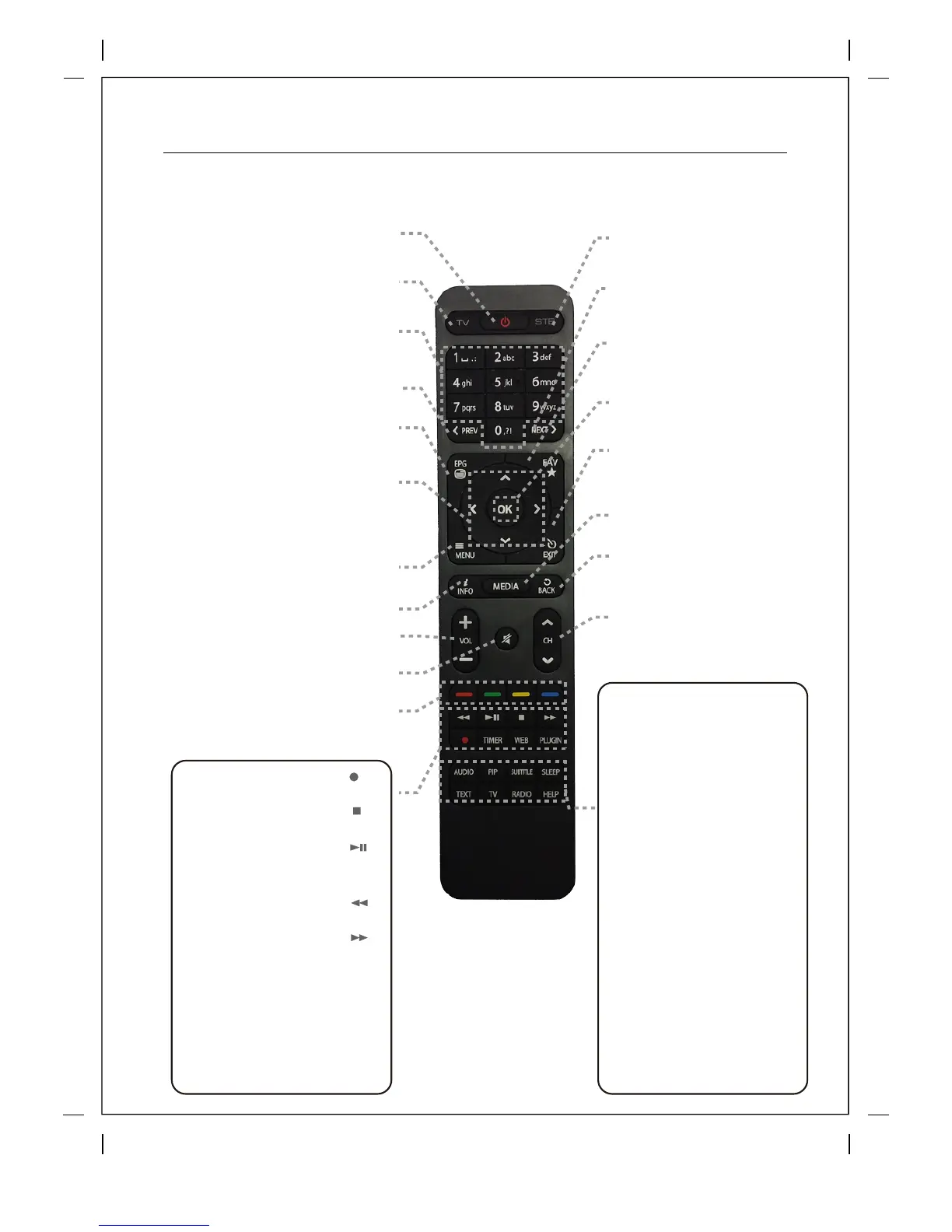
1.3 Remote Control
Power
Press to turn the product on or standby.
Long press power options.
TV
Press to switch the remote control to
control TV set.
Numeric Keys
Press to enter a channel number or numbers
according to the menu options.
Previous Press
to go to Previous Page / Zap History
EPG
Press to display the EPG (Electronic Program
Guide) information if the channel provides.
Navigation Keys
Press to navigate up/down and left/right on the menu
options.
Up/down keys are used to call up the channel list.
Menu
Press to access the main menu
Volume +/-
Press to adjust the audio volume.
MUTE
Press to mute the audio or un-mute.
Color Keys – RED, Green, Yellow & Blue Each
key is assigned a specific function that may be
different in each menu.
STB
Press to switch the remote
control to control this product.
Next
Press to go to Next Page Zap History
FAV
Press to view your favorite
folder & bouquets.
OK
Press to confirm the selected
menu option.
Media
Access your recordings
Back
Press to return to previous channel
or menu.
Channel (Page) up/down
Press to navigate through the
scanned channel list or move the
channel/Program list in pages.
Exit
Press to exit the current menu option
into the live mode, or switches one
step back in the menu.
Text
Press to display the teletext
information of the current channel, if
the channel provides teletext data.
Audio
Press to select available audio
language and Audio Type.
Subtitle
Press to display the subtitle of the
current channel, if the channel
provides subtitle data.
Help
Press to display major important
operation methods. This provides
users with a quick guide of product.
PIP
Press to activate Picture in Picture
TV
Press to display the TV channel list.
RADIO
Press to display the Radio channel
list.
Sleep
Press to turn off the product sleep
timer by user.
Recording [ ]
Press to start or stop recording media.
STOP [ ]
Press to stop playing media.
Play / Pause [
]
Press to play the selected file (e.g.
recording) at the normal speed or pause
the live program or recording play.
Timer
Press to view the Timer Schedule.
Plugin
Press to open your Plugin Browser
Fast Rewind[ ]
Faster rewind than the normal speed.
Fast Forward[ ]
Faster forward than the normal speed.
Web
Press to open the Web Browser Plugin
Info
Press to access program information



 To Next Page