36 System Configuration
Initialize / Format Hard Disk
How to use Pres
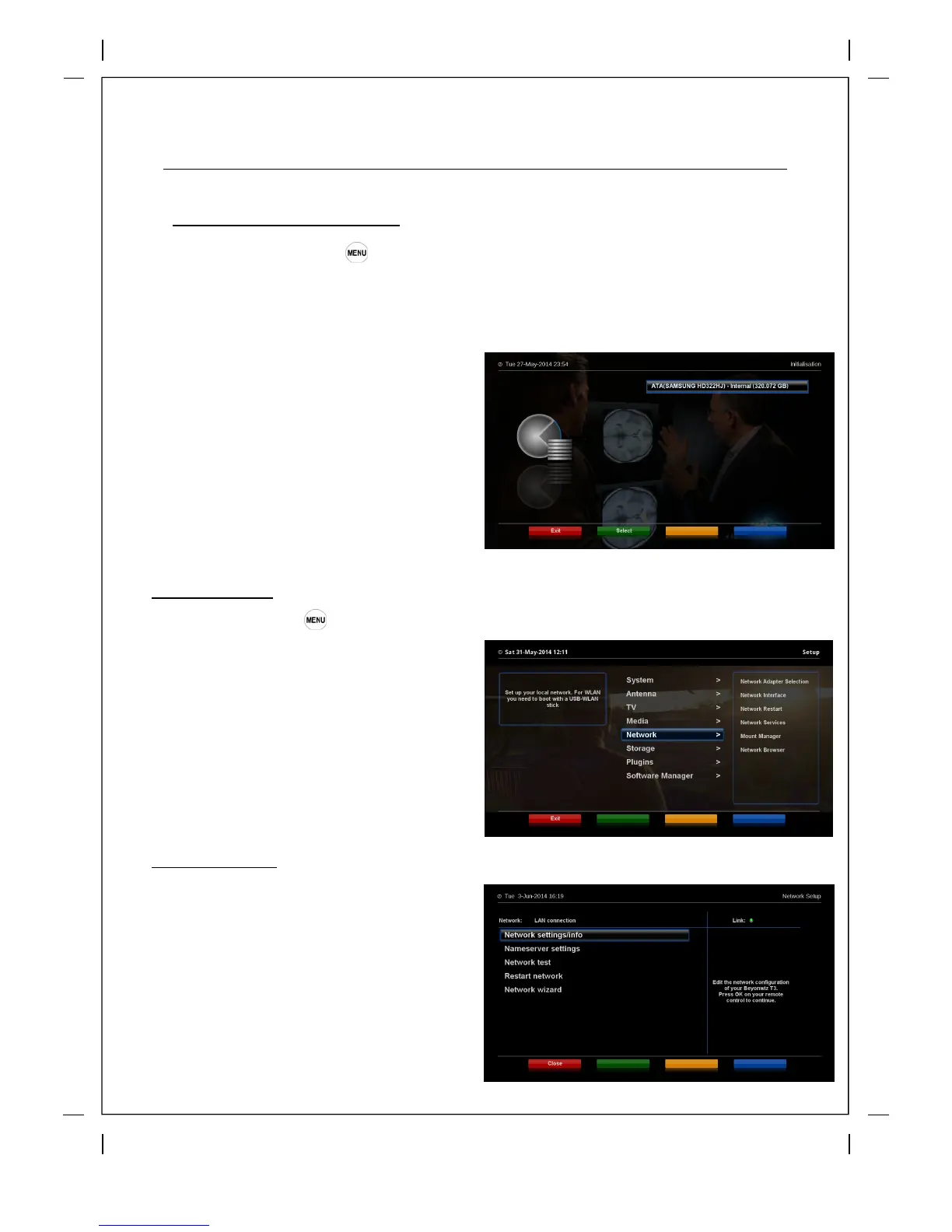
s > ‘Setup’ ‘Storage’ ‘Format Hard disk’
Please note this will delete any recordings or files you have on the HDD
You can format both internal and External Hard Drives
Network Setup
How to use > Press
‘Setup’ ‘Network’
Beyonwiz T3 is integrated with standard
10/100Mbps Ethernet with RJ 45 connector.
You are recommended
to use this network
capability of Beyonwiz T3 to fully enjoy the
system. You can setup the network settings
through this Network Configuration menu.
- Select the Hard drive you wish to
format and press the Green button
the 'select'
- Next press the 'Red' button to Initialize
- You will see a pop up asking you to
confirm, select Yes to format the HDD
LAN Connection
The easiest way to connect to your wired
home network is via the LAN connection
and using the Network Wizard either in
the initial set up or by going into the
Network menu as pictured above. Once
in the Network menu select Network
Adapter Selection and press 'OK' if you
then get a choice between LAN and
WLAN choose LAN and then pres 'OK'
and you will get this screen >



 To Next Page