35
13.1.8 Failsafe
This function configures the actuator action
in case of loss of the 4-20 mA input or BUS
signals. This action only takes place if the local
selector is in REMOTE and if the positioning
function or the BUS interface are active. When
the 4-20 mA or BUS signal is restored, the
ICON2000 resumes its normal functioning. The
Interlock and ESD controls override the failsafe
action according to the following diagram:
BIFFI FAIL SAFE ELECTRIC ACTUATORS, MODEL EFS2000V4
InstructIon and operatIng Manual
Configuration procedure
• Move the local selector to OFF and then
simultaneously press OPEN and STOP within
20 sec (see chapter ‘Local controls, entering
the set-up mode’). Select the language and
then enter the password according to the
instructions (see Entering the set-up mode).
When the message displayed is ‘SET-UP
MODE OK?’ press YES. Press YES to select
the actuator set-up menu, press NO to scroll
through the list of available routines and then
press YES to select POSITIONER.
• Press YES if the configured value of the Dead
band is correct (from ‘position resolution
%’ to 25.5%), or press NO to change it, then
press YES.
• Press YES if the configured value of the
Polarity is correct (4 mA=CL or 4 mA=OP), or
press NO to change it, then press YES.
• Press YES if the configured value of the
Motion inhibit time is correct (from 1 to
255 sec), or press NO to change it, then
pressYES.
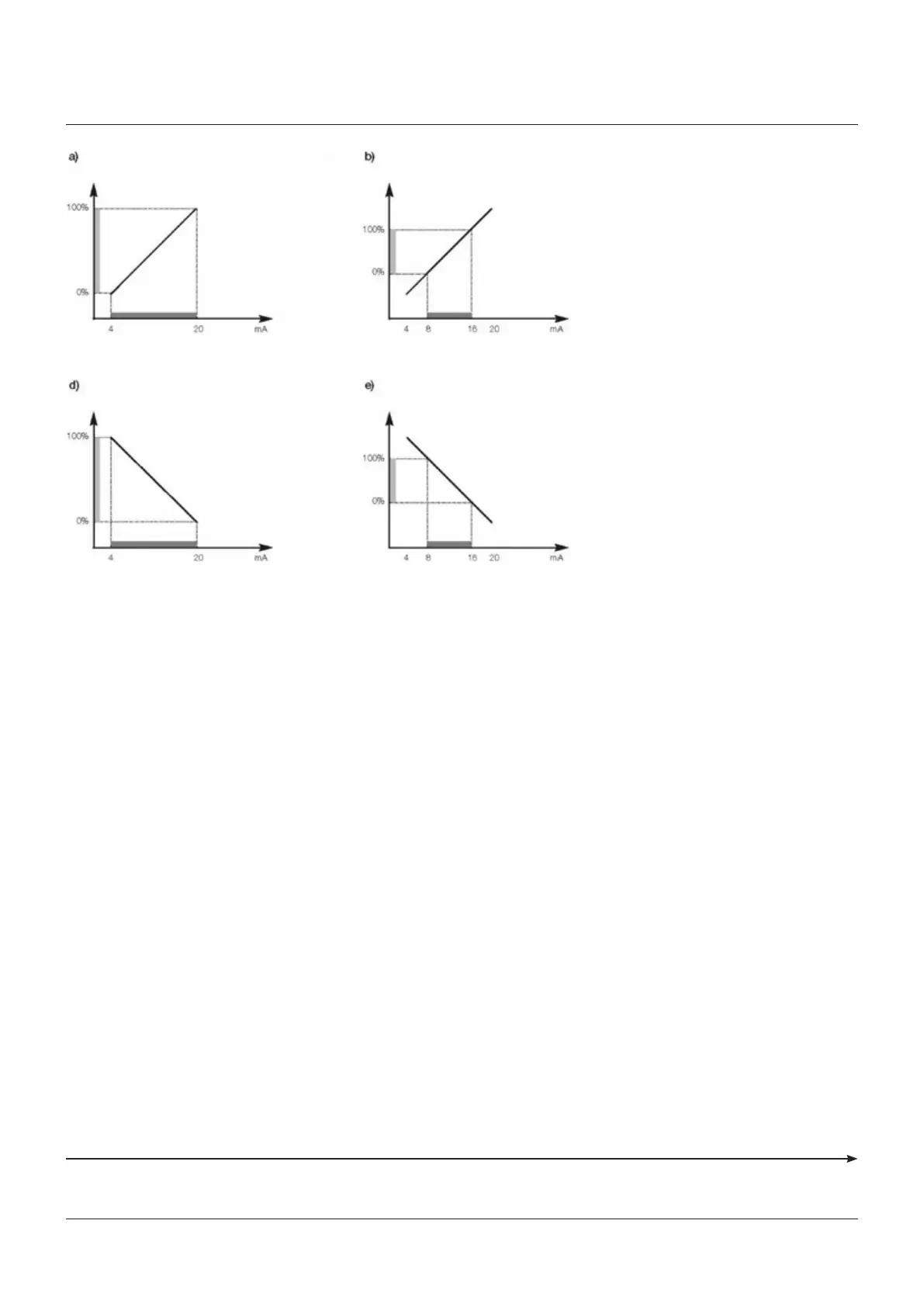
OP/CL controls Fail safe action Interlocks ESD
Lowest priority Highest priority
Position request %
Configured values:
% min = 0%
% max = 100%
Polarity: 4 mA = CL
Input signal
Position request %
Configured values
% min = 0%
% max = 100%
Polarity: 4 mA = OP
Input signal
Position request %
Configured values:
% min = 25%
% max = 75%
Polarity: 4 mA = CL
Input signal
Position request %
Configured values
% min = 25%
% max = 75%
Polarity: 4 mA = OP
Input signal
• Press YES if the configured value of the %
MIN is correct (from 0 to 75%), or press NO
to change it, then press YES. The standard
value is 0.
• Press YES if the configured value of the %
MAX is correct (from 25 to 100%), or press NO
to change it, then press YES. The difference
between % MAX and % MIN should be greater
than 25%. The standard value is 100.
The following options can be configured:
• Action: open, close, stay-put, go to position %,
no action (OFF)
• Delay: time before the failsafe action takes
place.



 To Next Page