EasyManua.ls Logo

Billion M500 - Page 14

Billion M500
181 pages
Print Icon
To Next Page IconTo Next Page
To Previous Page IconTo Previous Page
Loading...
10
Index
Item
Description
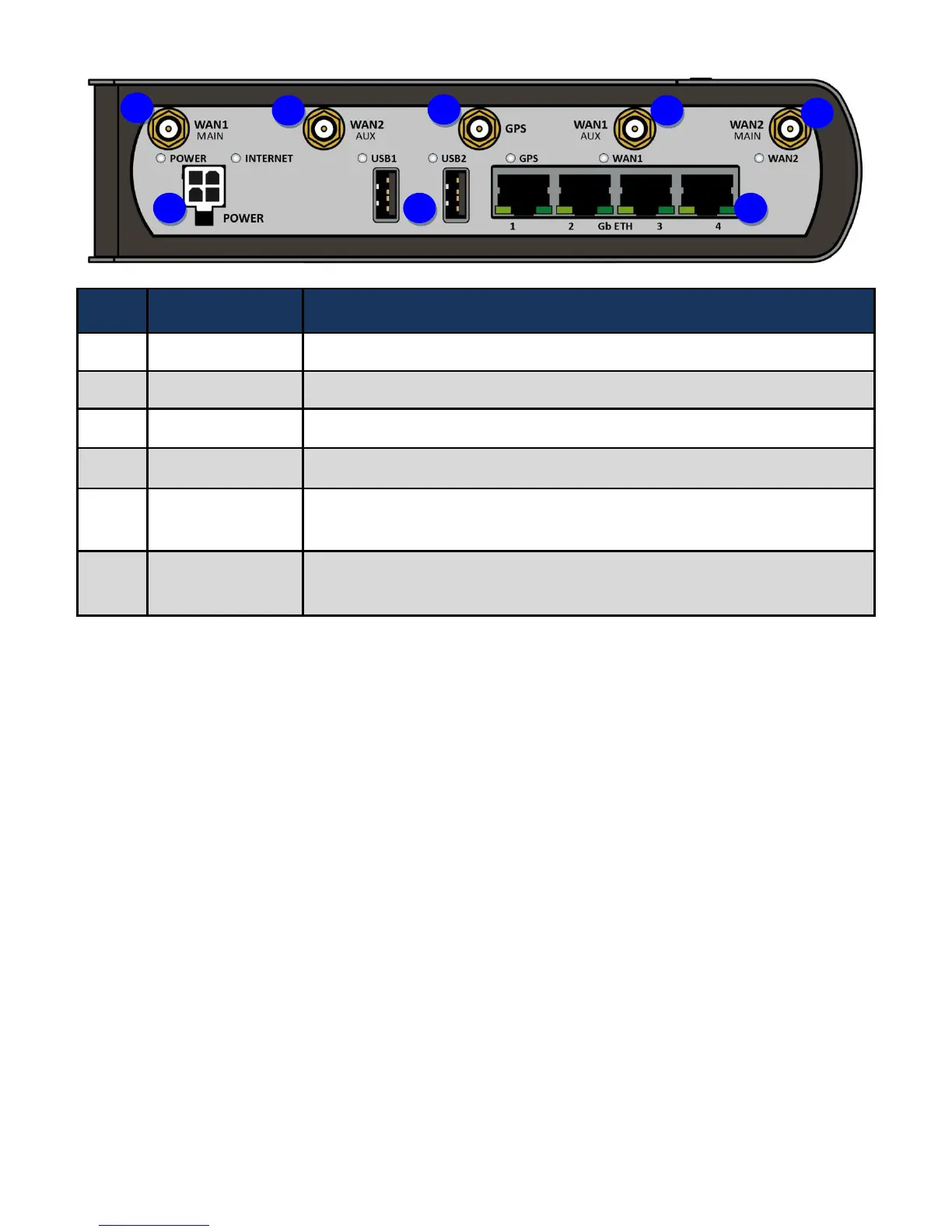
4G/LTE 1 antenna
Screw the supplied 4G/LTE antennas onto the antenna connectors for 4G/LTE module
1.
4G/LTE 2 antenna
Screw the supplied 4G/LTE antennas onto the antenna connectors for 4G/LTE module
2.
GPS antenna
Screw the supplied GPS antenna onto the antenna connectors.
Power connector
Connect the supplied Power cable to this connector.
USB port
The USB can support setup for storage/file sharing. Connect an external USB dongle /
hard drive for storage.
Gigabit Ethernet
(LAN 1 ~ LAN 4)
Connect a UTP Ethernet cable (Cat-5 or Cat-5e) to one of the four LAN ports when
connecting to a PC or an office/home network of 10Mbps/ 100Mbps/ 1000Mbps
1
2
3
1
2
4
5
6

Table of Contents

Related product manuals