139
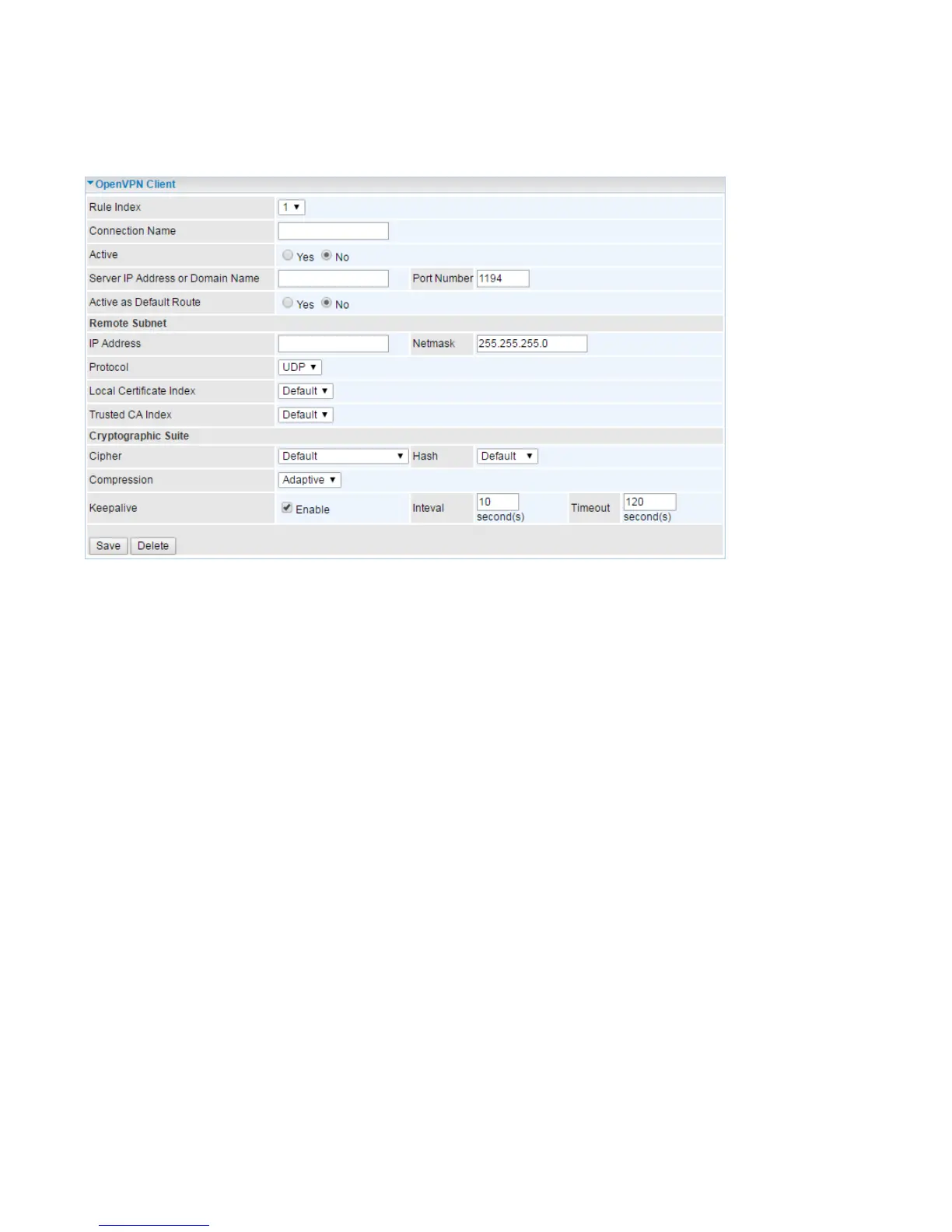
OpenVPN Client
The settings of the OpenVPN client should match what’s set on the server side.
Note: up to 4 tunnels can be added.
Rule Index: The index to identify the OpenVPN connection/rule.
Connection Name: user-defined name to mark the connection/rule.
Active: Select Yes to activate the rule.
Server IP Address or Domain Name: Enter the WAN IP address or Domain name of the OpenVPN
server.
Service Port: Port 1194 is the official assigned port number for OpenVPN
Active as Default Route: Choose Yes to let the OpenVPN tunnel/connection be the default route for
traffic, under this circumstance, all outgoing packets will be forwarded to this tunnel and routed to the
next hop.
Remote Subnet
IP Address: Set the network address of the remote peer.
Netmask: Set the subnet mask of the remote peer.
Protocol: OpenVPN can run over User Datagram Protocol (UDP) or Transmission Control Protocol
(TCP) transports. Select the protocol.
Local Certificate Index: Select the local certificate. Please Edit certificates in Maintenance >>
Certificate Management. OpenVPN mutually authenticate each other based on certificates and CA. If
not edited, only Default(the embedded certificate) is listed.
Trusted CA Index: Select the local CA. Please Edit certificates in Maintenance >> Certificate
Management. If not edited, only Default(the embedded CA) is listed
Cryptographic Suite














 To Next Page