77
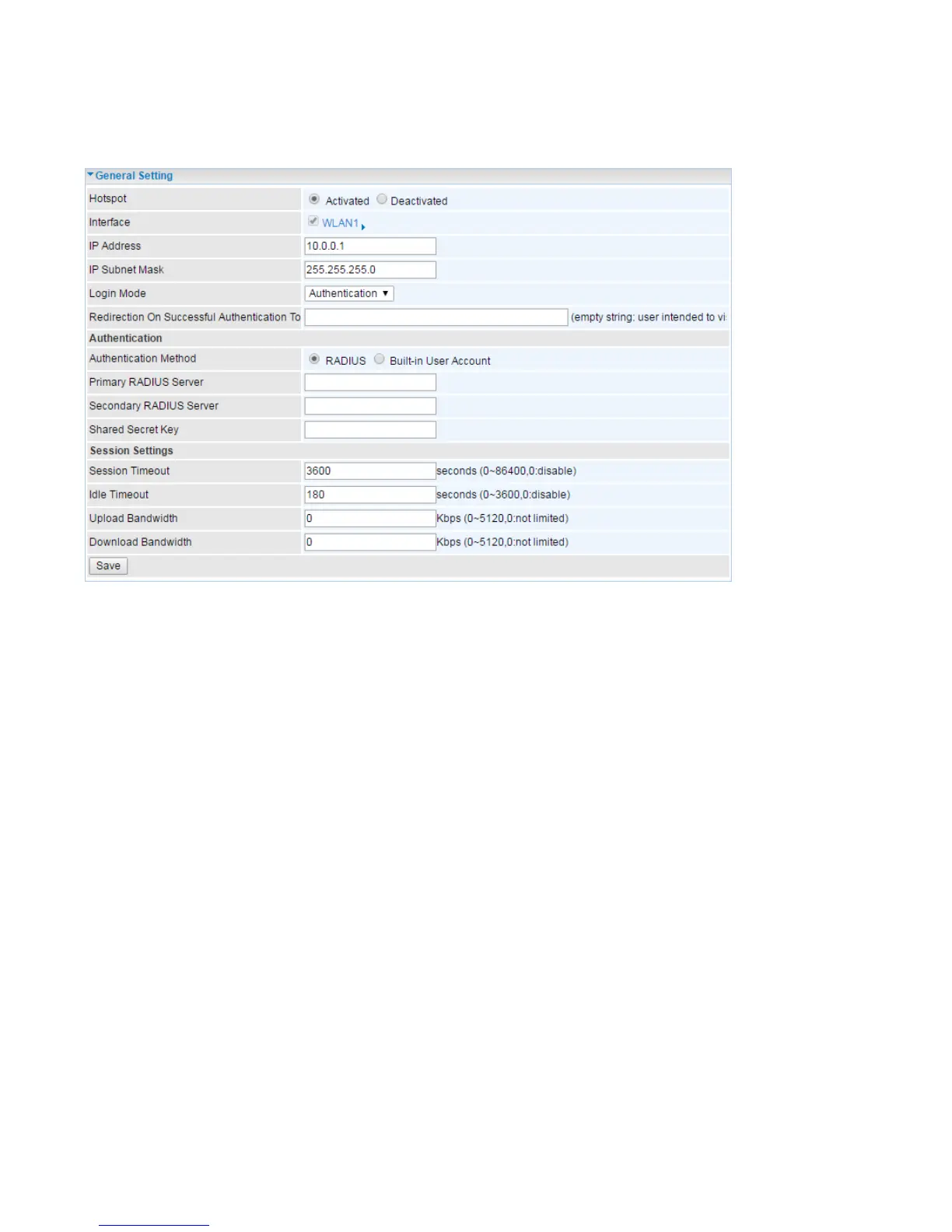
General Setting
This section is to setup setup HotSpot server on a router and authentication medthods, session
settings.
General Setting:
Hotsport: Activate or Deactivate Hotspot feature.
Interface: Determine which SSID is configured as a Hotspot. Industrial LTE Router has 4 virtual
SSIDs. Now it is fixed on SSID1 (WLAN1), it can be select in the future.
IP Address/IP Subnet Mask: The IP Subnet assigned to this Hotspot network. The IP can be
changed according to different user’s need.
Login Mode: Authentication or Agreement.
Authentication: when authentication is selected, client needs to provide authenticated
account, either via external RADIUS server or built-in user account database, to login to access
internet.
Agreement: when ageeemnt is selected, client doesn’t need an account to access internet.
Open your brower, the hotspot guide page directly appears.
Redirection on successful authentication to: Set the URL to be redirected to.
Authentication:
Authentication Method: Client login authentication methods via external RADIUS server or Industrial
LTE Router built-in user account database.
Primary/Secondary RADIUS Server: Specify the primary and secondayr RADIUS server address.
Shared Secret Key: The password for RADIUS server.
Session Settings:














 To Next Page