165
Certificate Management
OpenVPN mutually authenticate each other based on Local Certificate and Trusted CA.
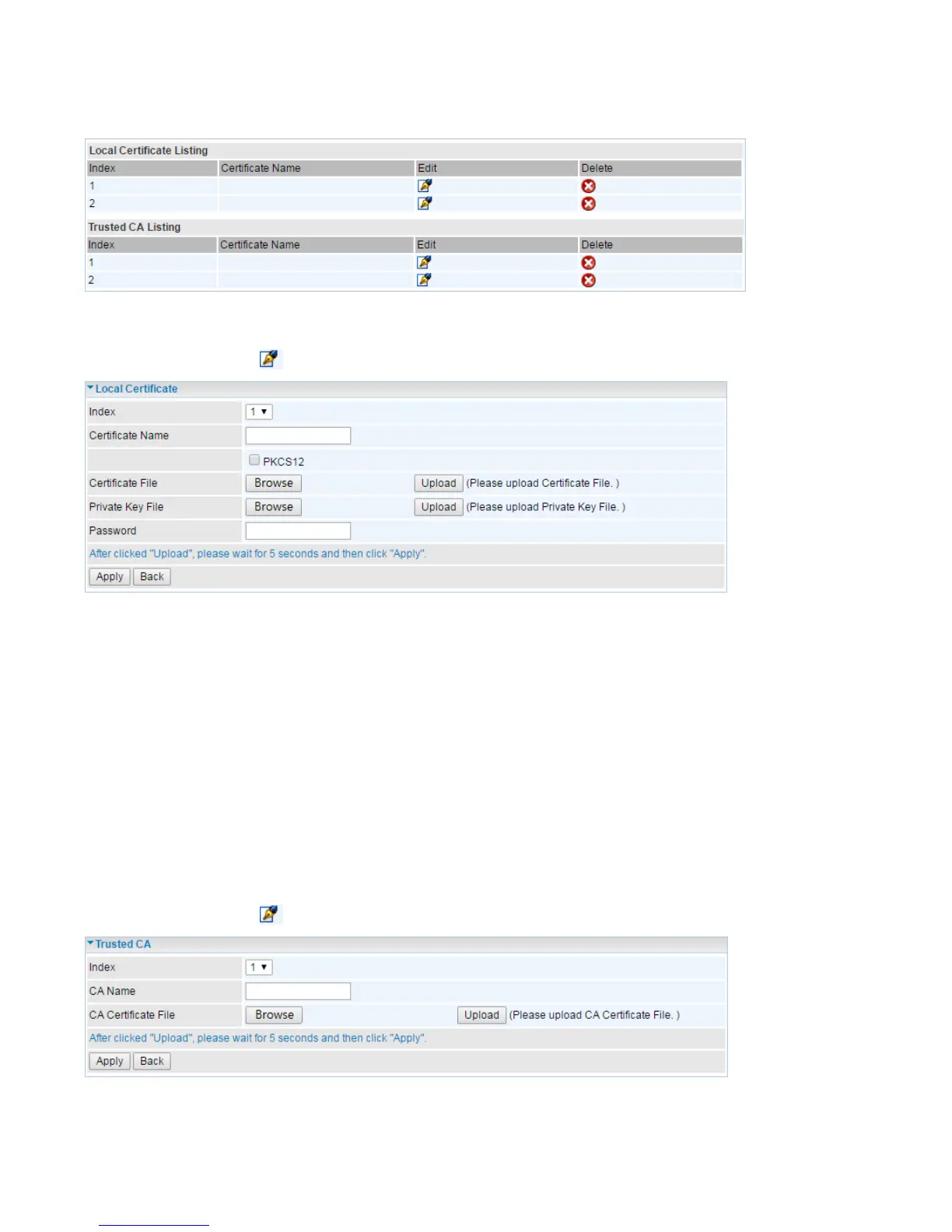
Local Certificate Listing
Edit certificate: Click , move to Local Certificate editing page.
Index: To identify the local certificate. 2 certificates supported.
Certificate Name: User-defined certificate name.
PKCS12: Every certificate is accompanied by a private key. Upload both files if PKCS is disabled.
Enable PKCS12 to put Certificate & Private Key in the same file, like *.p12, *.pfx.
Certificate File: Browse to locate the target certificate file on PC before uploading it.
Private Key File: Browse to locate the target file on PC before uploading it. If PKCS enabled, please
ignore this setting.
Password: Enter the password if any, which is used to protect the private key. Otherwise, leave it
empty.
Click Apply to save the settings.
Trusted CA Listing
Edit certificate: Click , move to Trusted CA editing page.
Index: To identify the CA files. 2 CAs supported.
CA Name: User-defined CA name.














 To Next Page