73
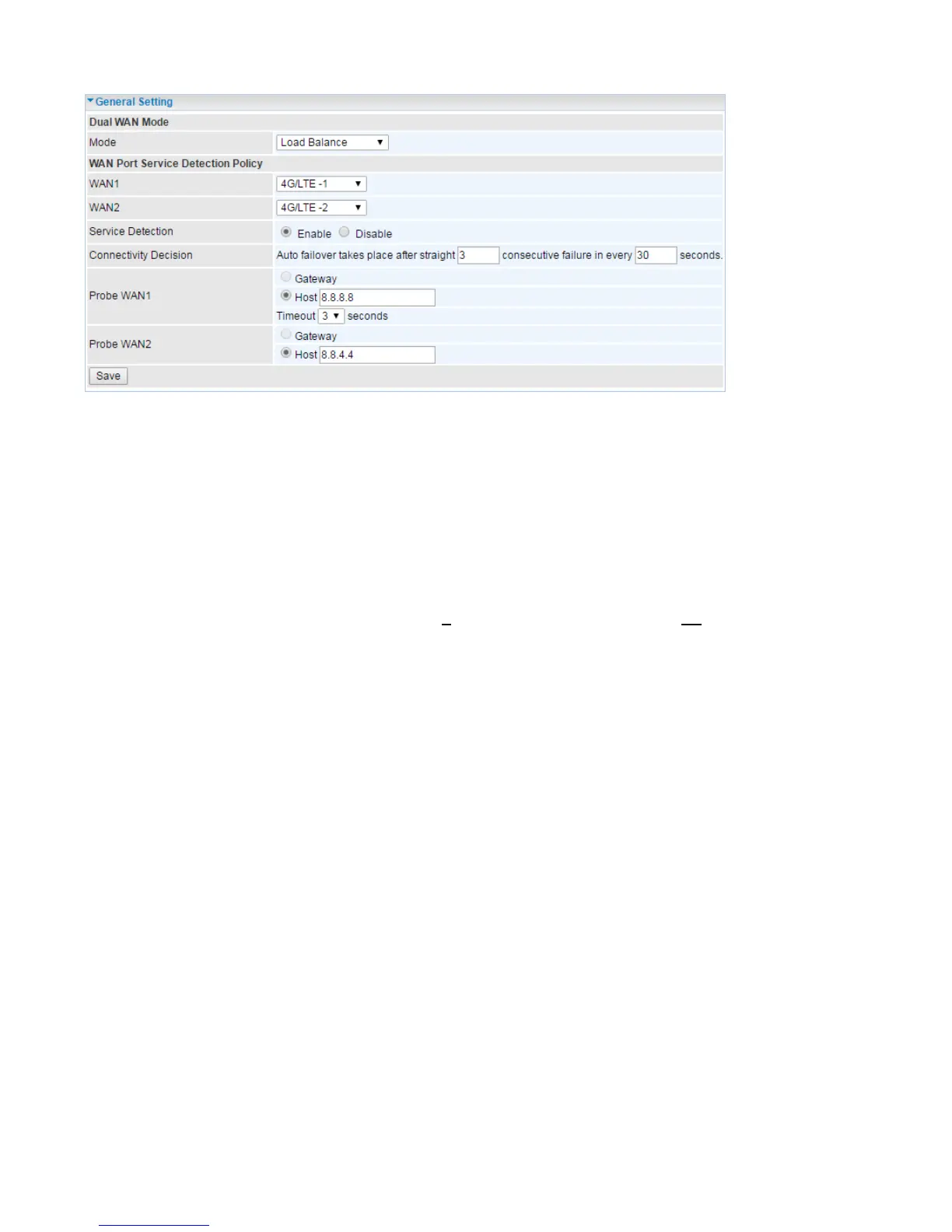
Load Balance
WAN Port Service Detection Policy
WAN1: Select “4G/LTE-1”, “4G/LTE-2”, “EWAN” or “Wireless Client” for WAN1.
WAN2: Select the “4G/LTE-2”, “EWAN” or “Wireless Client” if you select “4G/LTE-1” as WAN1.
Service Detection: Select if to keep detecte WAN interface connected. If enable the setting, the traffic
will be automatically through another WAN if the WAN interface is disconnected.
Connectivity Decision: Set how many times of probing failure to disable load balance.
Connectivity Decision & Probe Cycle: Set a number of times and time in seconds to determine
when to turn-off the Load Balancing service.
Example, Disable Load Balance after straight 3 consecutive failures in every 30 seconds meaning all
traffic will hand over to backup link (WAN2) after primary link fails to response in total of 90 seconds,
30 seconds for 3 consecutive failures.
Probe WAN1/WAN2: Enable Ping to the gateway or an IP address
Gateway: Internal system will wait for responses to the pings from the gateway of the WAN.
Host: Internal system will wait for responses to the pings from a fixed IP address.














 To Next Page