Epic X User Manual 23
7 Installation and Set-Up
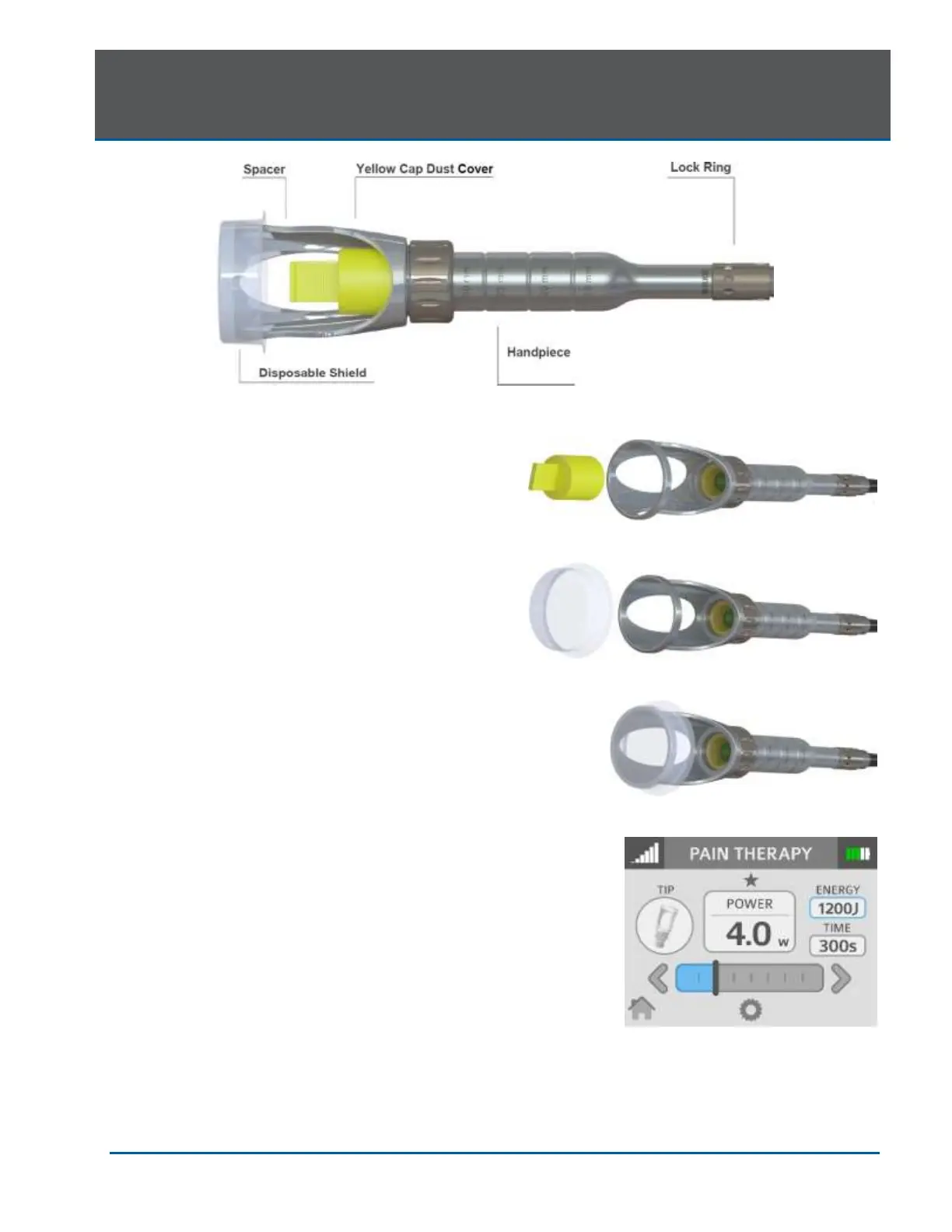
To connect the Handpiece to the Fiber Optic Cable,
slide the Handpiece over the fiber shaft until it
clicks on and is secured; if no click is audible,
disconnect the Handpiece and then re-install it.
Remove the yellow cap dust cover (Figure 7.11).
Set the spot size to 30mm by loosening the lock
ring and sliding the spacer to the 30mm spot size
detent location (Figure 7.10); tighten the lock ring to
prevent the spacer from moving during treatment.
Place the disposable protective shield over the
adjustable spacer (Figures 7.12, 7.13).
The Handpiece is now ready to use.
To disconnect the Handpiece from the Fiber Optic
Cable, press and hold both buttons at the base of
the fiber shaft and gently pull the Handpiece to
separate.
NOTE: Refer to the individual Instructions for Use
included with the Deep Tissue Handpiece
packaging for additional details.


 To Next Page