9 Maintenance
9.5 CHANGING THE WIRELESS FOOTSWITCH BATTERIES
The wireless Footswitch is powered by two AAA batteries. When the batteries are low, a warning
message will appear on the display screen indicating that the batteries need to be replaced. To
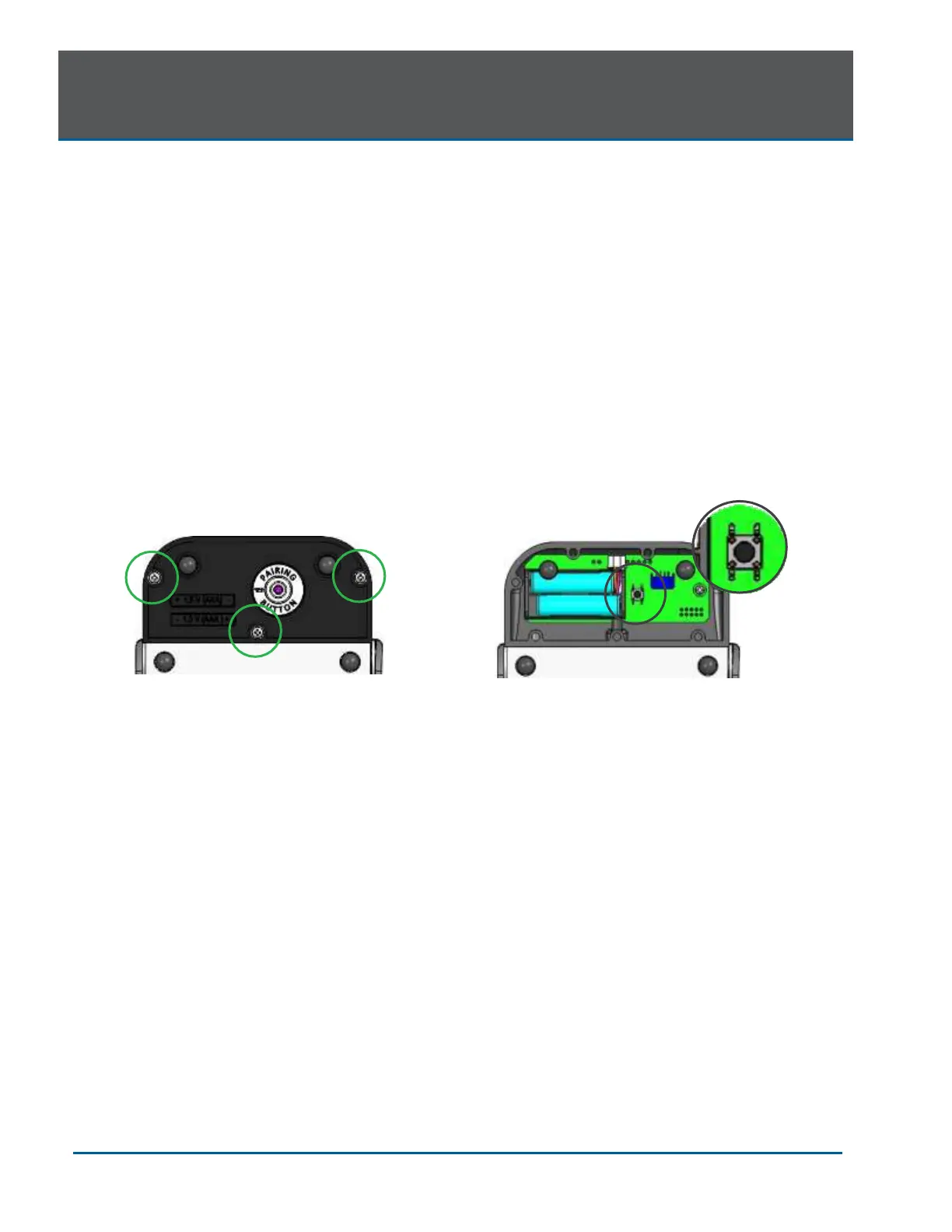
replace the batteries, remove the 3 screws on the underside of the Footswitch to remove the battery
cover (Figure 9.7); take out the old batteries and install the new ones, replacing the cover when
done. Discard the used batteries as regulated; do not throw them in a trash bin.
Do not press/push/touch the pairing button (Figure 9.8) while changing the batteries, as this will
disrupt the pairing of the laser console and Footswitch.
Replacing the batteries may disrupt the pairing of the laser console and Footswitch. If you find the
wireless communication has been interrupted, reestablish pairing by following the instructions
provided in Section 7.
NOTE: To ensure the longevity of the battery power, only BIOLASE-supplied batteries are
recommended as replacements (BIOLASE p/n 2400203); these are industrial-grade batteries which
under normal use have a longer life than conventional AAA batteries.


 To Next Page