Epic X User Manual 41
9 Maintenance
9.4 INSTALLING/REPLACING THE CONSOLE BATTERY PACK
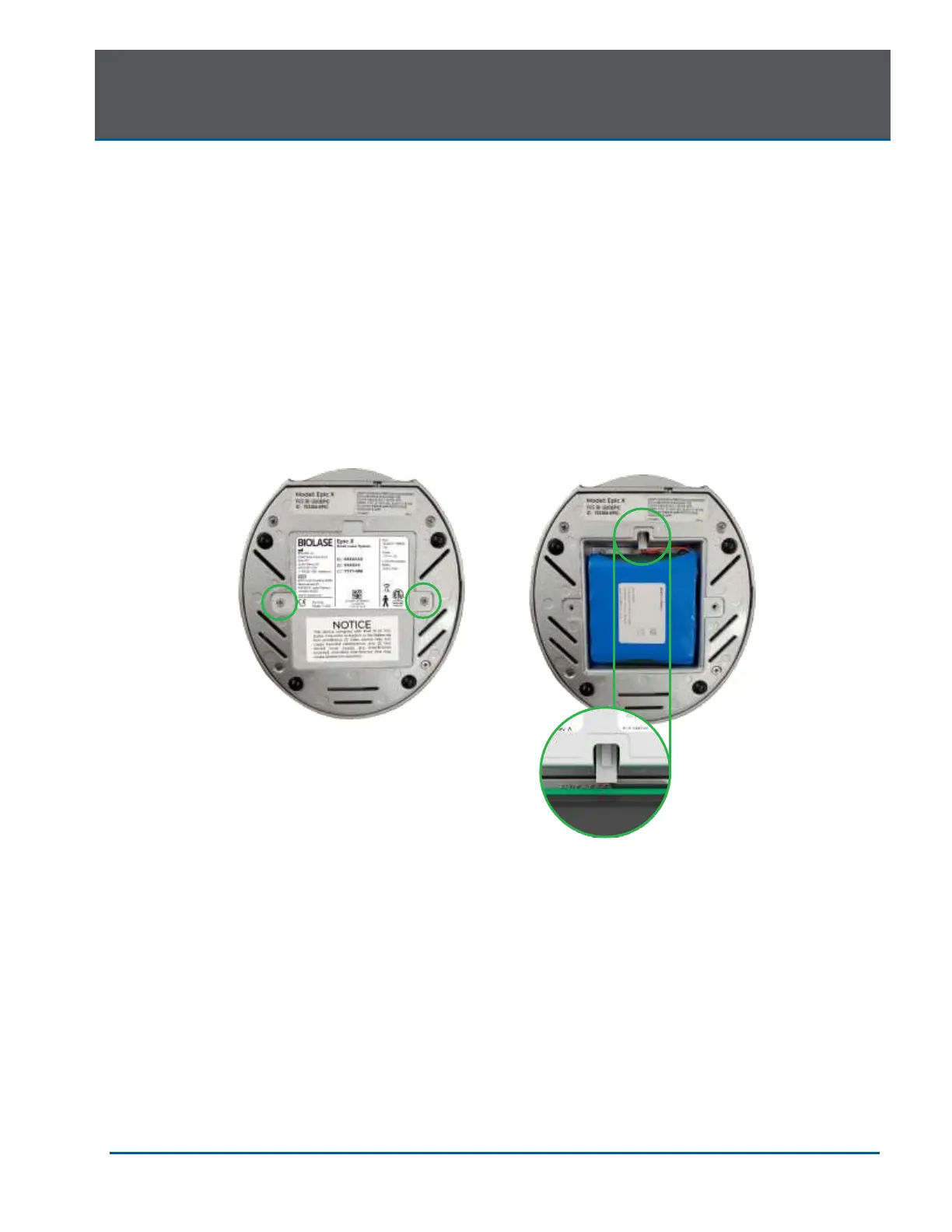
1. To install or replace the battery pack, remove the battery cover on the underside of the
console using the Phillips screwdriver included with the laser system.
2. To remove the battery, grip the battery at the top and pull the cable away from the connector.
Do not tug or wrench the cable from the connector.
3. To install the battery, insert the connector wire from the battery to the unit, making sure the
red wire is on the left, and gently place the battery into the compartment.
4. Replace the battery cover on the bottom of the unit, using the Phillips screwdriver provided.
5. Connect the power cord of the DC power supply module to the unit and plug into a wall outlet.
Before first use, it is recommended to fully charge the battery for at least three 3 hours. Once
the battery is charged, unplug the power cord from the wall outlet and the console. The unit
will run on battery power alone.
6. Dispose of the used Lithium Ion battery as regulated. Do not discard in a trash bin.
NOTE: Only use the battery pack supplied by BIOLASE. The battery pack is a separate accessory
(BIOLASE P/N 4400268).


 To Next Page