7 Installation and Set-Up
7.18 PROCEDURES BUTTON
The Epic X has the ability to store up to 20 pre-set procedures; Epic X is factory-installed with 14 pre-
programmed procedural presets and 6 empty slots for custom pre-sets. All of them can be
customized to your preference.
To customize the parameters (e.g., power, pulse duration, interval, etc.) for a particular clinical
procedure:
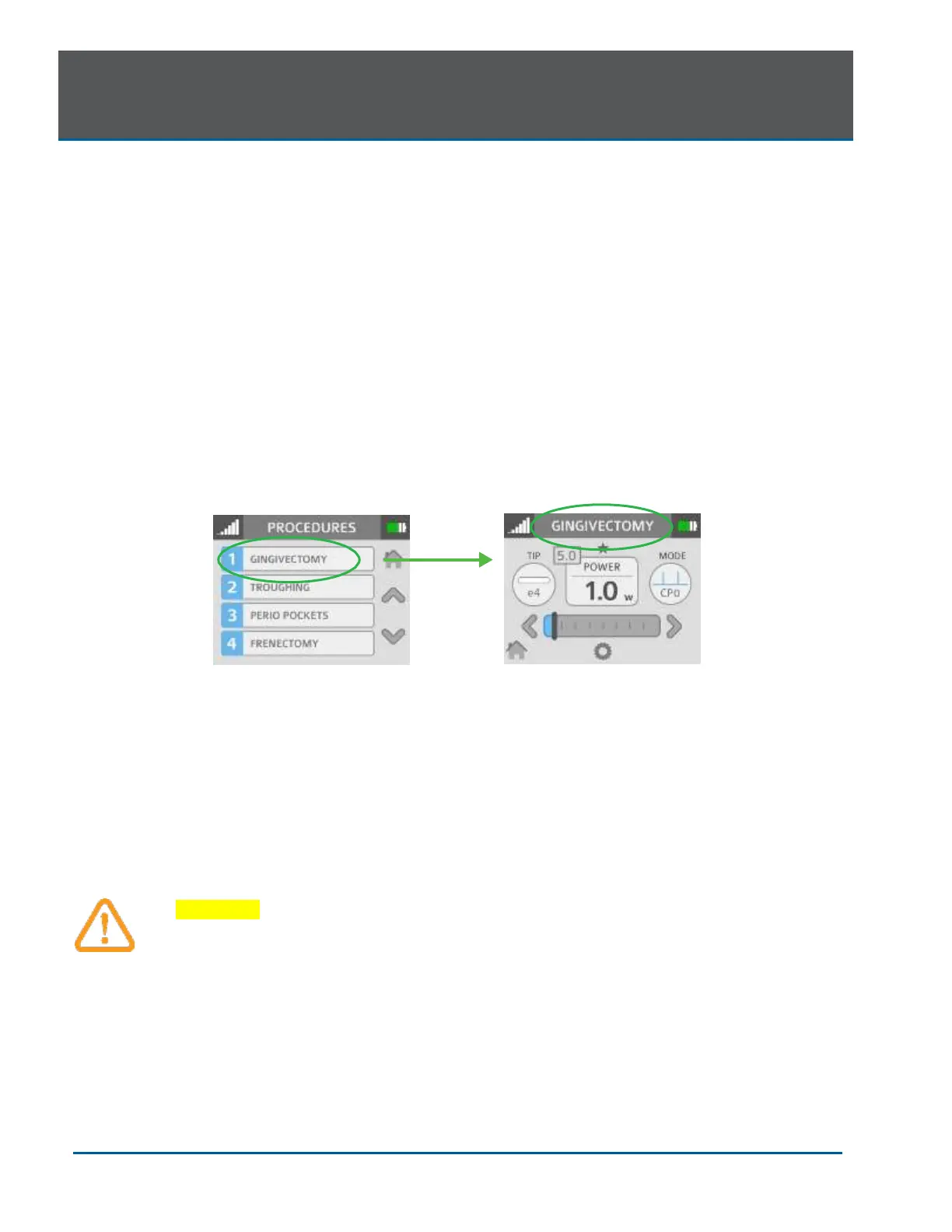
1. Go to the PROCEDURES menu by pressing the soft-tissue icon on the HOME screen;
scroll to and select the pre-set you wish to overwrite (Figure 7.28).
2. Press and hold the banner on the selected procedure for two seconds (Figure 7.29). The
parameters for that procedure will be changed and saved (the laser console will beep
when the adjusted settings are saved).
7.19 TURNING THE LASER CONSOLE OFF
• Wind the Fiber Optic Cable onto the fiber storage channel counterclockwise around the base
of the console
• Place the Handpiece onto the Handpiece Holder
CAUTION: Verify that the Fiber Optic Cable tubing assembly is not twisted once the
Handpiece is returned to the holder. The fiber may break if it is twisted.
• Press the CONTROL button on the front of the console for more than 2 seconds to turn the
console display off
• Press the power switch at the rear of the laser console to the OFF (O) position if the laser
system will not be used for an extended period of time


 To Next Page