7 Installation and Set-Up
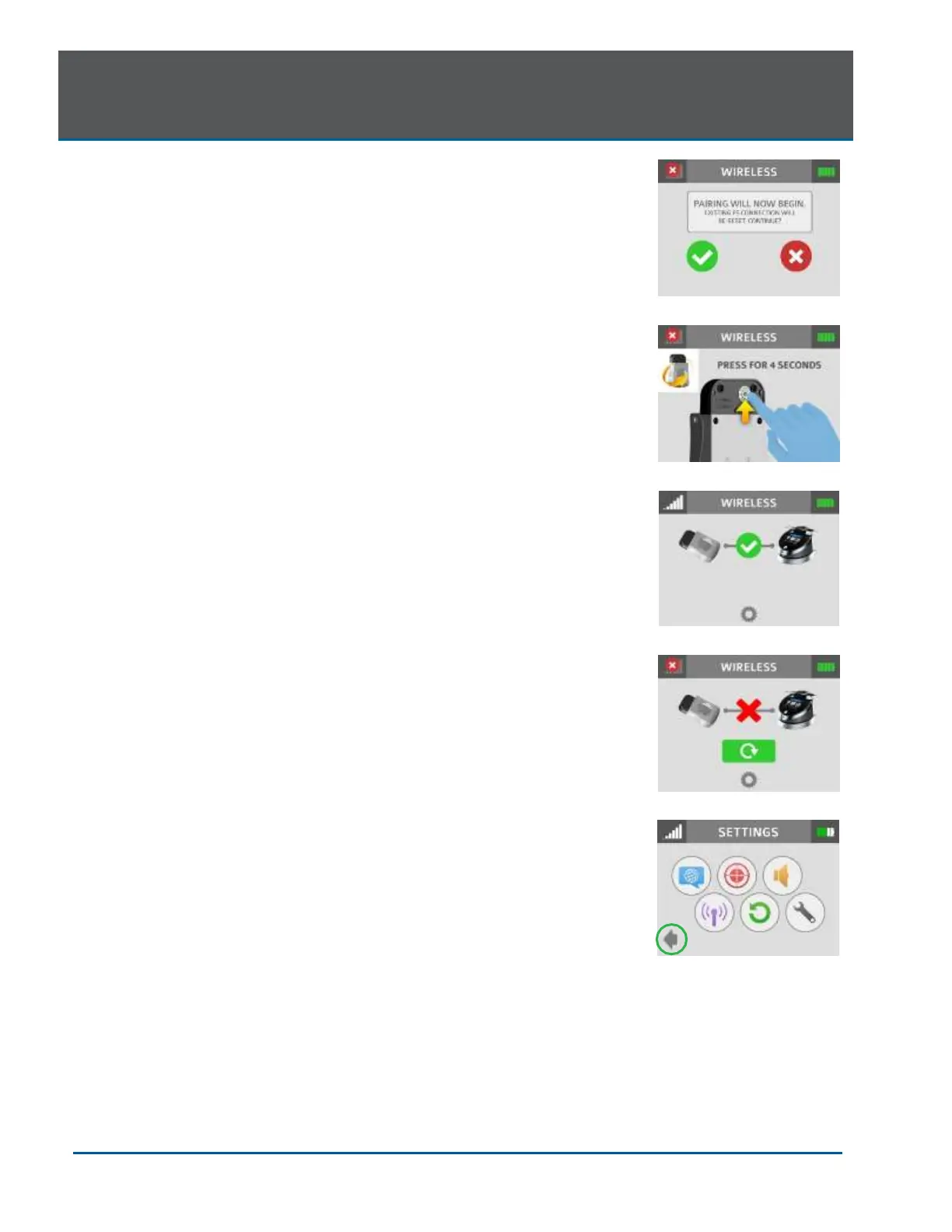
3. The message that “PAIRING WILL NOW BEGIN” will appear
(Figure 7.20); press the green check mark to continue.
4. To complete the pairing process, turn the Footswitch over and
press the pairing button for four (4) seconds (Figure 7.21).
5. The wireless screen will appear indicating that pairing was
successful and that the Footswitch and laser console are now
paired (Figure 7.22). Proceed to step 7.
6. If pairing has not occurred, the wireless screen will appear again
indicating that pairing was not successful (Figure 7.23); press the
green button to repeat steps 3 and 4.
7. Press the settings button to return to the settings menu; press the
arrow on the bottom left of the settings screen to return to the
home screen (Figure 7.24).
7.11 CONTROL BUTTON
The CONTROL button on the front of the laser console is a multi- function
button. Pressing and holding the CONTROL button for approximately two
(2) seconds will allow the transition from Standby or Ready mode to
Sleep mode. Note that you will not be allowed to go into Ready mode
unless you have chosen a treatment module on the HOME screen.
7.12 ENTERING READY OR STANDBY MODES
Press and release the Control button to place the laser console into either
Ready or Standby mode (the mode is displayed in the lower right-hand
corner of the console). The laser console will only emit laser energy when
the Footswitch is pressed, and the laser console is set to Ready mode.
While in Ready or Standby mode, mode setting and/or power setting
values may be changed only when the laser is not firing. If the laser is
firing (i.e., the Footswitch is engaged), the ability to change the settings is
blocked.
7.13 READY MODE
When entering Ready mode, the laser console fan will turn on; pressing
the Footswitch will activate the emission of laser radiation. There is a two
(2) second delay between switching to Ready mode and the ability of the
laser console to emit a laser beam.
NOTE: The aiming beam is on only when the laser is in Ready mode or
when adjusting the brightness of the beam while in Settings mode. If the aiming beam is not visible
in either instance, remove the Handpiece and confirm the beam is actually on by shining the end of
the Fiber Optic Cable on a plain, non-reflective surface. DO NOT look directly at the output end of
the Fiber Optic Cable. If the aiming beam is not on, turn off the laser console, then remove and re-
install the Fiber Optic Cable assembly. If the aiming beam is still not on, turn off the laser console
and call your authorized service representative.


 To Next Page