Chapter 3. Basic operation
1) System start
Press the power switch on the main body for two seconds; power will then be turned on, with the
company name displayed for around five seconds followed by the home screen.
2) System finishing
Holding the power switch for 3 seconds will turn off. Holding the power button of the device for more
than 6 seconds will trigger power off action.
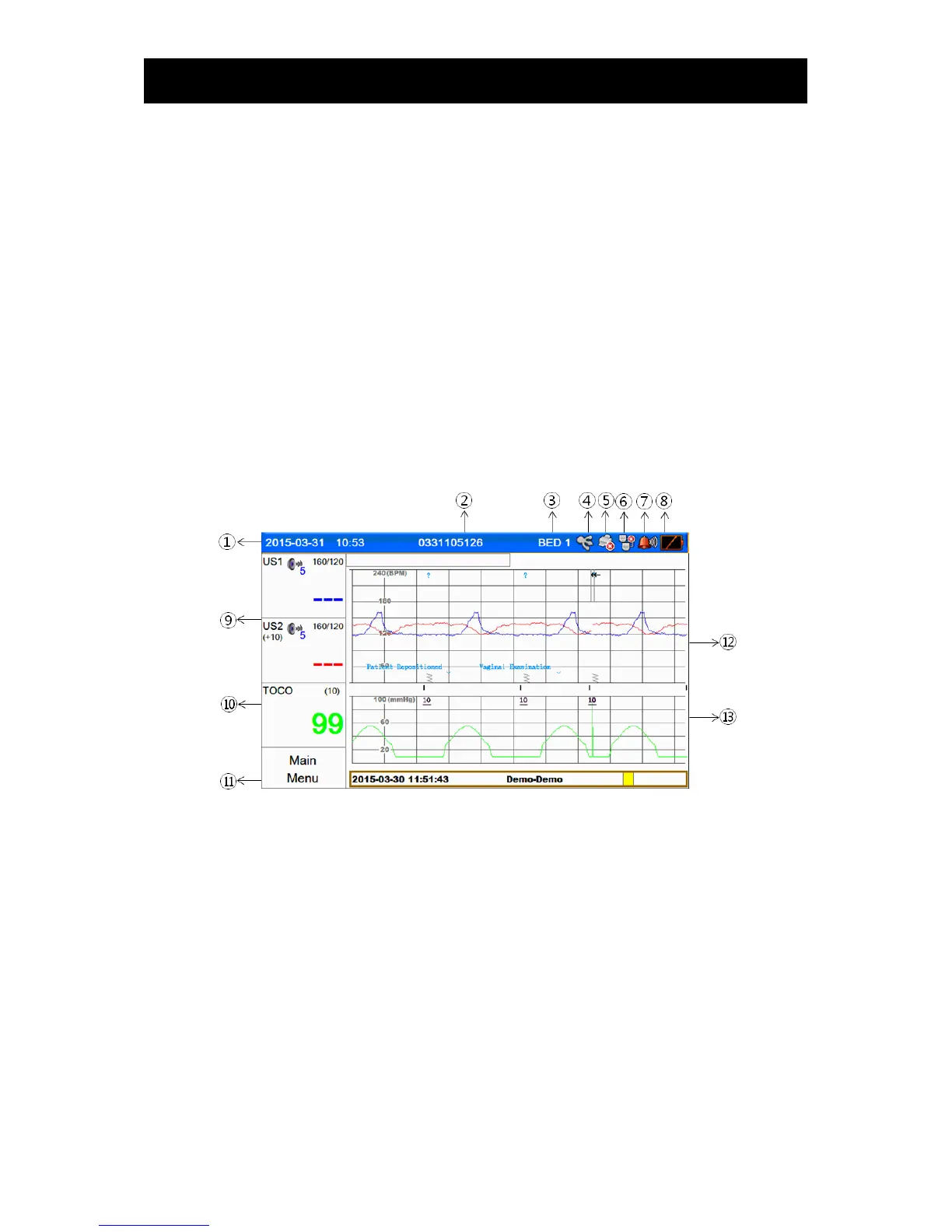
3) Graphic screen
▣ Monitoring screen
① Date and time
② Patient name or ID
③ Bed ID
④ Icon indicating the state of connection of the USB terminal
⑤ Icon indicating the state of printing
⑥ Icon indicating the state of connection of the network
⑦ Icon indicating the state of alarm sound and volume of Alarms
⑧ Icon indicating the residual battery capacity
⑨ Parameter window of fetal hart rates
⑩ Parameter window of Uterine contraction
⑪ Main menu
⑫ Window displaying the trends of fetal heart rates
⑬ Window displaying the trends in the degrees of uterine contraction, fetal movements



 To Next Page