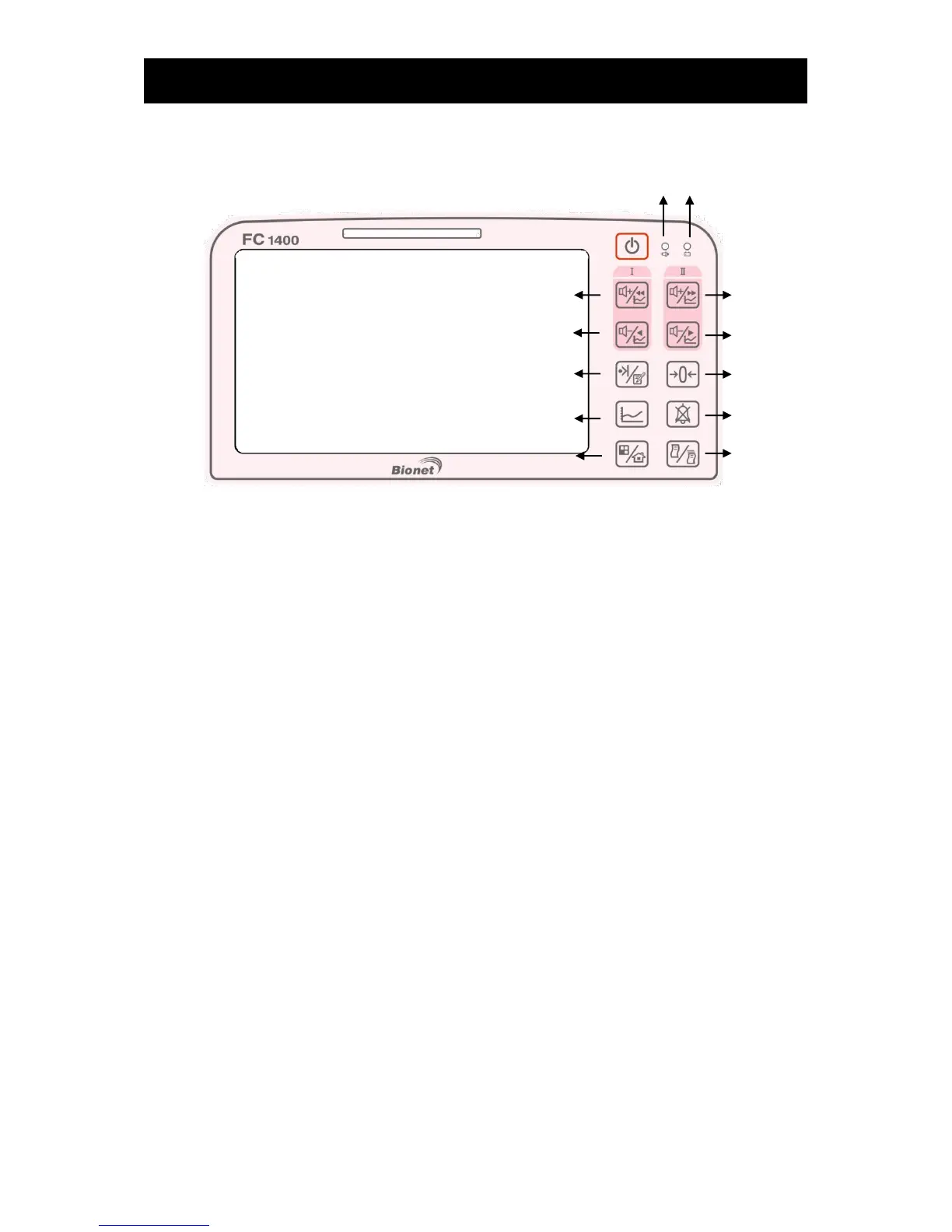
4) Operation panel
① AC power input LED: LED indicating the state of AC power connections
② Battery operation LED: LED indicating the state of battery charges
③ US1 volume up button
Short key : US1 Volume up or moving to earlier 1 min in trace mode
Long key : Return US1 volume back to the Pre-Mute stage.
④ US2 volume up button
Short key : US2 Volume up or moving to later 1 min in trace mode
Long key : Return US2 volume back to the Pre-Mute stage.
⑤ US1 volume down button
Short key : US1 Volume down or moving to earlier 6 Secs in trace mode
Long key : Mute US1 sound
⑥ US2 volume down button
Short key : US2 Volume down or moving to later 6 Secs in trace mode
Long key : Mute US2 sound
⑦ Clinical Mark and Note button:
Short key : Clinical Mark . To be used by user to record clinical mark.
Long key : To be used by user to record clinical note
⑧ Adjustment of zero point of the degree of uterine contraction
Attach the TOCO probe on the abdomen of the patient and press the zero point adjusting button to
set the reference value.
⑨ Trace button: This is used to view trace data.
⑩ Alarm silence key : This is used to change alarm status : silence, pause, alarm off, alarm on



 To Next Page