BP-007 User’s Manual
- 31 -
Chapter 4 Installing Paper
The printer can use the paper with the width of 76±0.5mm or 57.5±0.5mm, and it is easy to load paper.
How to load paper will be introduced in this chapter.
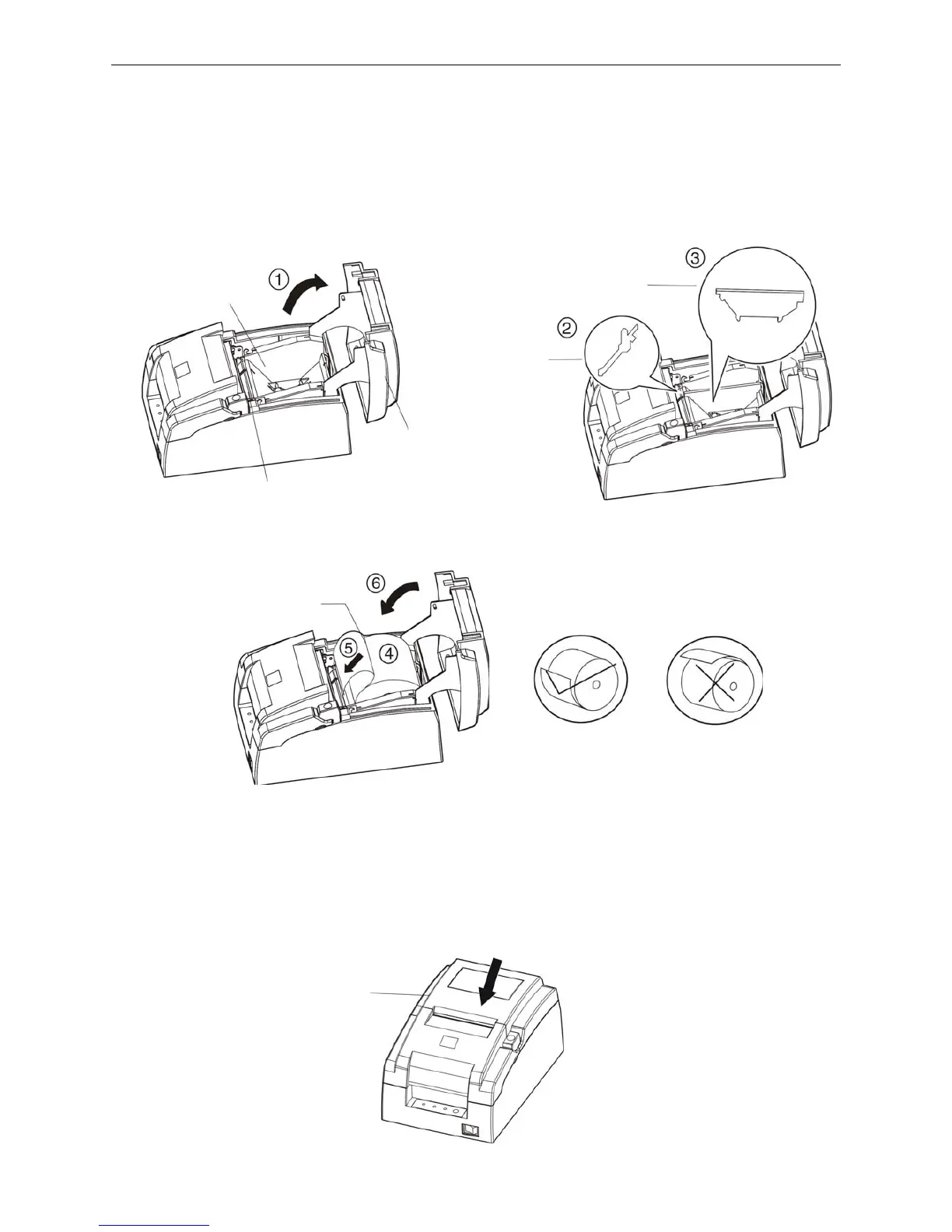
1. Press the cover-open button to open the upper cover. If you want to use 57.5mm paper to print, you
must install the 57.5mm paper stopper_mechanism and 57.5mm paper stopper_holder.
2. Place the roll paper into the paper holder.
Note: Paper head should be pulled out by the direction of paper-input slot, but not the opposite.
3. Turn on the printer, and then hold both edges of the paper and insert it straight into the paper-input slot
until the paper is fed automatically.
Note: Paper head must be even, or the paper cannot be fed. If this phenomenon happens, you
must pull out paper head and cut evenly the paper head, and load paper once again.
4. Close the upper cover and press FEED key to adjust the printing home position.
Correct
Error
Paper-input Slot
Upper Cover
Paper Holder
Roll Pa



 To Next Page