Digital Power Meter Model 5000-XT
50
Troubleshooting
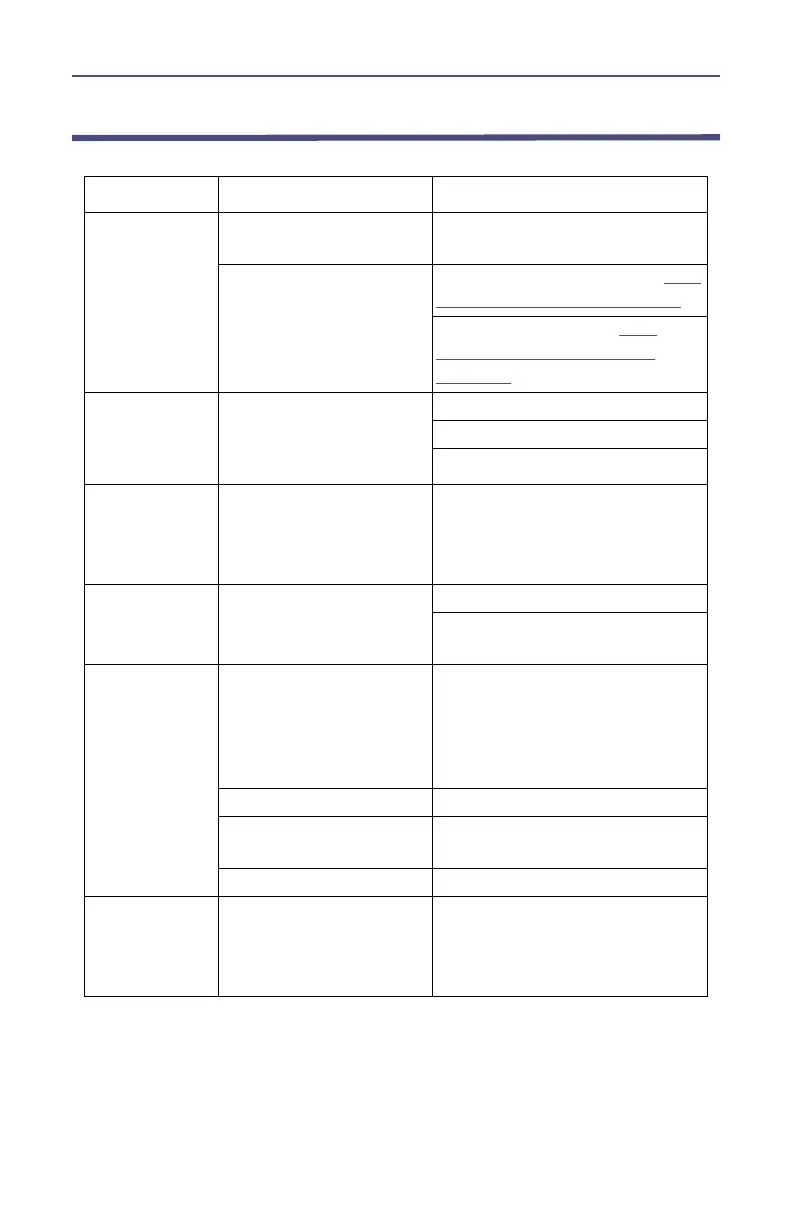
PROBLEM POSSIBLE CAUSE REMEDY
Nothing shown
on display
Unit is off
Press and hold the OK key until
the key is illuminated blue.
Batteries are drained
Use external power source (
see
"Power Supply" on page 6
)
Replace the batteries (
see
"Customer Service" on
page 51
)
Display shows
Start Screen
when sensor is
attached.
Sensor communication
has failed
Check connection to DPM.
Use a different cable.
Use a different sensor.
Display shows
dashes and
“Overrange”;
bar scale is full
Unit is overrange
Use higher power elements (if
applicable), or reduce RF power.
WPS Status
LED is not on
WPS not powered
Check connection to DPM
Connect WPS to a power supply
using the AC adapter
Erratic power
readings
Element contact out of
alignment (DPS)
Align the contact. It must be far
enough out to make good
contact with the element, but
must not restrict entry of the
element body.
Damaged element (DPS) Replace element.
Sensor has lost its zero
(TPS)
Rezero sensor.
Sensor is damaged Replace sensor.
PC locks when
booting with
the 5000-XT
connected.
Incorrect BIOS settings
on PC.
Disconnect the unit from the PC
then reboot.



 To Next Page