•
PROGRAMMED
COOKING
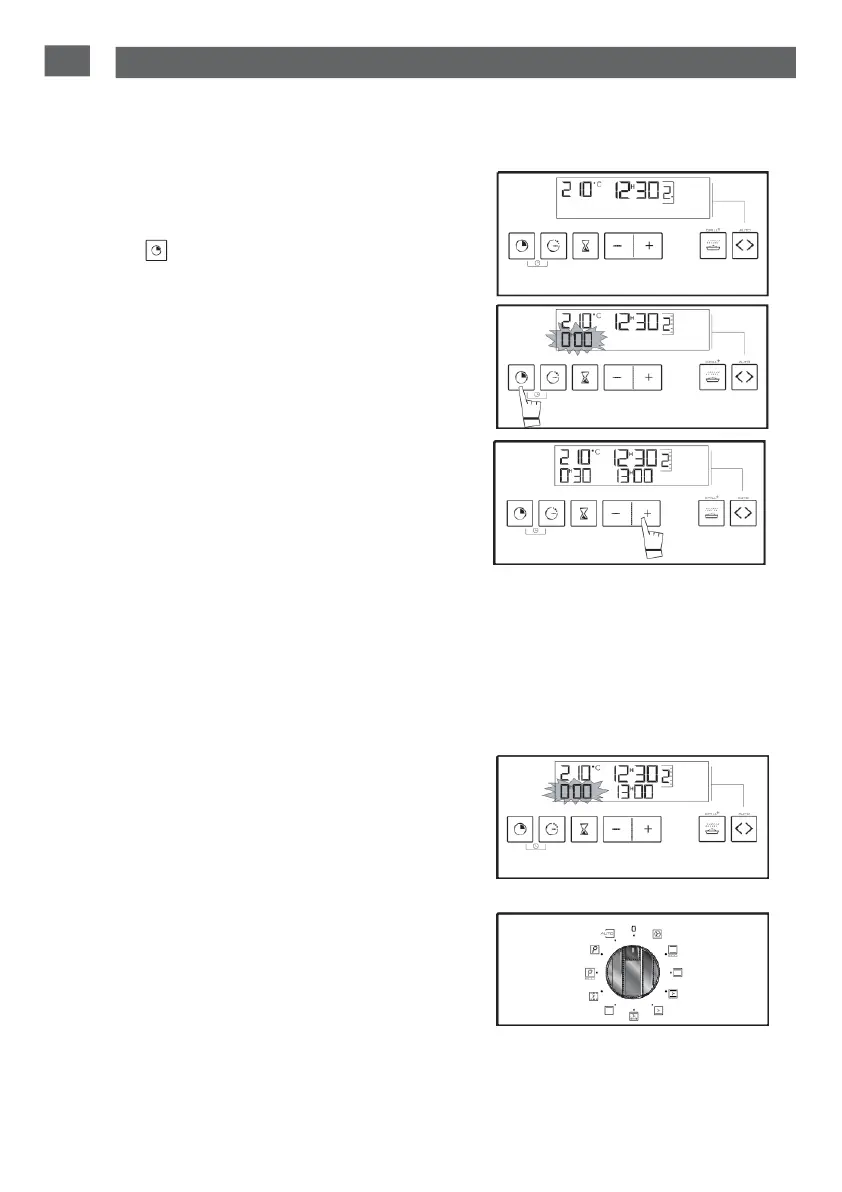
- Select
the cooking mode desired and adjust
the
temperature
(fig.1).
- Press
the “ ” butto
n
“
until the cooking time
indicator starts to flash.
fig.1
The display flashes 0:00
to tell
you
that
you
can
now set it (fig.2).
- Press
the
+
or
-
button to set the
desired
time.
Example: 30
min cooking
(
f
i
g
.
3
).
The
cooking time will be registered automati-
cally
after a few seconds.
The countdown starts
immediately
after ad-
justement.
The
end of cooking time (start time
+
cooking
duration) appears automatically
on the display.
The temperature
on the
thermometer
will start
to rise.
A series of beeps will sound when the oven
reaches
the
selected
temperature.
At the end of cooking (end of time
programmed
),
-
the
oven switches
off,
- 0:00 flashes
on the
display
(
fig.
4
).
-
A series of beeps is emitted for a few
minutes. Press any button to stop the
beeping.
fig.2
fig.3
fig.4
The display
goes back to showing the time of
day by
moving
the function selector back to 0
(fig.5).
fig.5


 To Next Page