Operation
20
Solid State Digital Control
1
2
3
4
5
6
7
8
9
10
11
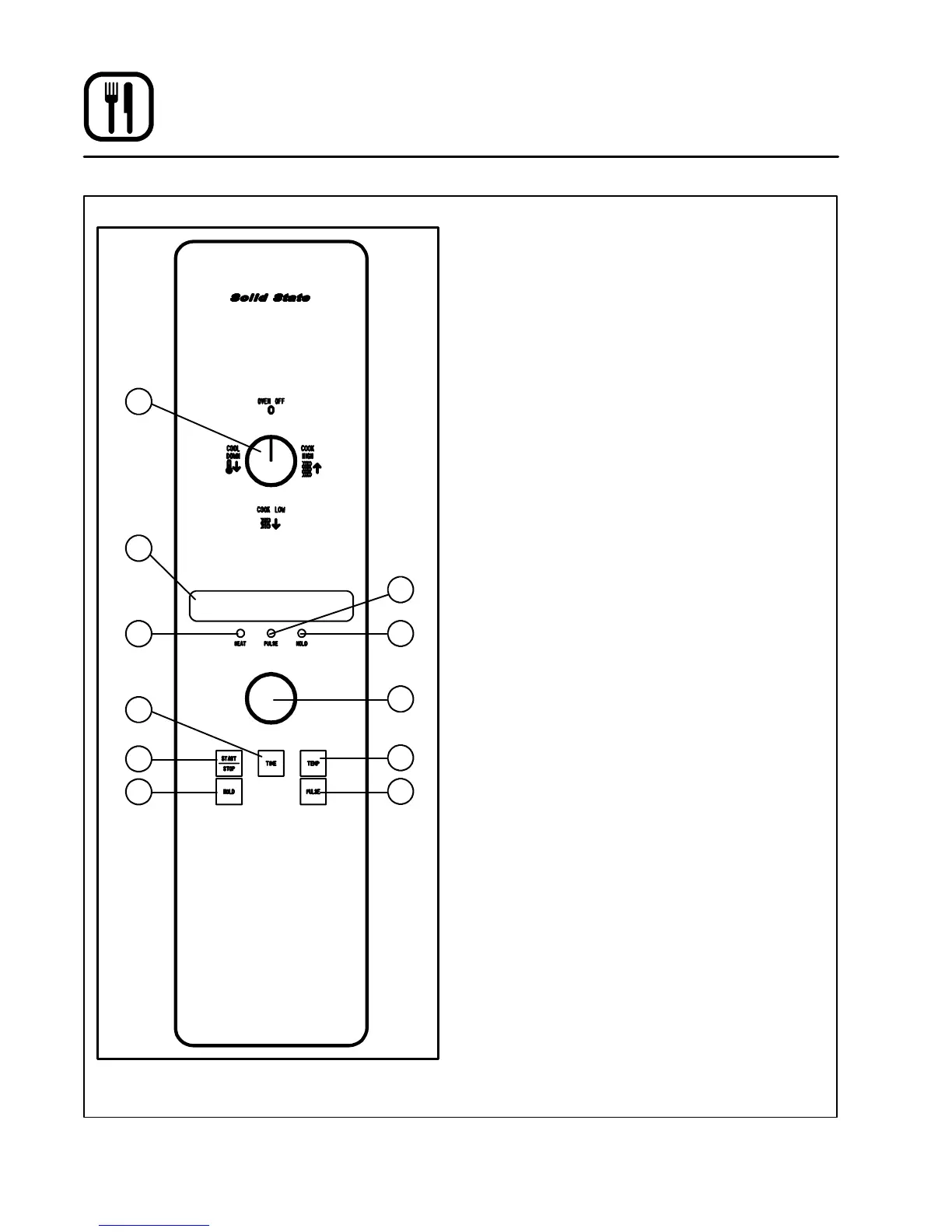
Figure 13
CONTROL DESCRIPTION
1. SELECTOR SWITCH --- turns power to the
oven on or off. Allows selection of Cook or
Cool Down Modes a nd fan speed (if applica-
ble).
2. DISPLAY --- displays time or temperature and
other information related to oven function.
3. HEAT LAMP --- lights when heater is on.
4. PULSE LAMP --- lights when Pulsed F an Mode
is turned on.
5. HOLD LAMP --- lights when Hold Mode is
turned on.
6. DIAL --- used to enter set points in display
7. START/STOP KEY --- starts or stops the timer.
8. TIME KEY --- used to show time in the display.
9. TEMP KEY --- used to show set temperature in
the display.
NOTE: Actual temperature is shown while the
TEMP key is held down.
10. HOLD KEY --- turns Hold Mode on or off.
11. PULSE KEY --- turns Pulse Mode on or off.
PROGRAMMING
To set the co ok temperature:
1. Press TEMP (9) key.
2. Rotate dial (6) to enter temperature.
To set the cook time:
1. Press TI ME (8) key.
2. Rotate the dial (6) to enter time.
NOTE: Time is entered in hours : minutes or
minutes : seconds.
To set the hold time:
1. Press HOLD key (10) to turn hold mode on.
NOTE: HOLD light is on.
2. Rotate dial (6) to enter the hold temperature.
3. Press START/STOP key (7)
To set the pulse time:
1. Press PULSE KEY (11) to turn pulse mode on.
NOTE: Pulse light is on.
2. Rotate DIAL (6) t o enter the pulse time. Pulse
time is a portion of the pre-set cook time.


 To Next Page
 Loading...