33
Name and Function of Parts
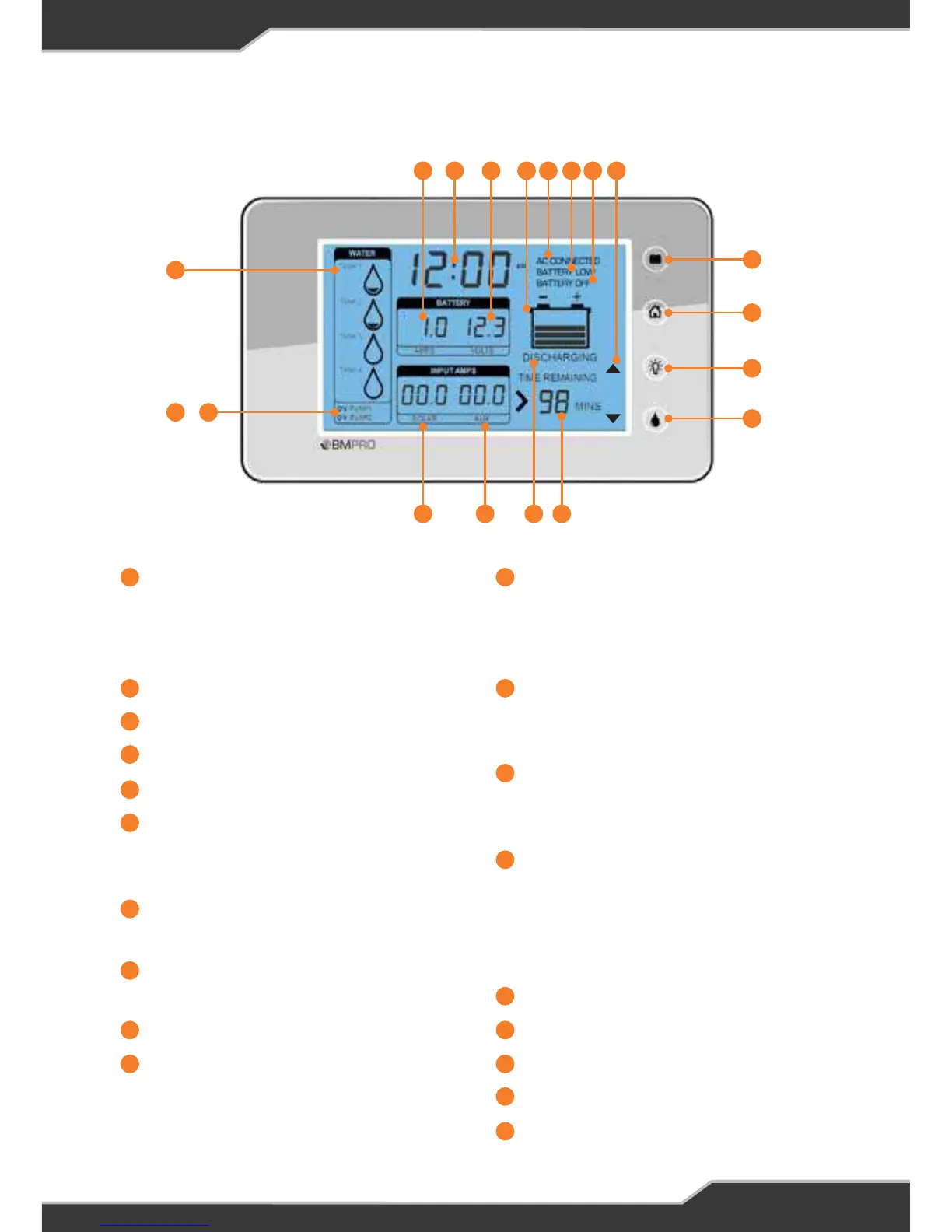
Tank 1 / Tank 2 / Tank 3 / Tank4
Water tank level indicators. These
can also be turned into waste water
tanks.
Pump 1 Status Indicator
Pump 2 Status Indicator
Solar Current
Aux Current
Battery Charge State
This shows if the battery is charging
or discharging
Time Remaining
Time until battery flat
Water Pump Button
Enables/disables the water pump
Backlight Button
Home Button
Home button is used for setup
functions
Battery Isolate Button
When paired with a BatteryPlus35,
this switch will isolate the battery
from the loads
Setup Mode Indicators
These indicators only appear when
in setup mode
Battery Off
Appears when the Battery is
isolated
Battery Low
Appears only when Battery voltage
is less than the low voltage warning
threshold. This is set in the Battery
alarm menu
AC Connected
Charge Bar Graph
Battery Voltage
Clock
Battery Current
1 11
2 12
3
4
13
5
6
14
7
16
15
8
17
9
18
10
19
1
4
19 18
5
17 16
6
15 14
7
13 12
8
9
10
11
2 3
+



 To Next Page