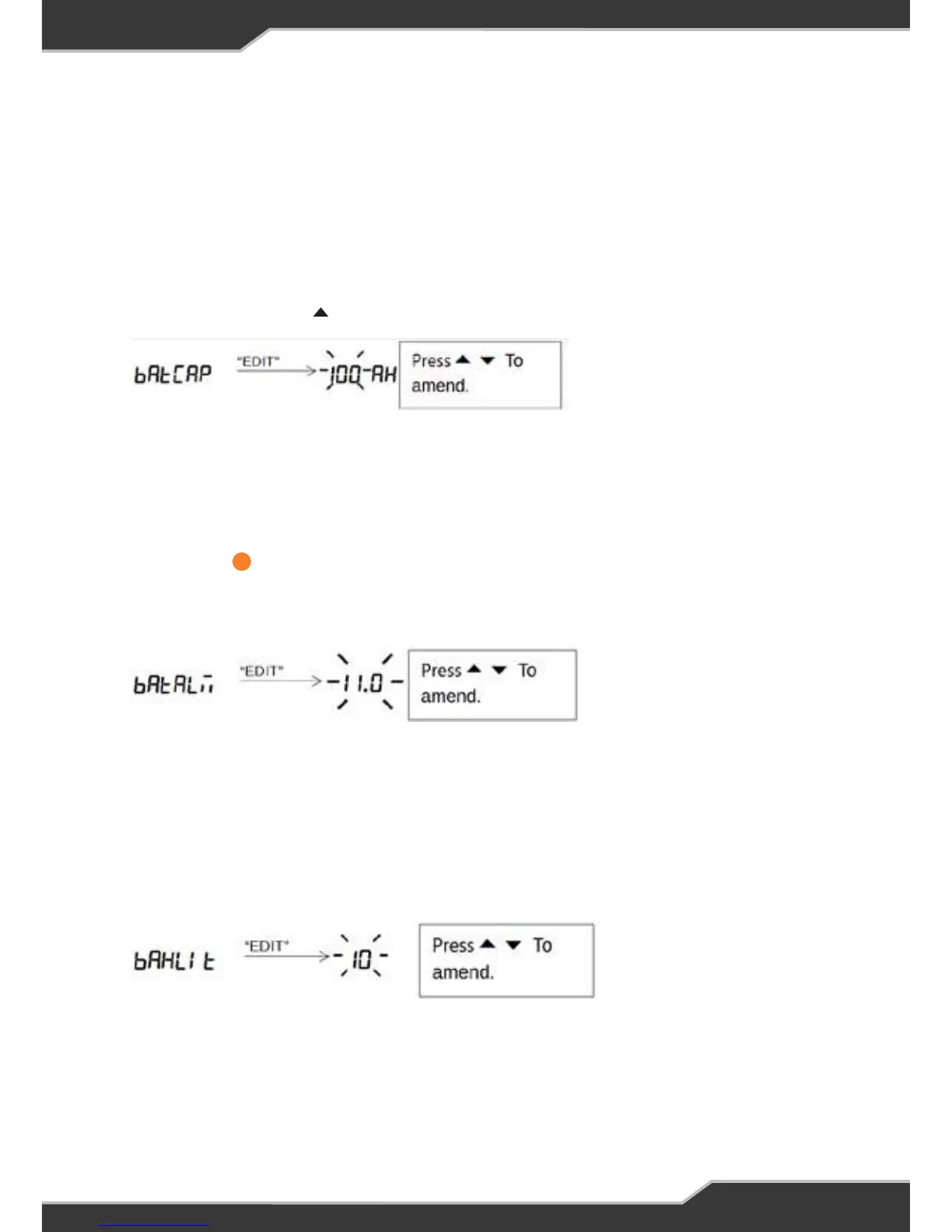
Battery Capacity Menu
This shows how to change the battery capacity in AH. The battery capacity can be
incremented or decremented.
When a new battery is fitted, set this to the nominal battery capacity (as marked
on the battery); doing this will assist the software in determining the actual
capacity.
Battery Alarm Menu
This shows how to change the battery alarm. This parameter indicates when the
Battery Low annunciator starts to blink. The alarm threshold can be
incremented or decremented in steps of 0.5V. The alarm threshold can be
adjusted from 10.5V to 12.5V.
15
14
LCD Back-light Menu
This shows how to change the LCD back-light brightness. The back-light
brightness can be incremented or decremented in steps of 10%. The
brightness can be adjusted from 10% to 100%.
Factory Reset Menu
This shows to to restore Trek back to factory settings.
WARNING: All saved
settings will be erased.
16
LCD Back-light Menu
This shows how to change the LCD back-light brightness. The back-light
brightness can be incremented or decremented in steps of 10%. The
brightness can be adjusted from 10% to 100%.
Factory Reset Menu
This shows to to restore Trek back to factory settings.
WARNING: All saved
settings will be erased.
16
Battery Capacity Menu
When a new battery is fitted, set this to the nominal battery capacity (as marked on
the battery); doing this will assist the software in determining the actual capacity.
This shows how to change the battery capacity in AH. The battery capacity can be
incremented or decremented.
Press and hold the HOME button until you see Setup
Press and release the button a few times until you see BATCAP
To exit menu, press and release the “Back” button a few times until the home screen
is seen.
Battery Alarm Menu
This shows how to change the battery alarm. This parameter indicates when the
Battery Low annunciator starts to blink.
The alarm threshold can be incremented or decremented in steps of 0.5V. The alarm
threshold can be adjusted from 10.0V to 14.0V.
To exit menu, press and release the “Back” button a few times until the home screen
is seen.
LCD Backlight Menu
This shows how to change the LCD backlight brightness. The backlight brightness
can be incremented or decremented in steps of 10%. The brightness can be adjusted
from 0% to 100%.
To exit menu, press and release the “Back” button a few times until the home screen
is seen.
14


 To Next Page