39
If the Trek discovers any other accessory that is compatible, it will display the ID of
that device and its hardware and software version.
To exit menu, press and release the “Back” button a few times until the home screen
is seen.
Clock Menu
Press and hold the HOME button until you see Setup
Press and release the button a few times until you see CLOCK
Setup 12hr Clock
Clock Menu
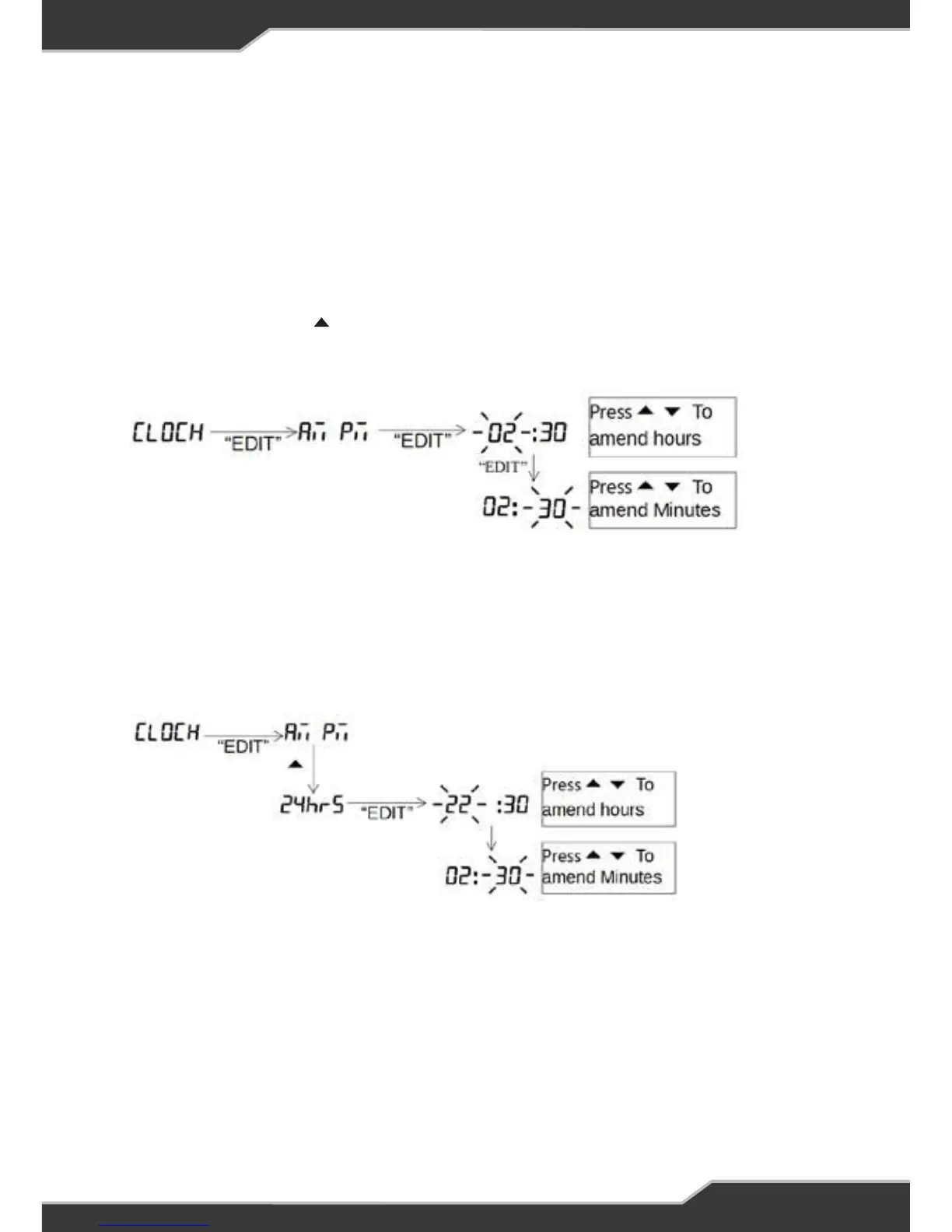
When in set-up mode the following needs to be followed.
Set-up 12hr Clock
AM and PM annunciators will automatically change as the time changed from 11
to 12.
To exit, keep pressing the “Back” button until the home screen is seen.
Set-up 24hr Clock
To exit, keep pressing the “Back” button until the home screen is seen.
Water Tank Menu
To exit menu, keep pressing the “Back” button until the home screen is seen.
Water Tank Enable
This shows how to enable or disable the water tanks.
After enabling the required tank, allow for 15 seconds for the tank levels to
update.
13
Clock Menu
When in set-up mode the following needs to be followed.
Set-up 12hr Clock
AM and PM annunciators will automatically change as the time changed from 11
to 12.
To exit, keep pressing the “Back” button until the home screen is seen.
Set-up 24hr Clock
To exit, keep pressing the “Back” button until the home screen is seen.
Water Tank Menu
To exit menu, keep pressing the “Back” button until the home screen is seen.
Water Tank Enable
This shows how to enable or disable the water tanks.
After enabling the required tank, allow for 15 seconds for the tank levels to
update.
13
AM and PM annunciators will automatically change as the time changes from
11 to 12.
To exit menu, press and release the “Back” button a few times until the home screen
is seen.
Setup 24hr Clock
To exit menu, press and release the “Back” button a few times until the home screen
is seen.



 To Next Page