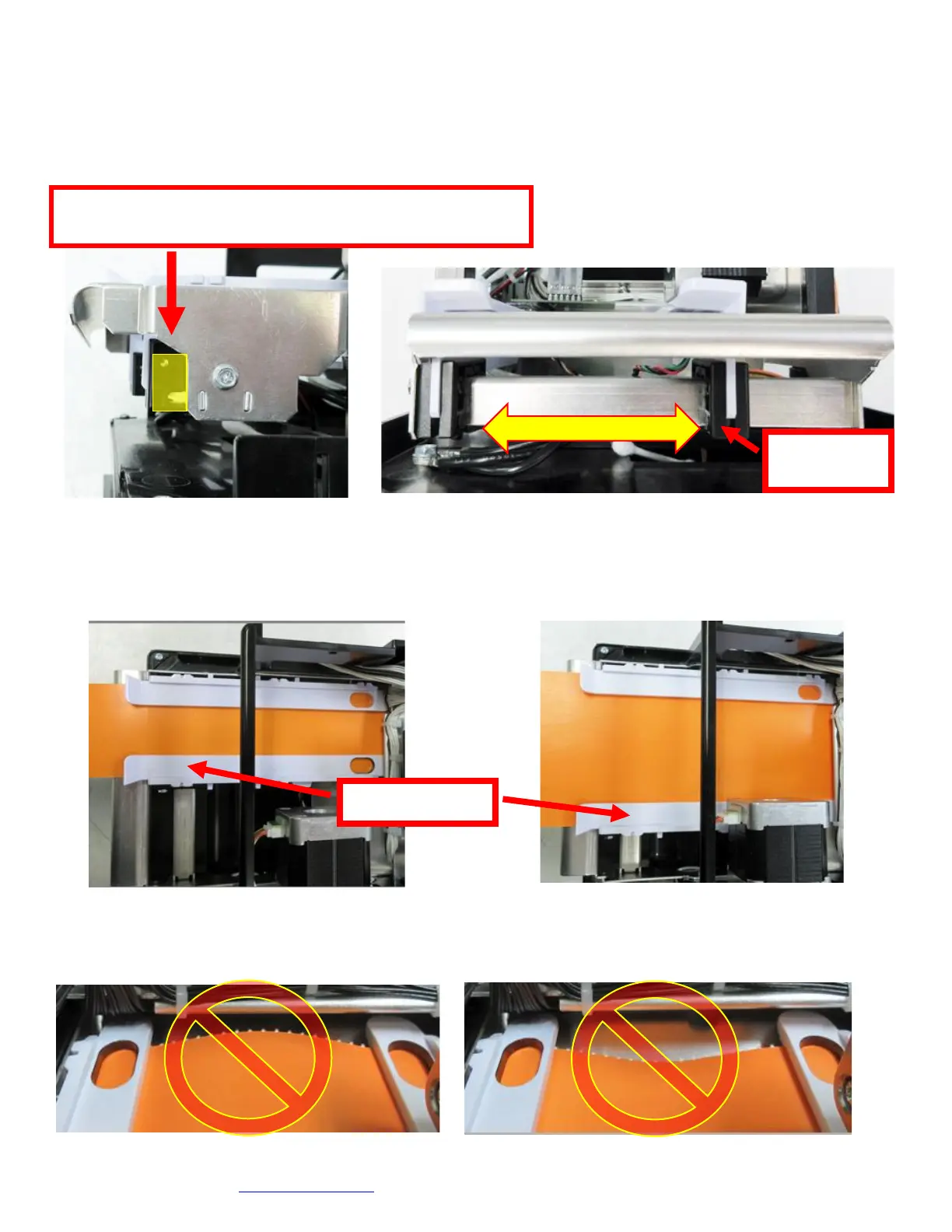
6.1 Media Width Adjustment
The below reviews how to adjust paper path of a Universal Paper Guide (UPG) printer for use with a different
ticket width. Adjust the slider bar down to the proper ticket width, making sure the bar is not too tight against
the ticket. The ticket should move freely in the paper guide path
PLASTIC RAIL UPG
• Open up the adjustable rail so it is a little wider than the width of the stock you intend to us.
• Insert your ticket stock into the paper guide.
• Adjust the rail down to the proper ticket width, making sure the rail is not too tight against the ticket. The ticket
should move freely in the paper path.
Above shows the UPG adjusted for 2” wide media Above shows the UPG adjusted for 3.25” wide media
CAUTION: If the slider bar is adjusted too tightly against the ticket stock, then it will cause the stock to buckle
(see photos below). This will lead to feed or ticket jam issues. Ensure the adjustable rail is properly adjusted.
Click here to return to > Table of Contents
The adjustable rail may be closed by gently pushing on the black
plastic block shown in the area below (highlighted in yellow).



 To Next Page