APPENDIX B - VERTICAL PRINTER INSTALLATION
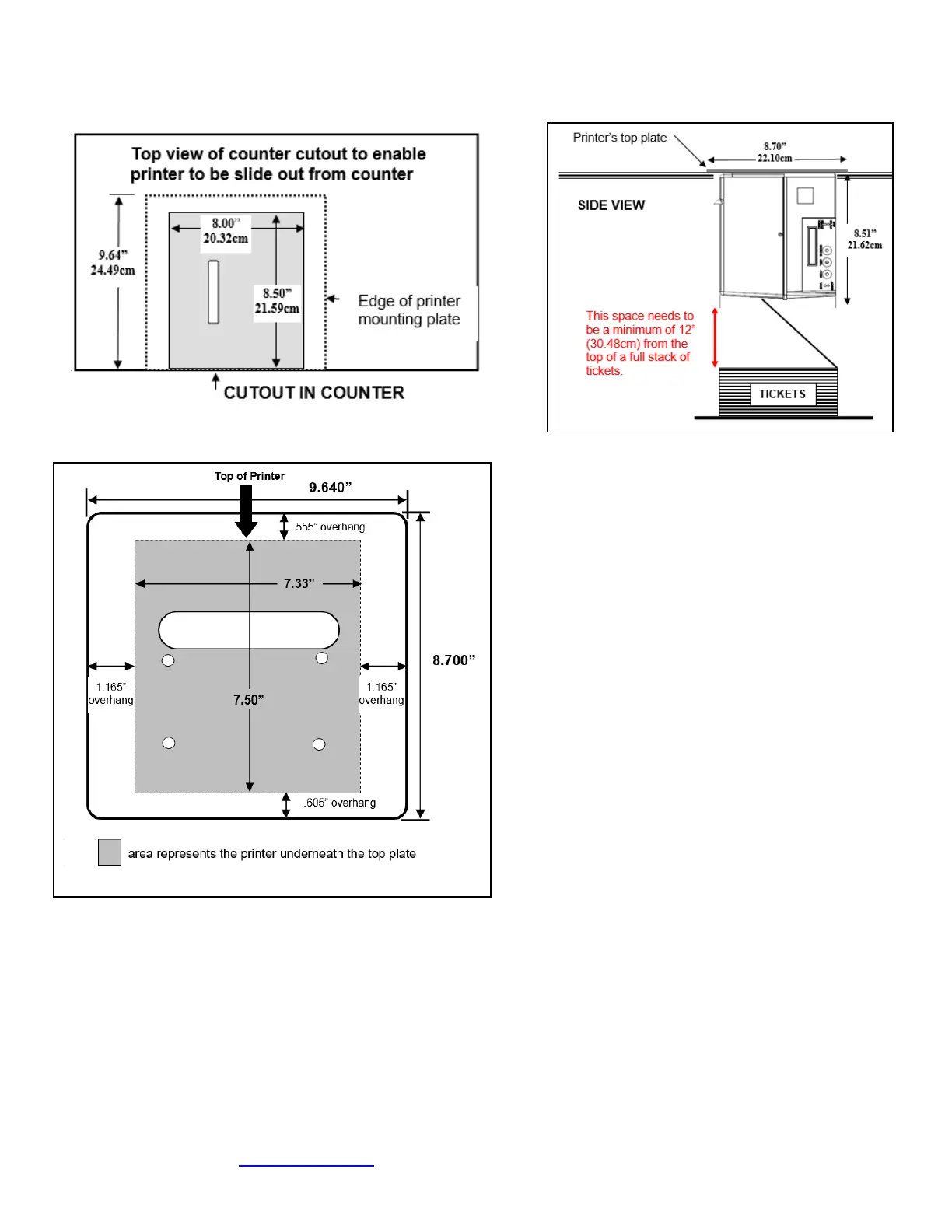
Prepare the counter top by cutting a rectangular hole in accordance with the dimensions specified for your printer model.
NOTE: The table or counter top must be able to support at least four times the weight of the printer.
Top view of standard 421421Z-P top plate
If you are looking to make the cutout just big enough to fit the printer then we recommend making the cutout 0.50” larger
than the height and width of the printer.
▪ Attach the top plate to the printer using only the supplied mounting hardware.
▪ Insert the printer with the top plate attached into the countertop cutout.
▪ Attach the power cord and the interface cable to the printer.
▪ Turn the power switch to the ON position.
▪ The printer is now ready for ticket stock to be loaded.
Click here to return to > Table of Contents



 To Next Page